
TD Group International Transfer: Exchange Rates, Fees, and Transfer Times

Author: April Summers

Editor: Artiom Pucinskij
We only list companies that are trustworthy and appropriately licensed. Our aim is to give you a comprehensive view of the regulated money transfer marketplace.
DisclosureMoneyTransfers aims to help users find the best money transfer provider for their needs. To support our free service, we may earn a commission from some of the providers listed in our search results. The commission may also impact the ordering of the providers shown. Our reviews are independent from this and are based on our editorial policy, research and testing of dozens of remittance providers on the market.
On this page
TD Group charges a flat fee of $50 per international transfer and a 3.4% markup on average.
This means a transfer of $1000 to Mexico would cost you $84.00 vs using a money transfer provider such as Wise which would cost $9.07.
You can use your TD Bank to send money abroad, but we'd recommend using it to deposit money into a Wise account and send it from there.
TD Group for international wire transfers
Sending money internationally is easy thanks to a variety of transfer options available with TD Bank.
TD Bank offers multiple options to send money overseas, including:
To a recipient’s bank account with TD Global Bank Transfer
To a recipient’s Visa debit or credit card with TD Visa Direct
For cash pick-up via the partnership with Western Union
However, is it worth it, or are you better off using a money transfer provider? Here’s a summary of how they compare.
Transfer type | TD Group | Money Transfer Companies |
|---|---|---|
Sending fees | $50 | $0 - $20 |
Receiving fees | $15 | $0 |
Exchange Markup | 2.31% - 5.14% | 0% - 2% |
Transfer Times | 1 - 5 business days | Instant - 3 business days |
Payment Methods |
|
|
Compare now to get the best transfer rate
You can send money using your TD Bank account through a money transfer provider to save on fees. Fill in the form to get the most out of your transfer.Scoring TD Group
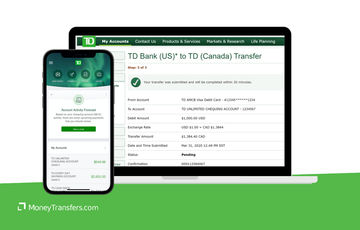
We’ve analyzed the exchange rates, transfer costs, support, and online user reviews. Here’s a quick summary of the top highlights and drawbacks.
- Partnership with Western Union: Although not uncommon, TD Bank is partnered with WU for quicker and cheaper remittance transfers.
- Cross-border accounts: TD Bank is particularly well-poised for transfers between Canada and the US, whether you reside in either country part-time or frequently send money there.
- High transfer fees: TD Bank has relatively high transfer fees for international wires, meaning less of your funds reach your recipient.
- Longer transfer times: Transfers with TD Bank will take around 3 - 5 working days, which is longer than many money transfer providers who can send money within a couple of hours.
TD Group fees and exchange rates
Fees and rates




TD Bank facilitates both domestic and international wire transfers to other bank accounts, but before sending your money it’s useful to make sure you know the exact costs involved with this type of transfer.
The two primary costs to look out for when making an international bank transfer are fees and exchange rate mark-ups (also known as the conversion fees).
Exchange rates
TD Bank charges a markup on top of the mid-market rate. This is a standard practice by the banks to generate profit. However, the key difference is how much markup.
Based on our analysis, TD Bank charges a 3.4% markup on average, which is lower than most other banks.
However, it is worth noting that the exchange rate markup will depend on the currency pair you want to convert or send.
For example, an exchange rate markup for USD-GBP is 2.98%, whereas for USD-PLN it’s 5.14%.
Here are a few more examples.
Currency | TD Bank Rate | Mid-Market Rate | Loss in USD | Markup |
|---|---|---|---|---|
CAD | 1.3257 | 1.36306 | 37.49 | 2.74% |
GBP | 0.7445 | 0.767375 | 22.95 | 2.98% |
EUR | 0.8724 | 0.89943 | 27.03 | 3.01% |
AUD | 1.436 | 1.483338 | 47.45 | 3.19% |
HKD | 7.57 | 7.78855 | 218.55 | 2.81% |
JPY | 140.6272 | 145.5715 | 4974.3 | 3.40% |
MXN | 18.4162 | 18.9229 | 506.7 | 2.68% |
NZD | 1.561 | 1.626745 | 65.985 | 4.04% |
NOK | 10.0402 | 10.50284 | 462.64 | 4.40% |
PHP | 54.7196 | 56.4625 | 1742.9 | 3.09% |
PLN | 3.6496 | 3.84746 | 197.86 | 5.14% |
SAR | 3.5945 | 3.752257 | 157.757 | 4.20% |
SGD | 1.2721 | 1.3058 | 33.7 | 2.58% |
ZAR | 17.1821 | 17.8631 | 686 | 3.81% |
SEK | 9.8135 | 10.22002 | 407.69 | 3.98% |
CHF | 0.8367 | 0.85652 | 19.82 | 2.31% |
*Data collected 20th Aug 2024.
Can you exchange money for what it’s actually worth?
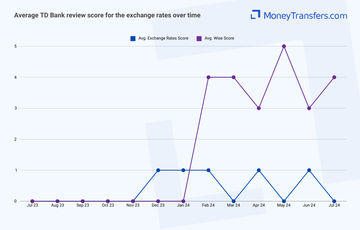
To avoid giving you a biased review, we’ve looked at online user reviews to see what they have to say about the exchange rates.
International transfer fees
For international wire transfers, you will be paying $15 to receive money into your account, as well as $50 to send money from your account abroad.
This is somewhat above the average fee charged by a bank.
For example, Citibank charges $35, Navy Federal charges $25, while Truist bank charges $65.
Here’s a breakdown of the fees for TD Bank depending on the transfer method you choose.
Service Category | Fees |
|---|---|
Money orders | $5.00 |
Official checks | $8.00 |
External transfers (to/from other institutions): 3-day delivery from other institutions | Free |
External transfers (to/from other institutions): 3-day delivery to other institutions | Free |
External transfers (to/from other institutions): Next-day delivery to/from other institutions | Free |
Zelle® - Delivery to others within minutes | Free |
Zelle® - Request funds from others | Free |
Zelle® - Standard ACH delivery (1 to 3 days) | Free |
Incoming wire (domestic & international) | $15.00 |
Outgoing wire (domestic) | $30.00 |
Outgoing wire (international) | $50.00 |
To put this into perspective, let’s assume you’re making a $1000 transfer from the US to a bank via wire transfer to an account in the following countries:
Country | TD Group fees | Wise fees |
$50 + ~2.98% markup | $6.69 + 0% markup | |
$50 + ~2.68% markup | $9.07 + 0% markup | |
$50 + ~5.14% markup | $7.15 + 0% markup |
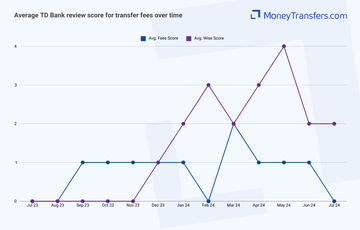
Similar to the exchange rates, we’ve looked at how the transfer fees are being rated online.
Transfer speed
Transfer speed
Just like with any other bank, the transfer for international wire transfers is around 1-5 business days.
Here’s a summary of transfer times depending on the transfer method.
Method | Transfer times |
Visa Direct | 24-48 hours |
Western Union Money Transfer | 2-4 hours |
International wire transfer | 1-5 business days |
Also, the processing times will vary depending on the transfer you make.
Same-currency transfers: For example, USD to USD or CAD to CAD, requested before 11:59 p.m. ET (8:59 p.m. PT) will be processed immediately.
Foreign-currency transfers: For example, USD to CAD or CAD to GBP, requested before 9:00 p.m. ET (6:00 p.m. PT) will be processed immediately.
If you can make the transfer before the weekend and the cut-off times above, your transfer will be made quicker.
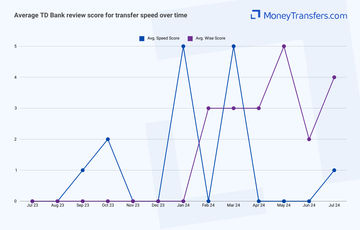
In addition, this is how users have rated TD Bank transfer fees.
Transfer limits
Transfer limits
Generally speaking, there is no information on wire transfer limits. However, most international transfers are made through the global bank transfer network, which has a limit of $6,500 per transaction.
The following limits apply when sending international transfers.
Method | Limits per transaction |
|---|---|
TD Global Bank Transfer | $6,500 |
Visa Direct | $2,500 |
Western Union Money Transfer | $999.99 |
Foreign exchange transfer | $250,000 USD equivalent |
International wire transfer | N/A |
Foreign currency bank drafts | N/A |
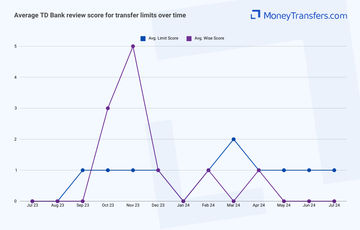
When it comes to transfer limits, this is what online user reviews look like when compared to Wise.
Product offering
Product offering
TD Bank offers 29 currencies you can receive into your account via wire transfer, and 43 currencies you can send abroad.
Here’s a breakdown of available currencies.
Currency | Send via wire | Receiving via wire |
|---|---|---|
Australian Dollar | Yes | Yes |
Aruba Florin | Yes | No |
Barbados Dollar | Yes | No |
Bermuda Dollar | Yes | No |
Bolivian Bolivia | Yes | No |
Cayman Island Dollar | Yes | No |
China Renminbi | Yes | No |
Czech Koruna | Yes | Yes |
Denmark Kroner | Yes | Yes |
East Caribbean Dollar | Yes | No |
Ethiopian Birr | Yes | No |
Euro | Yes | Yes |
Georgian Lari | Yes | No |
Hong Kong Dollar | Yes | Yes |
Hungary Forint | Yes | Yes |
Indian Rupee | Yes | Yes |
Israel Shekel | Yes | Yes |
Japanese Yen | Yes | Yes |
Liberian Dollar | Yes | No |
Malagasy Ariary | Yes | No |
Mexican Peso | Yes | Yes |
Mongolia Tugrik | Yes | No |
Nepalese Rupee | Yes | No |
New Zealand Dollar | Yes | Yes |
Nicaragua Cordoba | Yes | No |
Norwegian Kroner | Yes | Yes |
Philippines Peso | Yes | Yes |
Poland Zloty | Yes | Yes |
Rwanda Franc | Yes | Yes |
Saudi Riyal | Yes | Yes |
Serbian Dinar | Yes | Yes |
Singapore Dollar | Yes | Yes |
South African Rand | Yes | Yes |
South Korean Won | Yes | Yes |
Sterling Pound | Yes | Yes |
Swedish Krona | Yes | Yes |
Swiss Franc | Yes | Yes |
Taiwan New Dollar | Yes | Yes |
Thai Baht | Yes | Yes |
Turkish Lira | Yes | Yes |
U.A.E. Dirham | Yes | Yes |
United States Dollar | Yes | Yes |
Uruguayan Peso | Yes | Yes |
Foreign currency exchange
TD Bank offers 51 currencies that you can buy. It’s useful when traveling abroad, although we’d recommend looking into a multi-currency account which is much cheaper.
Here’s a list of currencies you can buy and sell at TD Bank.
Currency | The cash you can buy | The cash you can sell |
|---|---|---|
Australian Dollar | Yes | Yes |
Bahraini Dinar | Yes | Yes |
Barbados Dollar | Yes | Yes |
Brazilian Real | Yes | Yes |
Bruneian Dollar | Yes | Yes |
Bulgarian Lev | Yes | Yes |
Cayman Island Dollar | Yes | Yes |
Chile Peso | Yes | Yes |
China Renminbi | Yes | Yes |
Colombian Peso | Yes | Yes |
Czech Koruna | Yes | Yes |
Denmark Kroner | Yes | Yes |
Dominican Peso | Yes | Yes |
East Caribbean Dollar | Yes | No |
Euro | Yes | Yes |
Fiji Dollar | Yes | Yes |
Guatemalan Quetzal | Yes | Yes |
Hong Kong Dollar | Yes | Yes |
Hungary Forint | Yes | Yes |
Icelandic Krona | Yes | Yes |
Indonesia Rupiah | Yes | Yes |
Israel Shekel | Yes | Yes |
Jamaican Dollar | Yes | Yes |
Japanese Yen | Yes | Yes |
Jordanian Dinar | Yes | Yes |
Kuwaiti Dinar | Yes | Yes |
Malaysian Ringgit | Yes | Yes |
Mexican Peso | Yes | Yes |
New Zealand Dollar | Yes | Yes |
North Irish Pound | Yes | Yes |
Norwegian Kroner | Yes | Yes |
Omani Rial | Yes | Yes |
Peru Nuevo Sol | Yes | Yes |
Philippines Peso | Yes | Yes |
Poland Zloty | Yes | Yes |
Romanian Leu | Yes | Yes |
Saudi Riyal | Yes | Yes |
Scottish Pound | Yes | Yes |
Singapore Dollar | Yes | Yes |
South African Rand | Yes | Yes |
South Korean Won | Yes | Yes |
Sterling Pound | Yes | Yes |
Swedish Krona | Yes | Yes |
Swiss Franc | Yes | Yes |
Tahiti CFP Franc | Yes | Yes |
Taiwan New Dollar | Yes | Yes |
Thai Baht | Yes | Yes |
Turkish Lira | Yes | Yes |
U.A.E. Dirham | Yes | Yes |
United States Dollar | Yes | Yes |
Uruguayan Peso | Yes | Yes |
You can order your currency online, over the phone, in the branch, and using the TD Foreign Exchange Centres.
Mobile App
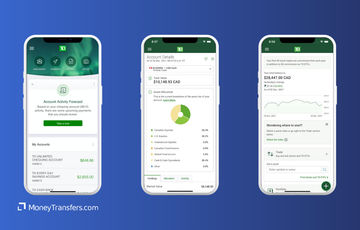
The TD Banking app is available on both Apple and Google stores and allows on-the-go access to deposits, and services such as Bill Pay and Zelle transfers.
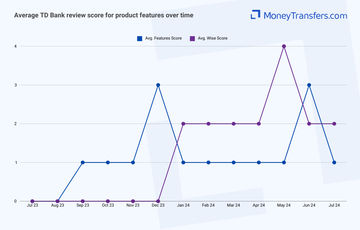
When looking at the online reviews, users had mixed opinions on the features offered.
Ease of use
Ease of use
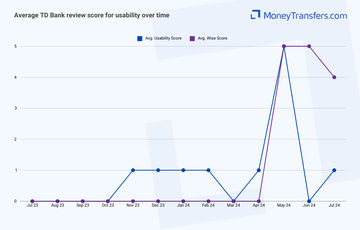
As for customer reviews, this is how TD Bank’s usability is rated online.
Customer service
TD Bank has a large help center on its website which addresses a wide range of frequently asked questions. If you want to get in touch with someone directly, you could visit a branch directly, message customer services on Facebook Messenger, or DM them via Twitter.
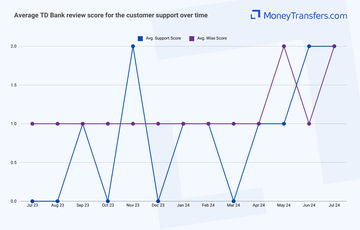
Customer support seems to be the key issue when it comes to traditional banking. This is how users have rated customer support of TD Bank.
Safety and trust
Safety and trust
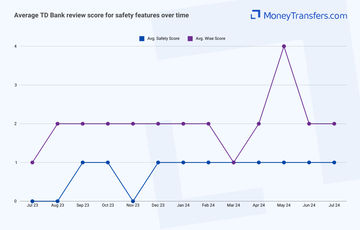
Just like with other areas of this review, we’ve looked at the online user reviews. This is how other users rated the safety features of TD Bank.
Customer feedback
Customer feedback
ANALYSIS OF USER REVIEWS
The online reviews for TD Bank highlight both the positives and negatives of their service.
On the positive side, some customers find it easy to use, noting that they find the bank's digital platforms straightforward and convenient.
However, the negatives dominate the feedback, with several customers expressing frustration over the bank's online banking experience, calling it unreliable and difficult to use.
Others report issues with customer service, including complaints about security procedures and a lack of responsiveness.
There are concerns about the handling of credit card services, with some users accusing the bank of misleading practices or inadequate support during critical situations, such as dealing with fraud or lost cards.
Overall, while TD Bank has its strengths in ease of access, there is an overwhelming number of negative reviews regarding its customer service and online banking reliability.
Here's a summary of average user reviews so far this year.
Review Category | Jan 24 | Feb 24 | Mar 24 | Apr 24 | May 24 | Jun 24 | Jul 24 |
|---|---|---|---|---|---|---|---|
International Transfers | 0 | 1 | 1 | 1 | 0 | 1 | 0 |
Fees | 1 | 0 | 2 | 1 | 1 | 1 | 0 |
Exchange Rates | 1 | 1 | 0 | 1 | 0 | 1 | 0 |
Speed | 5 | 0 | 5 | 0 | 0 | 0 | 1 |
Limit | 0 | 1 | 2 | 1 | 1 | 1 | 1 |
Features | 1 | 1 | 1 | 1 | 1 | 3 | 1 |
Ease of Use | 1 | 1 | 0 | 1 | 5 | 0 | 1 |
Safety | 1 | 1 | 1 | 1 | 1 | 1 | 1 |
Customer Support | 1 | 1 | 0 | 1 | 1 | 2 | 2 |
Opening an account with TD Group
To open an account with TD Group you will need the following:
Your Social Security number
A government-issued ID
Basic personal information (name, address, phone number, etc)
Funds to add to your new bank account
Once you have these ready, follow these steps to open an account:
Choose the Account Type
Visit TD Bank's website or a local branch to explore the different types of accounts they offer, such as checking, savings, or specialty accounts. Compare features like fees, interest rates, and benefits to determine which account best suits your needs.
Gather Necessary Documentation
Prepare the required documents for account opening, including a government-issued ID (e.g., driver’s license, passport), Social Security number, proof of address (like a utility bill), and initial deposit amount.
Visit a TD Bank Branch or Apply Online
You can open an account either by visiting a TD Bank branch or applying online through their official website. If visiting a branch, locate the nearest one using their branch locator tool.
Complete the Application Form
Fill out the application form with your personal information, including your name, address, Social Security number, and contact details. For online applications, ensure all details are entered accurately before submission.
Submit Identification and Documents
If applying in person, present your identification and proof of address to the bank representative. For online applications, you may need to upload or provide information from these documents as part of the verification process.
Make an Initial Deposit
Deposit the minimum required amount to activate your new account. This can typically be done by transferring funds from another account, depositing cash, or writing a check.
Making international transfers
You’ll need to provide the following information about your transfer when using TD Global Transfer:
Recipient’s account holder name and full address
Recipient’s account number
Their branch number and address
SWIFT code/ BIC
Routing number
The sum you are sending and the currency you want your funds converted to
Sending international wire
To set up a wire transfer, you can either go into your local branch or log in to your online banking.
If you’re doing it online, follow these steps:
Log in to TD EasyWeb or the TD App
Access your TD Bank account by logging into EasyWeb online banking or the TD mobile app using your credentials. This is your starting point for initiating a TD Global Transfer.
Select the “Send Money” Option
In the main menu, navigate to the “Send Money” option. This will lead you to various money transfer services, including TD Global Transfer.
Choose TD Global Transfer
Within the “Send Money” section, select “TD Global Transfer.” This service allows you to send money internationally using multiple delivery options.
Enter Recipient Details
Provide the recipient’s information, including their name, country, and delivery method (e.g., bank account deposit, cash pickup, or PayPal). Ensure all details are accurate to avoid delays.
Select the Delivery Method
Choose how the recipient will receive the funds. TD Global Transfer offers various options such as bank deposit, cash pickup, or through a PayPal account, depending on the destination country.
Enter the Transfer Amount
Input the amount of money you wish to send. The system will automatically calculate the exchange rate, applicable fees, and the total cost of the transaction.
Review the Transfer Details
Carefully review all details of your transfer, including the recipient’s information, the amount, fees, and the expected delivery time. Confirm that everything is correct before proceeding.
Confirm and Send the Money
Once satisfied with the details, confirm the transfer. The funds will be processed according to the selected delivery method, and you’ll receive a confirmation of the transaction.
Track Your Transfer
After sending, you can track the status of your transfer via EasyWeb or the TD App to ensure it reaches the recipient. You’ll be notified once the transfer is complete.
TD Bank’s swift code is TDOMCATTTOR
Use Wise to send money from your TD Bank account
It may be simpler to fund your transfer with your TD Group Bank account, but use a transfer provider like Wise to send your money overseas.
Register for a Wise account
Signing up only takes a few minutes. You’ll need to take a photo of your ID so they can verify you. If you have any issues setting up your account, you can contact customer services using the contact information in our Wise review.
Add the details of your transfer
Select ‘Send’, choose ‘Send from your bank’, and enter your recipient’s details. You’ll also need to confirm your TD Bank account details.
Review the received amount
Wise will show you exactly how much your recipient will get, and how much the transfer will cost. If you’re happy with this, continue.
Send the money
Proceed with the transfer. Your money will be taken from your TD Bank account and sent to your recipient.
To receive a transfer into your TD Bank account, you will need the following:
Your ABA, RTN, or SWIFT code
For domestic wire transfers, you’ll need to supply the Wire Routing Transit Number (your ABA or RTN).
The TD Bank RTN is different based on the transfer location. Use this page to find yours.
For international wire transfers, you’ll need to supply your SWIFT code or BIC: TDOMCATTTOR
The bank name and address
TD Bank address is different based on the transfer location. Use this page to find yours.
Your account number, name, and address
You’ll need to supply your complete TD Bank account number, the name on your account, and the complete address of your account as it appears on your bank account.
How TD Group compares to money transfer services
Generally, money transfer companies are much cheaper than any high street bank. Here’s a list of top alternatives if you’re planning to make international transfers.
Other Alternatives
Alternatively, consider using one of these neobanks for international transfers.
TD Bank Group: Is it good for transfers abroad?
In summary, TD Bank is one of the largest banks in the United States and thus has a reliably secure and efficient system in place for opening an account and transferring funds both domestically and abroad.
When compared to other banks in the US, it is cheaper, faster, and offers great support for international transfers.
Their exchange rates are better than the likes of BofA or Wells Fargo, but only by a little bit.
When compared to the money transfer service, TD Bank is not that great. It still ends up being more expensive and taking longer to send money.
If you need to make a transfer abroad, especially if it’s a large one, we suggest comparing your options using the form below to get the best exchange rates.
Find the best rates for your transfer
A bit more about TD Group
Can I open a TD Bank account in any country?
You can open a TD Bank account online, so you could be living abroad while setting up your account.
You will, however, need to be a resident in the US or Canada and be able to provide essential information such as your home address and social security number.
Can I use my TD Bank debit card when traveling abroad?
Yes, you can use your TD debit card outside of the USA when traveling abroad, whether that’s to get cash at a non-TD ATM or to purchase goods.
TD Bank will charge a foreign exchange fee equal to 3% of the transaction amount.
Help & FAQ
Get answers to the most common questions asked when sending money abroad. Covers costs, fees and the best way to compare.
More Banks
Capital One
You can send international wire transfers with Capital One, however, at a higher cost compared to other banks and services. They also use a SWIFT network to process their transactions, meaning transactions will take longer.
Bank of America
No doubt BofA is one of the more popular banks in the US, but it might not be your best option for sending money abroad.
Chase Bank
Here’s a quick overview of Chase and how it compares to an average money transfer provider.
Wells Fargo
Here’s an overview of Wells Fargo’s international transfers, and how they compare to money transfer companies.
TD Bank user feedback
Would you recommend TD Bank?
Be the first to leave feedback for TD Bank.
Contributors

April Summers

Please share your experience with …