
Citibank International Transfer: Exchange Rates, Fees, and Transfer Times

Author: April Summers

Editor: Artiom Pucinskij
We only list companies that are trustworthy and appropriately licensed. Our aim is to give you a comprehensive view of the regulated money transfer marketplace.
DisclosureMoneyTransfers aims to help users find the best money transfer provider for their needs. To support our free service, we may earn a commission from some of the providers listed in our search results. The commission may also impact the ordering of the providers shown. Our reviews are independent from this and are based on our editorial policy, research and testing of dozens of remittance providers on the market.
On this page
Citibank offers better rates for international transfers compared to many other banks, however, it is more expensive than using a money transfer provider.
Citibank charges $0 - $35 for each international transfer, a $15 receiving fee, and a 4% - 6% exchange rate markup.
This means that a $1000 transfer to the Dominican Republic would cost you $93.51 vs $8.91 with a money transfer service such as Wise.
You can use Citibank to send money abroad, but instead, it would be quicker and cheaper to use it to fund your Wise account and send it from there.
Citibank for international wire transfers
Compared to the services offered by money transfer specialists, like Wise or Zing, Citibank customers are making a loss on their international transfers due to transaction exchange rate margin.
For instance, if you were transferring GBP to USD, each time you transfer £100 you could be charged up to £10 in transfer fees: this is money your payee should be receiving.
Here’s a quick overview of how Citibank compares to an average money transfer provider.
Transfer type | Citibank | Money Transfer Companies |
|---|---|---|
Sending fees | $0 - $35 | $0 - $20 |
Receiving fees | $15 | $0 |
Exchange Markup | 4% - 6% | 0% - 2% |
Transfer Times | Same day if sent before 5:15 PM | Instant - 3 business days |
Payment Methods |
|
|
Compare now to get the best transfer rate
You can send money using your Citibank account through a money transfer provider to save on fees. Fill in the form to get the most out of your transfer.Scoring Citibank
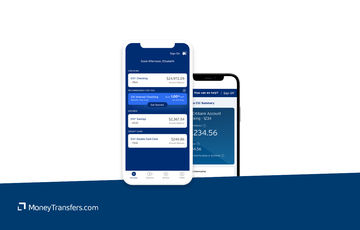
We’ve looked at and analyzed the exchange rates, transfer costs, support, and online user reviews. Here’s a quick summary of the top highlights and drawbacks.
- Worldwide access: Citibank has a global presence in hundreds of countries, making it easy and convenient for millions of customers to send money around the world
- Free transfers between Citibank customers: Citibank Global Money Transfers allow customers to send money between international Citibank account holders, with no transfer fees attached
- Convenient process: Sending money with Citibank is straightforward, the online platforms are easy to navigate and the onboarding process is user-friendly
- High transfer fees: If you are sending to a bank account outside of the Citibank network, the fees will be more expensive than international money transfer operators
- Higher exchange rate margin: Likewise, you’ll pay a higher markup on the exchange rate than you would with a specialist transfer provider so it is worth comparing your options
Citibank fees and exchange rates
Fees and rates




The most common charges associated with overseas bank transfers and foreign currency exchanges are:
Foreign transaction fees
The margins are added onto currency exchange rates, also known as exchange rate mark-ups.
Exchange rates
Citibank trades foreign exchange with other financial institutions using the mid-market rate.
However, in order to make a profit, banks tend to present customers with an exchange rate that contains a hidden fee. This is also known as an exchange rate mark-up.
The Citibank exchange rates also automatically apply when you trade with the Citibank mobile app.
In Citibank’s case, the profit margin added onto the mid-market exchange rate when transferring money internationally typically ranges between 4.20% to 9.50% and heavily depends on the currency pair.
It is possible to view the foreign currency exchange rates offered by Citibank before locking in a global transfer, through the website or in-app.
The exchange rate for a purchase or redemption of foreign currency includes a commission to Citibank for the conversion service.
Can you exchange money for what it’s actually worth?
Online money transfer providers like Wise, Revolut, and Instarem all make exchanges using the mid-market rate, but there’s a small fee for your transfer.
International transfer fees
Citibank has different foreign transaction fee options depending on factors such as the type of bank account you have, where you are sending money and the size of your transfer.
Fees for an outbound international transfer can range from $0 to $35, with the following fees applying to each account:
Service | Standard | Citi Priority | Citigold | Citigold Private Client |
|---|---|---|---|---|
Incoming Wire Fee - Domestic / International | $15 | Waived | Waived | Waived |
Outgoing Wire Fee - Domestic | $25.00 | $17.50 | Waived | Waived |
Outgoing Wire Fee - International (U.S. Dollars) | $35.00 | $25.00 | Waived | Waived |
Outgoing Wire Fee - International (Foreign Currency) | Waived | Waived | Waived | Waived |
To put this into perspective, this is how Citibank compares to Wells Fargo and Wise in terms of cost.
Let's assume you want to send 1,000 USD from a standard account to the following countries using Citibank international wire transfers.
Destination | Citibank fees | Wells Fargo fees | Wise fees |
|---|---|---|---|
$25 + ~6.85% markup | $30 + ~6% markup | $10.79 + 0% markup | |
$25 + ~6.85% markup | $30 + ~6% markup | $8.91 + 0% markup | |
$25 + ~6.85% markup | $30 + ~6% markup | $10.36 + 0% markup |
Transfer speed
Transfer speed
If the money transfer is submitted to Citibank before 5:15 PM (ET) funds will be sent the same day, else the next day; this is much faster than the average bank transfer speed.
For reference, Wells Fargo takes around 2 - 7 days, while BofA is around 1 - 2 days.
International Transfers Over SWIFT
Please note, that international bank transfers sent to non-Citibank account holders via the SWIFT network can take between 1- 5 working days to arrive.
The delivery speed is determined by the destination country and currency.
Transfer limits
Transfer limits
Citibank transfer limits depend on the account type you have. Here’s a summary of their transfer limits.
Account Type | Domestic / International (U.S. Dollars) | International (Foreign Currency) |
|---|---|---|
Standard | Up to $50,000 per account per business day | Up to $50,000 (USD equivalent) / transaction |
Citi Priority | No limit | Up to $500,000 (USD equivalent) / transaction |
Citigold | No limit | Up to $500,000 (USD equivalent) / transaction |
Citigold Private Client | No limit | Up to $500,000 (USD equivalent) / transaction |
Product offering
Product offering
Mobile app
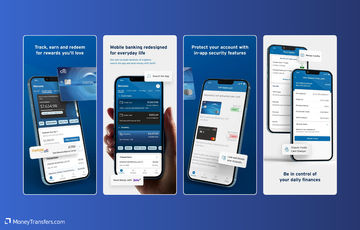
The Citibank app is called Citi Mobile and it is free to download for iOS or Android.
Citi Mobile has been rated 4.7 out of 5 stars on Google Play and 4.6 out of 5 on App Store.
The same app is used by CitiGroup customers.
World Wallet® Foreign Currency Exchange Services.
Citibank's World Wallet® Foreign Currency Exchange Services offer next-business-day delivery of over 50 foreign currencies to your home, office, or nearest branch.
There are no service fees for Citigold® or Citi Priority account holders, while other clients pay a $5 fee for transactions under $1,000.
Delivery to a branch is free, but home or office delivery incurs additional charges.
Currency conversions are done at competitive rates (which are not disclosed anywhere), and unused foreign currency can be exchanged at any Citibank branch.
Zelle for domestic transfers
Citibank also facilitates the use of the peer-to-peer payment app, Zelle, for customers making domestic transfers.
Additional costs may apply; you can find out more about Zelle’s partnership with Citibank here.
Ease of use
Ease of use
Citibank is fairly easy to use. In general, you get access to all the information you need.This applies to both desktop and mobile.
Customer service
Citibank offers a range of helpful support options to its global customer base. Here are the customer support options available at Citibank:
Phone support: Customers can call Citibank's general customer service line for assistance with account inquiries, technical support, and more. Phone support is available 24/7.
Online chat: Citibank offers online chat support through its website and mobile app, where customers can get real-time help from representatives.
Email support: Customers can email Citibank for support with specific issues or questions, typically through a contact form available on their website.
Branch visits: In-person support is available at Citibank branches for account-related queries, transactions, and other banking services.
Social media: Citibank provides customer support through social media channels such as Twitter and Facebook, where customers can send direct messages for assistance.
Mobile app support: The Citibank mobile app includes a support feature where customers can access FAQs, live chat, and request help directly from their mobile devices.
If you have any issues or need to contact them, use the following table for contact details.
Support Option | Contact Details |
|---|---|
Phone Support | Call 1-800-374-9700 (available 24/7) |
Online Chat | Access through Citibank's website or mobile app |
Email Support | Use the contact form on Citibank's website |
Branch Visits | Visit a local Citibank branch (find locations online) |
Social Media | Twitter: @Citibank, Facebook: facebook.com/Citibank |
Mobile App Support | In-app support through the Citibank mobile app |
Safety and trust
Safety and trust
Just like other major high street banks in the US, Citibank is taking safety very seriously. These are the key safety features at the Citibank:
Multi-factor authentication (MFA): Requires multiple forms of verification for accessing accounts online and via mobile.
Encryption: Uses advanced encryption techniques to protect sensitive customer data during transactions.
Biometric authentication: Supports fingerprint and facial recognition for mobile app access.
Card controls: Allows customers to manage their debit and credit cards, including locking and unlocking.
Identity theft protection: Offers services to help detect and resolve identity theft issues.
Transaction monitoring: Regularly monitors and analyzes transactions for unusual activity and potential fraud.
Real-time fraud alerts: Sends real-time alerts to customers in case of suspected fraudulent activities.
Mobile token authentication: Offers mobile token authentication for an added layer of security in mobile banking.
Phishing protection: Implements measures to protect customers from phishing attacks.
Secure payment solutions: Provides secure payment solutions such as tokenization and secure payment gateways.
Customer feedback
Customer feedback
We couldn’t find many objective reviews for Citibank.
Opening an account
Before opening the account, you will need the following information:
Your full name
Address
Date of birth
Email address
Social Security number (or equivalent)
Once you have it ready, follow these steps.
Choose the type of account
Decide whether you want to open a checking account, savings account, or another type of account based on your needs.
Gather required documents
Prepare necessary documents such as a government-issued ID (driver's license, passport), proof of address (utility bill, lease agreement), and your Social Security number or taxpayer identification number.
Visit the Citibank website or branch
You can start the application process online at Citibank's website or visit a local Citibank branch for in-person assistance.
Complete the application form
Fill out the application form with your personal information including name, address, contact details, and employment information.
Review and agree to terms
Carefully read the account terms and conditions. Agree to the terms by checking the relevant boxes or signing as required.
Submit your application
For online applications, submit the form electronically. If applying in person, hand over your completed form and documents to the bank representative.
Make an initial deposit
Follow the instructions for making an initial deposit if required. This can often be done via electronic transfer, check, or cash.
Set up online banking
Once your account is open, set up online banking by creating a user ID and password. This will allow you to manage your account online.
Receive account details
After your application is processed, you will receive your account details and any necessary materials such as debit cards or checks.
Making international transfers
International transfer requirements & details
To make an international wire transfer with Citibank, you will need the following details:
Recipient’s full name: The complete name of the person or entity receiving the funds.
Recipient’s address: The full address of the recipient, including country.
Recipient’s bank name: The name of the recipient’s bank.
Recipient’s bank address: The address of the recipient’s bank.
Recipient’s bank account number: The account number where the funds will be deposited.
Recipient’s IBAN (International Bank Account Number): Required for transfers to countries that use IBANs.
Recipient’s SWIFT/BIC code: The unique identifier for the recipient’s bank.
Transfer amount: The amount of money you wish to send.
Currency of the transfer: The currency in which you want the funds to be received.
Purpose of transfer: Some transfers may require you to specify the purpose of the transaction.
Sender's information: Your full name, address, and account details at Citibank.
Citibank’s swift code is CITIUS33
Making wire transfers
Making an international wire transfer with Citibank is a straightforward process that can be done through online banking or by visiting a branch. Follow these steps to ensure your transfer is processed smoothly:
Log in to your Citibank account
Visit Citibank’s online banking portal and log in using your user ID and password.
Navigate to wire transfers
Go to the "Transfers" section and select "Wire Transfers" from the available options.
Enter the recipient's details
Fill in the required information for the recipient, including their name, address, and bank details.
Specify the transfer amount and currency
Enter the amount you wish to send and select the appropriate currency for the transfer.
Review the transfer details
Double-check all the information you have entered to ensure accuracy. This includes the recipient's details, transfer amount, and any additional notes or references.
Confirm the transfer
After reviewing the details, confirm the transfer. You may need to enter a verification code sent to your registered mobile number or email.
Save the receipt
Once the transfer is complete, save or print the receipt for your records. This receipt will include a reference number and details of the transaction.
If you’ve initiated an international transfer before 5:15 PM ET, your transaction should be processed on the same working day.
Use Wise to send money from your Citibank account
It may be simpler to fund your transfer with your Citibank account, but use a transfer provider like Wise to send your money overseas.
Register for a Wise account
Signing up only takes a few minutes. You’ll need to take a photo of your ID so they can verify you. If you have any issues setting up your account, you can contact customer services using the contact information in our Wise review.
Add the details of your transfer
Select ‘Send’, choose ‘Send from your bank’, and enter your recipient’s details. You’ll also need to confirm your Citibank account details.
Review the received amount
Wise will show you exactly how much your recipient will get, and how much the transfer will cost. If you’re happy with this, continue.
Send the money
Proceed with the transfer. Your money will be taken from your Citibank account and sent to your recipient.
Receive international transfers
To receive an international wire transfer to your Citibank account, you’ll need to provide the following information to the sender.
Your ABA, RTN, or SWIFT code
For domestic wire transfers, you’ll need to supply the Wire Routing Transit Number (your ABA or RTN). Citibank's routing number will depend on the branch and state you are in.
For international wire transfers, you’ll need to supply your SWIFT code or BIC: CITIUS33.
The bank name and address
Depending on the type of transfer, Citibank's address is 100 Citibank Drive, San Antonio, TX 78245.
Your account number, name, and address
You’ll need to supply your complete Citibank account number, the name on your account, and the complete address of your account as it appears on your bank account.
How Citibank compares to money transfer services
Citibank might be a good option if you are a premium-paying customer and rarely make large international transfers.
However, if you are looking to make large transfers or you have a standard account and need to remit money often, we suggest considering these alternatives.
Other Alternatives
Alternatively, consider using one of these neobanks for international transfers.
Citibank: Is it good for transfers abroad?
Citibank is a brilliant global financial institution that allows customers to transfer money to other domestic and international Citibank accounts at relatively low costs.
However, if you need to send money overseas to a payee who does not have a Citibank account, higher charges will apply.
International money transfers from Citibank could take longer to arrive than using a currency broker or a money transfer service.
Citibank may additionally charge a flat rate commission fee when sending money abroad into another currency and foreign transaction fees vary depending on the amount you need to transfer.
We strongly recommend you compare the rates before you send money to get the most value out of your transfer. Use our form below to find the best deal for your needs.
Find the best rates for your transfer
A bit more about Citibank
Can I open a Citibank account in any country?
You can open a Citibank account online, from anywhere in the world, so yes. Customers are no longer required to physically visit a branch in person to set up a bank account.
Can I use a Citibank debit card when traveling abroad?
Yes, you can use a Citibank debit card when traveling abroad. However, you should know that their cards will incur a foreign transaction fee of around 3%. This foreign transaction fee will also vary depending on the card.
On ATM withdrawals, it's difficult to find the specific fees that Citibank charges outside the U.S.
The best information we have is that Citibank will charge around $2.50 foreign transaction fee plus a 3% on the total amount of money you're withdrawing.
Help & FAQ
Get answers to the most common questions asked when sending money abroad. Covers costs, fees and the best way to compare.
More Banks
Capital One
You can send international wire transfers with Capital One, however, at a higher cost compared to other banks and services. They also use a SWIFT network to process their transactions, meaning transactions will take longer.
Bank of America
No doubt BofA is one of the more popular banks in the US, but it might not be your best option for sending money abroad.
Chase Bank
Here’s a quick overview of Chase and how it compares to an average money transfer provider.
Wells Fargo
Here’s an overview of Wells Fargo’s international transfers, and how they compare to money transfer companies.
Citibank user feedback
Would you recommend Citibank?
Be the first to leave feedback for Citibank.
Contributors

April Summers

Please share your experience with …