
How to Send Money to and from PayPal
Table of contents

Author: Keith Hodges

Editor: Artiom Pucinskij
We only list companies that are trustworthy and appropriately licensed. Our aim is to give you a comprehensive view of the regulated money transfer marketplace.
DisclosureMoneyTransfers aims to help users find the best money transfer provider for their needs. To support our free service, we may earn a commission from some of the providers listed in our search results. The commission may also impact the ordering of the providers shown. Our reviews are independent from this and are based on our editorial policy, research and testing of dozens of remittance providers on the market.
Table of contents
Transferring money from your bank account to your PayPal balance is simple.
You can either instantly transfer it to your linked card, or do a standard transfer to a bank account.
Here, we'll explain both ways. We'll also look at how to link PayPal to your bank account, how to use it to make instant payments, and how to fund your PayPal account.
Search Now & Save On Your Transfer
Instantly view live exchange rates, fees & features.
Using PayPal for international transfers?
If you need to top up a PayPal account for an international transfer, we suggest avoiding it. PayPal fees are higher than both banks and money transfer companies.
Instead, we suggest using a better alternative such as Wise or running a live comparison.

"Over 15 million customers use Wise, mostly for their excellent mobile app, transparent fee structure & use of mid-market rates. Now increasingly used for larger transfers."
Please share your experience with Wise
Would you recommend Wise?
Russell Pinkes
I can’t send money to Belize
Katsiaryna
Once trying to open sire, was automatically blocked for no reason
Alan
Unable to transfer money from Philippines to any other country. Philippines Wise does not work
Anonymous
Retiro de dinero en transferencia
Uwe
great rates and service - unfortunately for some countries not yet available
Martin Premprakash Anantharaman
On the first transfer to a hospital in NY they were already screaming that this was a sure scam and the same on my next transfer to a fried in Nigeria. They then summarily closed my account TERMINATING THE RUNNING TRANSFER TO NIGERIA, claiming that, hold on, I was being scammed🤦♂️ Sure, I could have appealed but immediately found that I would have had to provide so much intrusive detail that I desisted.
Martin Premprakash Anantharaman
Setting up is a bit unwieldy if you want to make a one-off transfer, as you have to create an account with complete identification - but it works and the process as well as charges are great.
Anonymous
My brother wants to send me money from India to Nigeria but he's finding it difficult how can he do it
Mohammed
WARNING : Wise was Great until main office decided to ruin WISE By letting the TW India office control handling Random verifications and do what ever they want by insane replies and no replies etc. If you want to waste your time and enjoy a journey into Black Hole of Insane then go ahead and try WISE !
Anonymous
Can't receive money from php to idr so far
sudheir
They don't allow transfer to Brokerage firms from India
Anonymous
Good app to transfer money
Anonymous
I didn't find Cuba on your list.
Anonymous
cuba not work
Nina
I made a transfer to a Canadian company 1.5 months ago, and the funds have not yet been received. After multiple emails, Wise insists that the money was paid out. However, I have received an official statement from the recipient’s bank confirming that the money has not been received. Wise's complaints department sent me a final letter stating that, according to their records, the funds were paid out. Additionally, Wise states the following in their Customer Agreement regarding their responsibility for losses: Quote from Wise's Terms: "Our Customer Agreement also explains our responsibility for losses in Section 29: 29.1 Unforeseeable loss or damage. We are not responsible for any loss or damage that is not foreseeable. Loss or damage is foreseeable if either it is obvious that it will happen or if, at the time the contract was made, both we and you knew it might happen, for example, if you discussed it with us during your sign-up process. 29.9 We are not liable for things which are outside of our control. We (and our affiliates) cannot be liable for our inability to deliver or delay because of things which are outside our control." Despite these terms, Wise has not been able to resolve this issue, and the money has still not been delivered as promised. I find it irresponsible that Wise does not conduct any investigations into the matter. The Canadian bank associated with Wise is unable to provide any information, as everything goes through Wise. Wise must be capable of tracking the funds and providing precise details about where exactly the money is, who received it, and to which bank account it was deposited. I would advise everyone to be cautious when transferring large sums of money with Wise. They are not capable of executing a secure money transfer!
Shengjie Yin
good and perfect
Tristan
Beware: Wise's Unethical Policies and Unresponsive Support Cost My Business I am sharing my experience with Wise to warn fellow business owners about the serious risks and unacceptable practices you may encounter if you choose to use their services. My business, is a legally registered travel agency in the UK, and I relied on Wise to manage payments for my photography and cultural tours, primarily in South America. Things took a turn for the worse when Wise froze my account and accused my business of violating their Acceptable Use Policy, citing my once-a-year humanitarian trip to Cuba. Despite explaining multiple times that: No Cuba-related transactions were ever processed through Wise (I use a separate European bank for this purpose), My tours comply with the “Support for Cuban People” category authorized by OFAC, designed to help Cuban citizens outside state control, Wise completely ignored the facts. Their customer support team responded with automated messages, refused to engage in any meaningful dialogue, and even lied, claiming they didn't monitor my emails—despite clear evidence to the contrary. After days of chasing them and providing thorough documentation, they chose to close my account without justification. The Consequences: Wise left my business in chaos, disrupting essential transactions and client arrangements. Their rigid policies align with sanctions widely condemned by the global community, and in doing so, they indirectly support humanitarian suffering. The Bottom Line: Wise is unreliable, unresponsive, and unethical. If your business has any complexity or humanitarian focus, beware: Wise will shut you down without notice or explanation, and customer support will abandon you. Their actions have serious real-world consequences. Avoid Wise if you value your business stability or require ethical and accountable financial services. There are far better alternatives out there that won’t put your livelihood at risk Beware: Wise's Unethical Policies and Unresponsive Support Cost My Business
Anonymous
I have been a customer for a few years. Yes I love the instant deposits as I make around $1K. However as many non US entities Wise uses a bank out of New York. Therefore the TRANSFER and DEPOSIT from an account transfer can take 4 to 6 days. What this means is that you will not able to make another ACH transfer during this time. This is frustrating if you have to make a follow up transfer in a few days. All in all don't plan to make more than 4 transfer in a month because it may not fo through, Not sure if other transfer companies operate the same way but I am about to find out as I will try Revolute. Bottom linw will require you to use ANOTHER payment method like credit card or some other method. Understand this: YOU MAY HAVE THE MONEY IN YOUR ACCOUNT but they WILL NOT TRY TO VERIFY IT WITHIN THE THE PERIOD IT WILL TAKE THEM TO DEPOSIT IT IN YOUR ACCOUNT. To add insult to injury I called in and the agent siad that they can see that they got paid but the computer takes time to update/reconcille I guess! It is a slow system!
Anonymous
There is a lot of advice on RECEIVING INHERITANCE in the UK from overseas but nothing on the rules for SENDING money gifts to grandchildren living OVERSEAS and the rules on Inheritance Tax in that case.
Anonymous
The service is decent, nothing more. I have had security issues that are not quickly resolved. Call center personnel are average. The app is not, in general, user friendly. You should definitely do research on a variety of service providers before making a choice. Do not take the reviews at face value. I chose Wise based on positive reviews but now regret not doing more research on other companies.
Anonymous
So far so good
Daniel
I checked to see if Wise even sends money to Colombia. Colombia is not even in their list of countries. Why is it even advertising for Colombia?
Bill Sanders
I have used Wise for several years. They once rejected a large transfer because it was to a coal company. Apparently, they are a woke company! But they refused to tell me why. More recently, they required verification of my identity using a smart phone. I am 69 and never owned a cell phone because I don't need one. But they forced me to buy one, which I did last week. Getting the phone updates ate up all my data, so i got 1 GB more. I took 12 different pics of my passport and another 12 of my face for them. They rejected them - and are holding up my transfer. Now my phone ate up that gig of data and I must buy another gig (thru Tracfone) just to use the phone. What a hassle. This is not a photo studio! They know who i am already. Note: This comment has been edited by the MoneyTransfers.com team to align with our content guidelines.
Ziggy Meilus
It used to be always instant, now it may come right away or it can take 5 even 7 days to get the money.
Anonymous
i've heard of people having issues with accounts being locked/restricted, but i think that was mostly for business accounts, maybe they were locked for good reason. for me, i've had no issue with my account though i've only used it for small transfers and not very often, over the past 5+ years
Transfer money from a bank account to PayPal
Transferring money from your bank account to PayPal is easy.
1. Set up or login to a PayPal account
You can download the PayPal app for free from Google Play and the App Store. You can also login to PayPal on any device.
You’ll need an email address and password, and on some devices, you can add a biometric login for an extra layer of security.
2. Confirm a bank account and link it to PayPal
Linking your bank account to PayPal allows you to make quick and easy transfers without needing to credit money to your PayPal account separately for each transaction. You can do this via the PayPal website or the PayPal app.
How to link a bank account to PayPal in the app
Linking a bank account to PayPal is straightforward - here’s what you need to do:
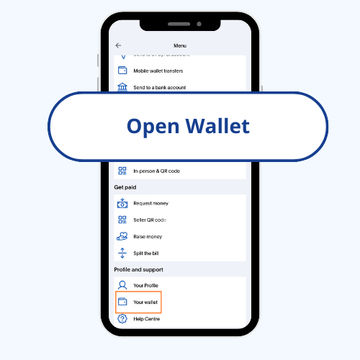
Go to your PayPal wallet
Open the PayPal app and tap ‘Wallet’.
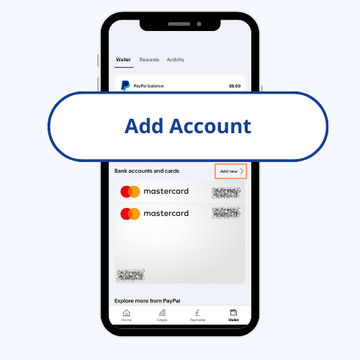
Add an account
Tap the ‘+’ symbol next to ‘Banks and cards’, then tap ‘Banks’.
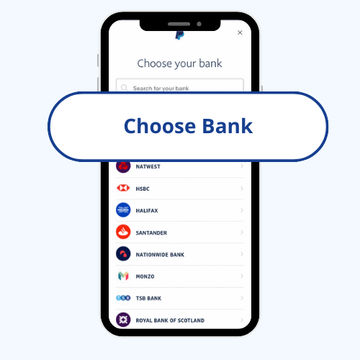
Find your bank
Search for your bank or select it from the list.
How to link a bank account to PayPal on the web
You can log in to your PayPal account via their website.
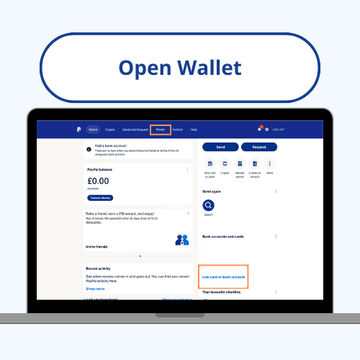
Go to your PayPal wallet
Log in to your PayPal account and click ‘Wallet’.
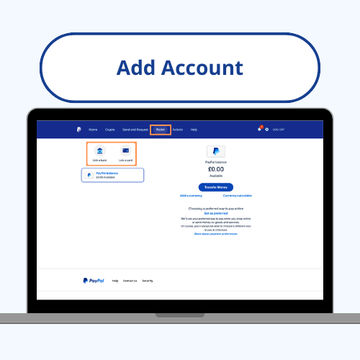
Add an account
Click ‘Link a card or bank', then ‘Link a bank account’
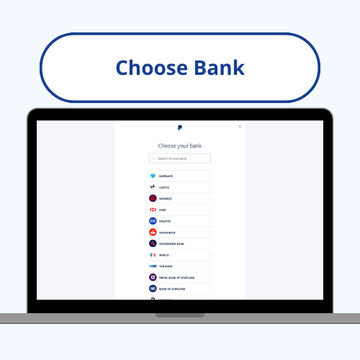
Find your bank
Search for your bank or select it from the list.
Verification
You can link your bank account instantly by entering your online banking login details. If this option isn’t available, you can enter your bank details manually and click ‘Agree and Link’.
If you don’t want to enter your login details to confirm your bank, you can click ‘Link your bank another way’. You can enter your account information here and PayPal will send you two small deposits within three business days to confirm your account. They will then debit these payments back when your account has been confirmed.
3. Transfer money to your PayPal account
Once set up, you can transfer money from your bank account to your PayPal wallet via the PayPal website or the PayPal app.
How to transfer money from a bank account to PayPal in the app
The app is available on Google Play and the App Store.
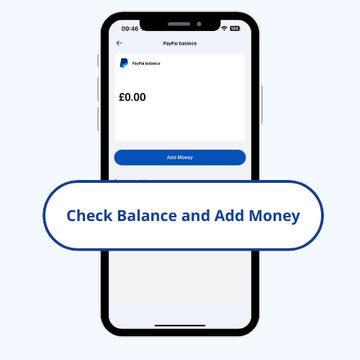
Go to 'Add money'
Open the PayPal app and tap ‘Add Money’, beside your balance.
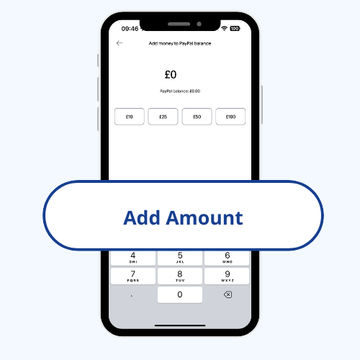
Enter the amount
Enter the amount of money you'd like to send to your PayPal balance.
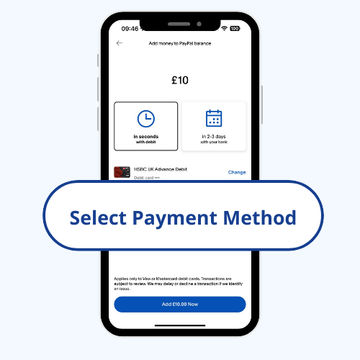
Select your payment method and timeframe
Choose ‘in 3-5 days with your bank’.
How to transfer money from a bank account to PayPal on the web
You can log in to your PayPal account via their website.
Go to your PayPal wallet
Log in to your PayPal account and go to your ‘Wallet’.
Select where you'd like to transfer money from
Click ‘Transfer Money’, and then ‘Add money from your bank or debit card’.
Enter the amount
Enter the amount of money you'd like to send to your PayPal balance.
Select your payment method and timeframe
Choose ‘in 3-5 days with your bank’.
How long does it take for funds to reach your PayPal account?
Transferring money from your bank account to PayPal can take 3-5 business days.
While bank transfers to PayPal can be quite slow, you can transfer money to your PayPal account using your debit or credit card. These payments are instant.
Instant payments with PayPal
Despite it taking several working days to transfer funds from your bank account to your PayPal account, it is possible to make an instant payment with PayPal. When making an online payment or signing up for a subscription, rather than entering your card details you can choose to pay via PayPal.
The vendor will need to have this activated. Something to note here, Stripe is the second biggest payment gateway in the world with a 32% market share, and has no integration with PayPal.
When you do this, the seller or merchant will be credited immediately, while your bank processes PayPal’s request for the money.
To complete an instant transfer with PayPal, you’ll need to have linked your bank account to your PayPal account already using the steps listed above. PayPal will usually email you once the transaction is successfully completed.
Google Pay and Apple Pay
If using a mobile, or online store, to make a payment, most retailers will accept Google Pay and Apple Pay. Both of these are connected to a debit card and bank account. Using one of them removes the need to ensure a store has PayPal integration.
PayPal fees for adding money to an account
There are no fees for transferring money from your bank account to your PayPal balance, and making local purchases through PayPal are also free.
However, charges can come into play when transferring money overseas using PayPal. If you’re looking to send money abroad, it is cheaper to use international money transfer provider.
Here is how PayPal costs stack up against money transfer companies and banks for international transfers.
Method | Detail | Mid-Market Rate | Exchange Rate ($1 = €XX) | Fees | Received amount |
|---|---|---|---|---|---|
Money transfer company | A company online, or through an account manager, offering competitive rates on international transfers. | 0.9302 | 0.9378 | $6.42 | €931.73 ✅ |
Bank account | Every day banks, like Chase, offer weaker exchange rates and slower transfers. | 0.9302 | 0.9058 | $5.00 | €900.80 ❌ |
PayPal | Apps like PayPal generally offer the worst exchange rates and add a fee percentage on top. | 0.9302 | 0.8996 | $4.99 + 4.5% | €858.64 ❌ |
How to add cash to PayPal using the PayPal Debit Card
The PayPal Debit card
The PayPal Debit Mastercard lets you spend your PayPal balance anywhere Mastercard is accepted.
This can be used as a top-up method as well, including cash deposits.
You’ll need to go to one of PayPal’s participating stores to add cash to your account with your debit card. Over 90,000 locations across the US participate in the PayPal cash transfer scheme, including Rite Aid, CVS Pharmacy, GameStop, Walmart, Dollar General, and Family Dollar.
When you’re at the store:
Go to your 'Wallet'
Open the app and go to your ‘Wallet’.
Select where you'd like to transfer money from
Tap ‘Add money’, then select ‘At a store, with cash'.
Choose a store
Choose a store from the list; a barcode will appear.
Show the barcode at the checkout
Show the barcode at the checkout and the cash will be transferred.
PayPal have a cash deposit limits
The daily limit is $500, which is also the limit on each individual barcode.
You can use up to three barcodes per day, but only up to the maximum total of $500.
The maximum amount of cash deposits per month is $4,000.
The minimum deposit per barcode is typically $20.
How soon is cash available to use in my PayPal account?
The PayPal cash deposit process is very fast. Money is typically added to your PayPal balance within minutes of the transaction.
P2P PayPal payments
To send money to someone’s PayPal account, both parties will need to have PayPal accounts. You can’t transfer money from your bank account directly to someone else’s PayPal account.
This is a decent option for sending domestic payments covering:
Transfers to friends and family
Paying an invoice raised in PayPal
Signing up to a subscription
To send money to someone else’s PayPal account, you can set up your own PayPal account and add money to your balance via the method shown above. When you have a PayPal balance, you can transfer money to someone else’s PayPal account by following these steps:
Transfer money via the PayPal app
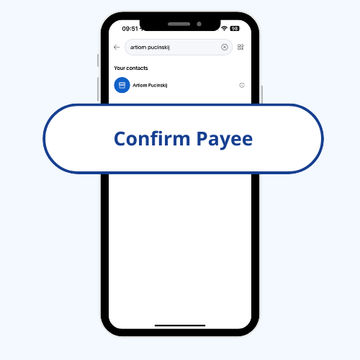
Confirm payee
Enter the recipient’s information: Name, @username, email address or mobile phone number
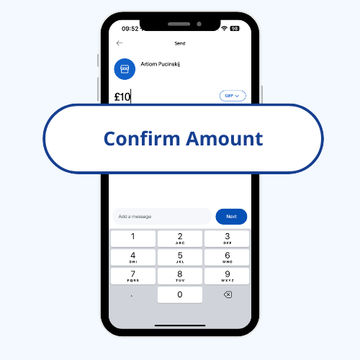
Confirm amount
Enter the amount you’d like to transfer, choose the currency, add an optional note if you wish, and tap ‘Next’
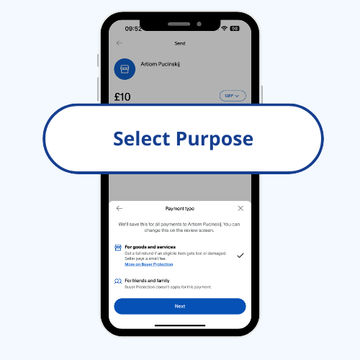
Confirm the reason
Select why you are sending the payment.
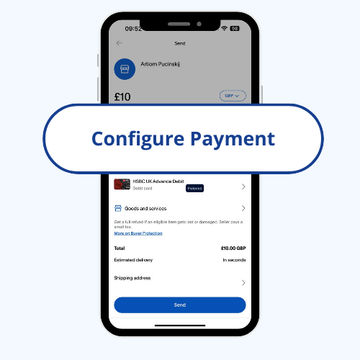
Configure payment option
Select your funding source, review the information, and tap ‘Send’
Transfer money via the PayPal website
Go to ‘Send and Request’
Enter the recipient’s information: Name, @username, email address or mobile phone number, and click ‘Next’
Enter the amount you’d like to transfer, choose the currency, add an optional note if you wish, and tap ‘Continue’
If available, choose the payment type
Choose how you want to pay and click ‘Next’
Review the information and click ‘Send Payment Now’ when you’re happy
Receiving money into your PayPal account
You can receive money through PayPal when someone sends a payment to your email address or mobile number.
When this has happened, PayPal will send you a message letting you know that your account has received some money.
You can access this money via your PayPal homepage, and either:
Transfer it to your linked bank account, or
Keep it in your PayPal balance
Sending money to PayPal - simple, but sometimes slow
PayPal is a very useful system for paying for goods and sending money to other PayPal users, but transferring money directly from your linked bank account to your PayPal balance can take some time.
You can avoid these delays by transferring funds from your debit card, or adding cash using the PayPal Debit Card.
However, despite its clear usefulness, the heavy fees charged for international transfers make it a poorer choice for sending money overseas. You’ll find a better rate using a specialist money transfer provider.
Beat PayPal costs
Get a better deal on international money transfers by not using PayPal. Compare rates and for your transfer.Transferring money from PayPal to a bank account
You can withdraw money from your PayPal account in one of two ways:
Instant transfer to your connected debit card or bank account
Standard transfer to your bank account
You can withdraw money from your PayPal account via either the website or the app.
How to withdraw money from your PayPal account via the app
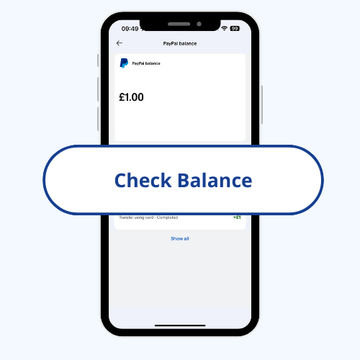
Check balance
Check the amount you have in the account.
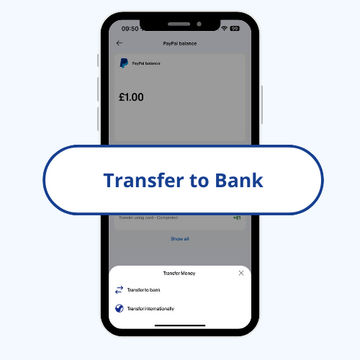
Choose where
Choose where you want to withdraw funds to.
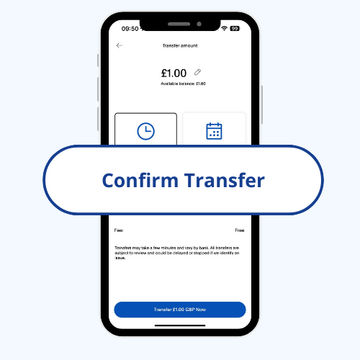
Confirm transfer
Confirm you are happy with the withdrawal.
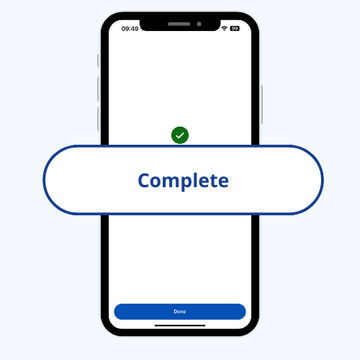
Receive funds
Complete the transfer and receive your funds.
How to withdraw money from your PayPal account on the web
Go to your ‘Wallet’
Click ‘Transfer Money’
Click ‘Withdraw from PayPal to your bank account
Select ‘Instant (Free)’ or ‘Standard (Free)’
Follow the instructions
The Instant transfer to your bank account is quicker, typically taking just a few minutes to complete, up to a maximum of 30 minutes. The standard transfer is not quite as fast, typically completing in one working day. This also depends on your bank’s clearing process, and may take 3-5 business days.
Check before you withdraw
The name on your PayPal account must match the name on your bank account exactly. For example, if your bank account name is J W Murphy, but your PayPal account name is John William Murphy, the transfer could fail. If your PayPal account name is slightly different, you should change it to make sure it matches the name on your bank account.
PayPal only supports transfers in the local currency, so if you withdraw money in a foreign currency, they’ll charge a conversion fee.
Some banks charge fees for processing electronic payments. You should check this before submitting a withdrawal request, as we’re not able to cancel a withdrawal once we’ve started processing it.
You can’t cancel a withdrawal request
A bit more on PayPal transfers
Why can’t I transfer money from my bank account to PayPal?
If you’re unable to transfer money from your bank account to PayPal, one of the following may have happened:
You’re asking to transfer more than your maximum limit allows
You’re asking to transfer less than the minimum amount required
There may be a limitation on your account, which will be visible in the PayPal Resolution Center
Your bank account or card may not support instant transfers to PayPal
The information you entered when linking your bank account doesn’t match what your bank has on file
If you were able to request a transfer but it’s showing as ‘Pending’, usually this means the payment needs a little more time to go through PayPal’s internal review process.
Does PayPal take money from your bank account immediately?
Transfers directly from your linked bank account can take 3-5 business days to process. This is because the money is moved from your bank account and processed through the Federal Reserve’s ACH before it can be released. However, payments from a debit or credit card are sent to your PayPal balance immediately.
Are PayPal transfers instant?
If you’re making a payment using PayPal, most transactions take only a few minutes before your money is debited.
Transferring money from your bank account to your PayPal balance can take a little longer, around 3-5 working days. But, payments made to your PayPal balance from your linked debit or credit card are usually processed within minutes.
What is the fastest way to get money into PayPal?
The fastest ways to get money into PayPal are via a debit or credit card, or adding cash using your PayPal cash debit card at one of PayPal’s participating stores. The benefit of adding money via your credit or debit card is that you can do so anywhere via the PayPal app, cash deposits are only available at participating stores.
Do different banks take longer to send money to PayPal?
Generally, all banks take around the same amount of time, although some will make additional checks when sending large amounts, which could take longer. Banks like Wells Fargo, Chase, Capital One, and Bank of America can transfer funds to PayPal in about 3-5 business days.
How do you send money from Wells Fargo to PayPal?
Sending money from Wells Fargo to PayPal is the same as sending money from any other linked bank account to PayPal. You can link your bank account to PayPal via the PayPal app. Check out our section on how to send money from your bank account to PayPal for more details.
Guide to Making PayPal Mass Payments in 2026
This US-based online money transfer provider is one of the most popular payment platforms of all time and the company was one of the first of its kind when it launched in 1998. PayPal is now one of the leading electronic money institutions in the world, with an estimated 392 million customers as of early 2021. Customers can use their account, logging in via web or the PayPal app, to transfer and collect money, set up payments, and make in-store and online purchases.
PayPal Alternatives
PayPal is everywhere, and for small online purchases or paying someone you know domestically, it’s pretty convenient.
Contributors

Keith Hodges

Please share your experience with …