
Wise Business Review

Author: Keith Hodges
We only list companies that are trustworthy and appropriately licensed. Our aim is to give you a comprehensive view of the regulated money transfer marketplace.
DisclosureMoneyTransfers aims to help users find the best money transfer provider for their needs. To support our free service, we may earn a commission from some of the providers listed in our search results. The commission may also impact the ordering of the providers shown. Our reviews are independent from this and are based on our editorial policy, research and testing of dozens of remittance providers on the market.
On this page
A strong digital only platform for growing businesses
Wise has traditionally been an online platform for international money transfers, but they also offer business accounts. Through this they position themselves as a multi-currency banking alternative, for businesses, it’s a convenient option - although it does have some limitations compared to specialist options
Wise Business overview
Features | Insight |
|---|---|
Monthly Fee | $0 |
Exchange rate | Matches the mid-market rate |
Transfer fees | From 0.33% |
Multi-currency account | 10 local accounts (US registered companies), 19 (Europe registered companies) |
Batch payments | ✅ Up to 1,000 per transaction with guaranteed rates |
Expense management and tracking | ✅ (although, cards not currently being issued in the US) |
Pay invoices | ✅ |
Receive Payments | ✅ |
Marketplace integration | ✅ Amazon, Upwork, Etsy + more |
API options | ✅ Automated payments, regular payments |
Manage Payroll | ✅ |
ATM Access | ✅ |
Forward Contracts | ❌ |
Scoring Wise Business
Our key measures when testing Wise Business for international business transfers were the product offering, cost, speed, safety and customer satisfaction. We've covered the key points in the table below and each element in more detail throughout the review.
- No transfer limits on getting the mid-market rate on converting currency
- Sending fees from 0.33% make Wise Business one of the cheapest business accounts for sending money
- Supports holding over 70 currencies that can be kept at no cost, or converted to a USD account
- Only 10 local accounts available to US businesses, vs. 19 for those operating in Europe
- Currently Wise Business is not issuing cards in the US
- Online only platform will not be suitable for companies wanting hands-on account management
Analysis of online reviews
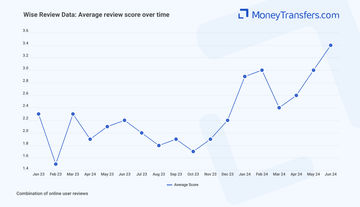
Online review software is unreliable because it averages out scoring across a company, for decades at a time. To give a clear view of how Wise Business is actually performing now, we analysed online review scores from a number of different sources, specifically for the business offering. This chart shows an average score out of 5, per month, since the start of 2023.
Wise Business multi-currency accounts
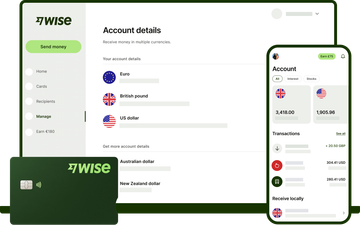
The options when using Wise Business allow for local accounts, holding currencies in over 70 locations, batch payments, and integrations with some of the bigger financial software. This all-round option is strong, and as a natural money transfer company, Wise Business provides a solid option for businesses (and freelancers) looking for flexibility.
Provider





Supported local accounts and holding currencies

The basis of Wise Business offering is through its multi-currency account (compared to others here). The account is strong with 10 local accounts (from the US). In comparison, Sokin offers 4 local accounts in total and Airwallex offers 12. Companies operating in Europe can access 19 local accounts.
The local accounts you can access from the US are:
AUD, CAD, EUR, GBP, HUF, NZD, RON, SGD, TRY and USD. You should note, USD is a non-wire account, and you’ll pay $6.11 for incoming wire transfers.
To get access to these accounts you will pay $31 each time as a setup fee.
The accounts you can hold local currencies if you have European offices are:
AUD, BGN, CAD, CHF, CZK, DKK, EUR, GBP, HKD, HUF, JPY, NOK, NZD, PLN, RON, SEK, SGD, TRY and USD. As above, USD is a non-wire account.
This difference can be off putting if you need to access one of the European only local currencies, but on the whole the US account does cover a wide range of options and more than many other providers on the market.
For receiving currencies, there’s over 70 options available. This covers wide areas of South America, Europe and Asia and can make receiving payments pretty easy.
You can hold these currencies, or pay the 0.33% fee to convert them into a local account. Anything ‘out of network’ (those currencies not supported) will be subject to a 2% fee instead.
Account limits
Account limits on Wise are $50 million per day or $150 million per year for receiving money.
Spending limits
Wise is currently NOT issuing cards in the US with no set date on when this service will resume.
Spending limits on cards differ based on countries and set monthly - these are dependent on where the business is registered:
Where your business is registered | Monthly spending limit | Monthly ATM withdrawal limit |
|---|---|---|
UK | 45,000 GBP | 4,000 GBP |
EU | 45,000 EUR | 4,000 EUR |
Japan | 6,000,000 JPY | 530,000 JPY |
Singapore | 78,750 SGD | 7,000 SGD |
Canada | 82,500 CAD | 7,000 CAD |
Australia | 78,750 AUD | 7,000 AUD |
New Zealand | 78,750 NZD | 7,000 NZD |
US cards are not currently being issued - as such, for businesses registered in the US that will need access to a bank card for spending on things like expenses, there’s not a great deal Wise can offer at the time of writing.
In locations where cards ARE offered, businesses can expect to pay an initial $5 per physical card, or get access to a virtual card at no cost.
The pros and cons of each method will be dependent on a business. Those who need multiple users on one card, or to make larger transactions, are best opting for physical cards. Companies making regular, smaller transactions across a lot of different people could be better served with virtual cards. It’s likely both options are useful however.
Expense management
Although Wise offers expense management as a feature, for US customers, this will be more in the form of inputting receipts than tracking spend through a card. This is a pretty standard offering and you will find it with most multi-currency business accounts.
Bigger and more specialist companies like Airwallex and Payoneer allow you to assign cards to employees that can use these for spending. They can then take a photo and upload the receipt with the transaction. This makes managing expenses a lot easier.
Not having this option, due to not offering physical cards in the US, puts Wise at a disadvantage when it comes to expense management and is currently one of the bigger limitations on the account. Although, again, this is not an issue for businesses in Europe.
Sending and receiving payments
Cost type | Amount |
|---|---|
Exchange rate | Mid-market rate |
Fees | From 0.33% |
As you would expect with a company listed as one of the best money transfer providers, sending and receiving business payments through Wise Business is very easy.
On sending payments you will get the mid-market rate and sending fees are 0.33%. This is hugely competitive.
For comparison, business payments through a managed service like TorFX, will be fee free but have an exchange rate in the region of 1.5-2% in some instances.
For every $1,000 sent, the Wise Business rate could save a business $17.
The approach and process differs based on the type of payment, all fairly straightforward and outlined below.
Sending mass or batch payments
Batch payment limit | 1,000 recipients |
Mass or batch payments with Wise Business can be automated, or manually uploaded - so the freedom here is helpful when operating different systems based on recipients. Payments can be made up to 1,000 recipients at a time.
Recurring batch payments like payroll or invoices can be managed through the API and integrated with your accounting software. This will give delivery timeframes and costs as well on each payment.
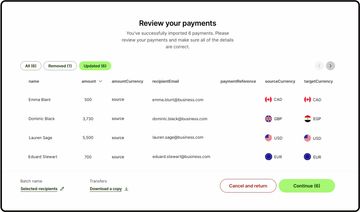
Those wanting to be more hands on for each payment run can use the upload tool. This allows for a spreadsheet to be created and added. When we tested this it was pretty simple, and in effect worked the same as making one payment, just with more rows.
The nature of Wise’s fees makes batch payments relatively competitive as well. In effect you’re making one payment, with each transaction subject to a fee. Once submitting a payment, Wise will offer a guaranteed rate on the transaction. However, if you miss the cut-off for the guaranteed rate, the payment will be made at the live exchange rate.
The Wise website says the batch payments tool is free to use, which it is. But so is the rest of the website. You will pay per transaction to send the money to each of the recipients.
Sending to an individual
Ensuring you’ve got the funds
Inputting bank details
Confirming the payment
Sending through an integration
If sending batch payments or individual payments through a platform like Xero you need to send the exact amount and use the correct B-ref. Not doing this will cause the payment to fail.
Receiving money
Wise Business Receiving Fees | $0 for supported currencies |
Receiving money into a Wise business account allows you to attach invoice to the payment and assign the payment.
This is one of the perks of a lot of multi-currency business accounts offering international payments.
As Wise Business has the ability for 10 local accounts (US registered businesses), it’s possible to receive direct payments using the bank details you have on each of these accounts. Otherwise, you can receive the payment in one of the other supported currencies with a 0.33% fee to transfer it to your local account after the money has been received, or you can hold it.
Holding it is potentially useful if you need to make another payment at a later date in the same currency as it will save on fees.
Something to note, if you receive an international SWIFT transfer from Canada you will pay a $10 fee.
There are 15 locations where you can receive SWIFT payments from with no fees, including Europe and the UK. Although, you should note the sending bank might add fees at the time of sending.
For people operating in marketplaces, you can also receive payments from platforms like Amazon, Etsy or Upwork.
Interest on balances
Cash flow in business often means large amounts of money can be held in an account at any given time.
Using a Wise Business account is beneficial with interest rates at the time of writing in USD, EUR and GBP of:
Currency | Wise interest rate |
|---|---|
USD | 4.85% |
EUR | 2.12% |
GBP | 3.22% |
Generally, with these rates, it pays to move money into one of the local accounts.
Account options
There’s not too much to say on account levels with Wise Business - you in effect just pay a setup of $31 for each local account. The levels Wise offers are actually just Business and Personal.
Here’s the difference between them:
Feature | Business | Personal |
|---|---|---|
Transfers at the mid-market rate | ✅ | ✅ |
Access to 70+ currencies | ✅ | ✅ |
Access to 10 local accounts | ✅ | ✅ |
Earn interest on balances | ✅ | ✅ |
Multiple user logins | ✅ | ❌ |
Make batch payments | ✅ | ❌ |
Receive payments from marketplaces | ✅ | ❌ |
API access | ✅ | ❌ |
Accounting software integration | ✅ | ❌ |
Setup fees | $31 per account | None |
Integrations
Wise Business integrates with a number of different softwares, through its own app marketplace. Of particular strength is the integrations offered on accounting apps.
These are:
Xero
QuickBooks
FreeAgent
RECASH
QuickFIle
Ember
FreshBooks
Oracle NetSuite
Within the ecommerce space there’s also integration with Shopify, Amazon, Ebay, Etsy and BigCommerce. As well as some smaller players in the market.
One of the perks of Wise is this option for one size fits all, and the ability to customize the system for your needs. That being said, for growing SMEs, you might find there are limitations on some of these integrations.
Compare Business Multi-Currency Business Accounts

Selecting a multi-currency account for business can feel a little tricky with different options, local accounts and features. We've broken down the top accounts across the industry at the moment.
Fees and rates when using Wise Business
As highlighted previously, fees and rates on sending money are competitive with Wise Business. There’s some potentially off putting areas in terms of fees per new local account, but these are outweighed by the convenience offered and overall lower cost.
Outside of this, potential transfers - whether individuals or batch payments - are converted at the mid-market rate, and fees for sending start at 0.33%. ‘Bigger’ currencies like GBP or EUR, will get the 0.33% rate - this in particular is a huge selling point for Wise’s Business offering.
Provider
Wise Business fee breakdown
Service | Wise |
|---|---|
Domestic Transfers | Free |
International Transfers | From 0.33% |
Currency Conversion Fee | Mid-market rate |
Receiving Fee | Free/local, $6.11 USD wire, $10 CAD SWIFT |
Holding 70+ currencies | Free |
Card Payments | 1.75% ATM over £200/month |
Monthly Fee | None |
Setup Fee | None (in US), €45 in Europe |
Payment Tracking | Included |
Additional Fees | 0.6% annual fee for investments |
ATM use* (up to $100 pm) | Free |
ATM use* (over $100) | 2% + $1.50 |
*cards are not currently being offered to US businesses
Some points to be clear on with Wise Business:
The amount you are charged in fees is 0.33% of the total amount of the transfer. For batch payments, this is PER transfer (even on batch payments)
Sending outside of the supported Wise network will result in fees of 2%, as opposed to 0.33% - but you will still pay the mid-market rate to exchange
You can send up to $50 million per day, or $150 million per year
Guaranteed rates on batch payments
When planning a batch payment, you can get a guaranteed rate from Wise. This is set for a particular period of time. When planning payments this is the same as using a forward contract.
The Wise option will mean you can action the payments in your account at any time still. If you make the payment before the guaranteed rate expires, you will exchange at that rate. If you make the payment after, you will pay the live mid-market rate.
For Wise Business users, this is obviously helpful as it locks in a rate. With the company offering the mid-market rate on transfers anyway, it can result in a nice saving. The biggest benefit here is that you lock in a mid-market rate against companies like Airwallex, who are offering between 0.4% and 1% on exchange rates.
Transfer speeds with Wise Business
Transfers through Wise Business take anywhere from seconds to days, depending on where the money is going and how much is being sent
Provider
Batch payments take a little longer to process from start to finish, but actual transfer terms were largely unaffected.
The accounting software integrations, multiple user options and app access all add to the speed in terms of convenience.
Wise Business service and account management
One of the bigger pitfalls for Wise Business is that it can feel very much like a self-service, online only, platform.
When dealing with APIs and big financial moves within a company, setup can feel a little confusing. Companies like Airwallex and Payoneer excel in this area with access to an account contact that can work with you to setup the software and integrate it fully.
For us, this makes Wise Business a little weaker for growing businesses looking for support or enterprise businesses looking for fully fledged integration. It does however provide a useful option for those with enough experience in online banking and with regular payments to make the day to day easier.
Considering US businesses cannot get a card either, US businesses should consider this as a payments platform at heart.
It’s potentially unfair to list this as a pitfall, as to Wise’s credit, they are not trying to be anything more than this. If you are happy with the online only approach, it’s definitely one of the strongest options.
Customer service options
Beyond this there are some customer service options within Wise Business that also bridge the gap between the online approach and lack of account manager.
In testing we found:
Phone support
Availability | 24/7 |
|---|---|
Response time | Minutes |
Languages | English, Hungarian, Spanish, German, Italian, French and Portuguese |
Phone support is available and testing required us to jump through some automated hoops to reach the right person. Once here however, we found our questions on opening a business account pretty easy.
For queries on the Wise Business API integration we were asked to contact a specific API email. This is to be expected with the specialist nature of development and APIs.
Availability | 24/7 |
|---|---|
Response time | Within an hour |
Languages | English, Hungarian, Spanish, German, Italian, French and Portuguese |
Email support is accessible and easy to use, being logged in also makes this a little quicker as you’re sending direct from your account.
API support queries went to a different email address, but again were relatively quick in response - although we did ask generic questions on whether we could hook the system up to Xero.
Help center
Availability | 24/7 |
|---|---|
Languages | German, English, Spanish, French, Italian, Indonesian, Magyar, Polish, Portuguese, Romanian, Turkish, Russian, Chinese (Traditional and Simplified) |
Whilst not for everyone, the help center Wise Business has a lot of documentation and the API and Open Banking reference guides are helpful.
For adding things like Xero integration, or marketplace integration, this more than offered what was needed.
Using Wise Business
Wise Business is one of the easier business money transfer offerings to use. This simplicity however, will be a limiting factor for some users.
Provider
We tested the following for ease of use
Invoicing
Integrations
Adding multi-user access for employees, roles and permissions
Paying-in and withdrawing funds
For each option the process was simple and easy to follow, Wise is very much a platform where you can see within one or two actions, how to achieve what you need to achieve.
Eligibility and sign up
To sign up for a Wise Business account, the business will need to be registered in the US.
Initially, just register to sign up on the site.
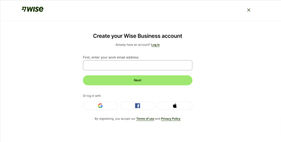
To do this, you will need to provide:
Legal name of the business / entity
Primary Place of Business and U.S. Street Address (non-PO box addresses)
Employer/Taxpayer Identification Number (EIN)
Shareholders Information
Full name
Country of residence
Date of birth
Exact percentage of shares owned (for those holding 25% or more)
Directors Information (if applicable to company type)
Full name
Country of residence
Date of birth
Company Website Details and Business Description
Depending on your company's registration type, such as a not-for-profit or general partnership, additional requirements may apply. For instance, Limited Liability Partnerships (LLPs) must also provide details of the managing partner, including their full name, date of birth, and country of residence.
Add the local accounts you want
From here set up the accounts you want to access, each will have a one time fee of $31. For example, if you want local accounts in USD, EUR and GBP - this will be $93.
Wait for verification
Verification for Wise Business accounts can take up to 10 days. Within this timeframe Wise will confirm any additional information they might need from your business.
Following verification you will be able to use the account in full to add funds, send and receive payments, integrate with account software and take advantage of the API. You can also access virtual cards, add more users and start to schedule batch payments.
Safety and regulation
Wise Business comes with some regulation and compliance measures that showcase its safety credentials.
Provider
Safety nets on the account include two-factor login for all users if you want it and real time notifications on card spending or transactions to a core, or set of users.
Wise Business also promotes the use of a security operations team that monitors out-of-ordinary behaviours on accounts. This is paired with regular attacks tests carried out across the business to ensure security is tight and a bug bounty program through Bug Crowd.
Regulators

US regulation is through FDIC and there are also specific regulations at state levels for international payments.
The company is also regulated in countries such as the UK through the FCA.
For protection of data on a global level, the company adheres to practices such as SOC 1 type 2, SOC 2 type 2 and is ISO27001 certified.
Not keen on Wise Business?
If you are unsure of whether Wise Business is for you, here's some other options in the market.
Bancoli Review
Before you choose whether to transfer funds overseas with Bancoli, here’s a quick summary of benefits and drawbacks.
Equals Money
Before going into more details, here’s a quick summary of the benefits and drawbacks of Equals Money.
WorldFirst
Before going into more detail, here’s a quick summary of the benefits and drawbacks of WorldFirst.

IFX Payments Review
Their flagship product, ibanq, provides multi-currency virtual IBAN accounts, enabling businesses to receive, hold, and send funds across borders, giving companies greater control over their global cash flow. Their mass payment functionality simplifies payroll and supplier payments, even across multiple currencies, ensuring businesses can process international payments in bulk without opening local currency accounts.
Moneycorp Business
Historically, Moneycorp is considered one of the biggest money transfer providers in the world. The company has over 45 years of history and launch in the USA in 2018. The company is headquartered in the UK but with offices in USA, Ireland, France, Romania, UAE, Hong Kong, Australia and Brazil.
OFX Business
Our key measures when testing OFX Business for international business transfers were the strength of the product offering, cost of service and transfers, speed, safety and customer satisfaction.

Revolut Business
Like their personal offering, the Revolut Business offering is tiered - giving more access to features, the more you pay.
Xe Business
Xe Business offers strong all-round support for international business transfers. As part of our scoring process we have looked at product offering, cost, speed of transfers, safety and customer satisfaction.
Sokin
Multipass
Multipass offers a strong selection of multi-currency option. A setup fee and higher monthly fees than elsewhere are a little offputting when you consider exchange rates are higher than Airwallex, Wise Buiness and Revolut Business.

Payoneer
Globally Payoneer serves around 190 countries, gives access to local accounts in 9 and supports 70 currencies. Features within the account allow you to take advantage of payments, invoicing and bulk options in each location. Where Payoneer is stronger than the likes of Revolut Business or Wise Business, is that it is built for international companies - as opposed to being an offshoot of a personal offering. This sets them apart from other providers, alongside the likes of Airwallex, by offering a full international business solution.
Airwallex
When scoring Airwallex as an international business provider we factored in the product offering, speed of sending money, cost, safety measures in place and customer satisfaction.
User feedback of Wise Business
Customer feedback
Feedback for Wise Business is generally positive and in-line with Wise Personal reviews.
Provider
Feedback on TrustPilot for Wise shows 220,000 reviews at an average rating of 4.3. It should be noted that these reviews are Wise generic however, so won’t always be applicable to the business offering.
There's some negative mentions more recently on Wise Business in particular, that there is no customer support and the service is limited.
We looked at the most recent 2,000 reviews that contained references to the Wise Business account, the recent average score was 2.5.
With this said, there is a fair amount of overlap between what is good about Wise Business and Wise Personal. Sign-up, ease of use, the competitive rates against competitors like Revolut Business, are just a few areas of note.
Something to point out on their review profile, which bleeds into Wise generally, is they are do use AI to reply to some reviews - so to reiterate, if you want to really work with an account manager and have hands on help, Wise probably isn’t the right option.
Wise user feedback
Would you recommend Wise?
Roald
Very good!
Anonymous
They won't open my account.
Contributors

Please share your experience with …