
Best International Money Transfer Apps in 2026
Table of contents

Author: Keith Hodges

Editor: Artiom Pucinskij
We only list companies that are trustworthy and appropriately licensed. Our aim is to give you a comprehensive view of the regulated money transfer marketplace.
DisclosureMoneyTransfers aims to help users find the best money transfer provider for their needs. To support our free service, we may earn a commission from some of the providers listed in our search results. The commission may also impact the ordering of the providers shown. Our reviews are independent from this and are based on our editorial policy, research and testing of dozens of remittance providers on the market.
Table of contents
Money transfer apps make transferring money easy and convenient by syncing desktop and mobile experiences.
We've looked into the fees, speed, extra features, and usability of all the most popular apps, to guide you to the best option for overseas transfers.
Search Now & Save On Your Transfer
Instantly view live exchange rates, fees & features.

Wise has one of the best app options in the money transfer space. You can access accounts, sync to bank accounts, and use a virtual card for spending.

Using Airwallex you can track and submit expenses, manage currency risk, and carry out business transfers.
Money transfer apps enable secure, fast, and cost-effective international transfers across multiple devices. They typically offer low fees, competitive exchange rates, and features like multi-currency support. Popular choices include Wise, Revolut, and Remitly.
Sending money through PayPal can feel more convenient if you already have an account. It is often the go-to when considering which app to use.
More often than not, PayPal will not be the right choice. You will get a worse exchange rate and pay higher fees than sending through a money transfer company.
Thankfully, there is another way.
Specialist money transfer apps offer:
Better exchange rates than PayPal (and banks)
Low or no fees
Beyond this, an international money transfer app works by offering features like:
Multi-currency cards and virtual cards
P2P payment options
Better exchange rates and fees than using traditional banks
Open banking and syncing with accounts
Loyalty schemes and bonuses
The best transfer apps
Wise is the app that stands out for its offering across all platforms. The app serves as a multi-currency account, grants access to virtual cards and supports P2P transfers to other Wise users.
For those handling large sums, XE is the go-to app. With a generous limit of $535,000 per transaction, it's our preferred choice for substantial transfers.

"Over 15 million customers use Wise, mostly for their excellent mobile app, transparent fee structure & use of mid-market rates. Now increasingly used for larger transfers."
Please share your experience with Wise
Would you recommend Wise?
Russell Pinkes
I can’t send money to Belize
Katsiaryna
Once trying to open sire, was automatically blocked for no reason
Alan
Unable to transfer money from Philippines to any other country. Philippines Wise does not work
Anonymous
Retiro de dinero en transferencia
Uwe
great rates and service - unfortunately for some countries not yet available
Martin Premprakash Anantharaman
On the first transfer to a hospital in NY they were already screaming that this was a sure scam and the same on my next transfer to a fried in Nigeria. They then summarily closed my account TERMINATING THE RUNNING TRANSFER TO NIGERIA, claiming that, hold on, I was being scammed🤦♂️ Sure, I could have appealed but immediately found that I would have had to provide so much intrusive detail that I desisted.
Martin Premprakash Anantharaman
Setting up is a bit unwieldy if you want to make a one-off transfer, as you have to create an account with complete identification - but it works and the process as well as charges are great.
Anonymous
My brother wants to send me money from India to Nigeria but he's finding it difficult how can he do it
Mohammed
WARNING : Wise was Great until main office decided to ruin WISE By letting the TW India office control handling Random verifications and do what ever they want by insane replies and no replies etc. If you want to waste your time and enjoy a journey into Black Hole of Insane then go ahead and try WISE !
Anonymous
Can't receive money from php to idr so far
sudheir
They don't allow transfer to Brokerage firms from India
Anonymous
Good app to transfer money
Anonymous
I didn't find Cuba on your list.
Anonymous
cuba not work
Nina
I made a transfer to a Canadian company 1.5 months ago, and the funds have not yet been received. After multiple emails, Wise insists that the money was paid out. However, I have received an official statement from the recipient’s bank confirming that the money has not been received. Wise's complaints department sent me a final letter stating that, according to their records, the funds were paid out. Additionally, Wise states the following in their Customer Agreement regarding their responsibility for losses: Quote from Wise's Terms: "Our Customer Agreement also explains our responsibility for losses in Section 29: 29.1 Unforeseeable loss or damage. We are not responsible for any loss or damage that is not foreseeable. Loss or damage is foreseeable if either it is obvious that it will happen or if, at the time the contract was made, both we and you knew it might happen, for example, if you discussed it with us during your sign-up process. 29.9 We are not liable for things which are outside of our control. We (and our affiliates) cannot be liable for our inability to deliver or delay because of things which are outside our control." Despite these terms, Wise has not been able to resolve this issue, and the money has still not been delivered as promised. I find it irresponsible that Wise does not conduct any investigations into the matter. The Canadian bank associated with Wise is unable to provide any information, as everything goes through Wise. Wise must be capable of tracking the funds and providing precise details about where exactly the money is, who received it, and to which bank account it was deposited. I would advise everyone to be cautious when transferring large sums of money with Wise. They are not capable of executing a secure money transfer!
Shengjie Yin
good and perfect
Tristan
Beware: Wise's Unethical Policies and Unresponsive Support Cost My Business I am sharing my experience with Wise to warn fellow business owners about the serious risks and unacceptable practices you may encounter if you choose to use their services. My business, is a legally registered travel agency in the UK, and I relied on Wise to manage payments for my photography and cultural tours, primarily in South America. Things took a turn for the worse when Wise froze my account and accused my business of violating their Acceptable Use Policy, citing my once-a-year humanitarian trip to Cuba. Despite explaining multiple times that: No Cuba-related transactions were ever processed through Wise (I use a separate European bank for this purpose), My tours comply with the “Support for Cuban People” category authorized by OFAC, designed to help Cuban citizens outside state control, Wise completely ignored the facts. Their customer support team responded with automated messages, refused to engage in any meaningful dialogue, and even lied, claiming they didn't monitor my emails—despite clear evidence to the contrary. After days of chasing them and providing thorough documentation, they chose to close my account without justification. The Consequences: Wise left my business in chaos, disrupting essential transactions and client arrangements. Their rigid policies align with sanctions widely condemned by the global community, and in doing so, they indirectly support humanitarian suffering. The Bottom Line: Wise is unreliable, unresponsive, and unethical. If your business has any complexity or humanitarian focus, beware: Wise will shut you down without notice or explanation, and customer support will abandon you. Their actions have serious real-world consequences. Avoid Wise if you value your business stability or require ethical and accountable financial services. There are far better alternatives out there that won’t put your livelihood at risk Beware: Wise's Unethical Policies and Unresponsive Support Cost My Business
Anonymous
I have been a customer for a few years. Yes I love the instant deposits as I make around $1K. However as many non US entities Wise uses a bank out of New York. Therefore the TRANSFER and DEPOSIT from an account transfer can take 4 to 6 days. What this means is that you will not able to make another ACH transfer during this time. This is frustrating if you have to make a follow up transfer in a few days. All in all don't plan to make more than 4 transfer in a month because it may not fo through, Not sure if other transfer companies operate the same way but I am about to find out as I will try Revolute. Bottom linw will require you to use ANOTHER payment method like credit card or some other method. Understand this: YOU MAY HAVE THE MONEY IN YOUR ACCOUNT but they WILL NOT TRY TO VERIFY IT WITHIN THE THE PERIOD IT WILL TAKE THEM TO DEPOSIT IT IN YOUR ACCOUNT. To add insult to injury I called in and the agent siad that they can see that they got paid but the computer takes time to update/reconcille I guess! It is a slow system!
Anonymous
There is a lot of advice on RECEIVING INHERITANCE in the UK from overseas but nothing on the rules for SENDING money gifts to grandchildren living OVERSEAS and the rules on Inheritance Tax in that case.
Anonymous
The service is decent, nothing more. I have had security issues that are not quickly resolved. Call center personnel are average. The app is not, in general, user friendly. You should definitely do research on a variety of service providers before making a choice. Do not take the reviews at face value. I chose Wise based on positive reviews but now regret not doing more research on other companies.
Anonymous
So far so good
Daniel
I checked to see if Wise even sends money to Colombia. Colombia is not even in their list of countries. Why is it even advertising for Colombia?
Bill Sanders
I have used Wise for several years. They once rejected a large transfer because it was to a coal company. Apparently, they are a woke company! But they refused to tell me why. More recently, they required verification of my identity using a smart phone. I am 69 and never owned a cell phone because I don't need one. But they forced me to buy one, which I did last week. Getting the phone updates ate up all my data, so i got 1 GB more. I took 12 different pics of my passport and another 12 of my face for them. They rejected them - and are holding up my transfer. Now my phone ate up that gig of data and I must buy another gig (thru Tracfone) just to use the phone. What a hassle. This is not a photo studio! They know who i am already. Note: This comment has been edited by the MoneyTransfers.com team to align with our content guidelines.
Ziggy Meilus
It used to be always instant, now it may come right away or it can take 5 even 7 days to get the money.
Anonymous
i've heard of people having issues with accounts being locked/restricted, but i think that was mostly for business accounts, maybe they were locked for good reason. for me, i've had no issue with my account though i've only used it for small transfers and not very often, over the past 5+ years

"Xe has over 30 years of currency exchange experience, and is one of the most reputable names on the market. 200 countries, 100 currencies, & funds often received in seconds."
Please share your experience with Xe
Would you recommend Xe?
Anonymous
The transfer rate was way lower than displayed on the comparison site.
Anonymous
Great for large transfers.
Anonymous
Fast, great rates, easy to use. Good for large transfers.
Paul Ansems
XE money transfer scam -stay away-WARNING Don't use this company! After several successful transfers. This time, I sent the money and they received it. After 7 days with no reason that they would cancel it. I sent their compliance team everything they asked. I found my privacy threatened but sent them anyway. I asked for a supervisor or manager but was denied. They obviously hang onto your money as long as possible and after making money from it like interest. If the exchange rate amount is too high and drops after holding it then they cancel it. WARNING Don't use this company!

"TorFX's 5-star service handles most currency needs, especially relating to overseas property, emigration & retirement. Friendly phone support, no-obligation conversations & no max transfer limit."
Please share your experience with TorFx
Would you recommend TorFx?
Arun
Misleading information
Anonymous
Can't transfer from India

"Remitly focuses on sending money to friends and family in Asia, Africa and South America. Wide coverage and well-suited to regular transfers home."
Please share your experience with Remitly
Would you recommend Remitly?
Anonymous
The Exchange rates are Terrible. Lost £150.00 by sending £5000 That is a huge amount. When other companies have much better rates. costing about £25-£35 for the same amount of funds transferred
Anonymous
Was told the money would be there same day, transferred money for an emergency 3 days later and they keep saying something different each time we call. It’s not a small amount of money and the money is no longer in our bank account.
Andrew Lippert
Too convoluted - Not worth the time
Anonymous
MY BANK REFUSE TO DO BUSINESS WITH THIS COMPANY
Anonymous
I am not currently a customer, having an experience of delivery to the wrong account and slow resolution with MoneyGram .
Jymmy François
Okkkkkkkkkkk
Ray
After 14hours of waiting & 6 phone calls by me, recipient never received currency, was told overseas bank problem. Used another currency operator, money arrived in seconds. Poor Show, now waiting for full refund!
Anonymous
Can't send to Russia
Anonymous
Good service
Anonymous
Not possible to send money to a bank account
Kenneth Thomas
The funds I needed arrived in minutes and saved me. It was an easy and straight forward process. Thanks Remitly
Anonymous
Good option
Anonymous
good and easy
Anonymous
First time user. So far is fast and easy.
Anonymous
Currently unavailable to send money from USA to Russia

"24/7 live chat support provided in six languages. Special first transfer rates available, with airtime topup supported to many countries in Africa, Asia and South America."
Please share your experience with WorldRemit
Would you recommend WorldRemit?
Andrew Judd
My account was deactivated. No reason given. I don’t have multiple accounts. One recipient was a scammer and I deleted them. I’ve helped out many friends with medical expenses. Wisdom tooth extracted 2500 and 1000 for some food. That’s all Motorcycle accident 5000 that’s all Flight home and medicine for grandfather 6000 That’s all. The scammer offered a video. I don’t buy any videos I’m visiting a friend who is a teacher and offered to pay 2600 for a flight and 16000 for luggage, swimsuit and rent on her place while she is off work and holidaying. Now I have to go to a post office and use western union
Terry Twala
Very efficient.
Anonymous
Very misleading, live exchange rate does not match with their app is showing. Fast and seems to be secure, I use them when I'm in need to send fund ASAP.
Anonymous
different price from shown here
Anonymous
exchange rates on comparison website are quite high
Anonymous
Only phone app.
Stanley Davidson
After setting up a valid account with all true and real identity, the system blocked me without any valid reason. Upon calling Customer Service & requesting a reconsideration & a valid reason why I was blocked, Customer Service said that I "violated some TOUs" (Terms Of Use) without stating exactly what I did. My ONLY action was an ATTEMPT to do a normal wire transfer. One can't do anything but to do a wire transfer, & it WAS NOT completed. How do they block my account for something, whatever it was, that I supposedly committed? When I requested the reason for the block they'd said that "it's Company policy to not provide reason(s) why an account is blocked", so exactly how am I supposed to not do something if I re-read their Policy against such action when I can't find why I was blocked? It was asked repeatedly why/what Policy(ices) was/were broken enough to cause the account to be blocked, but they'd completely refused to answer or acknowledge the question, they'd just kept completely silent. That ended the conversation because anything further would remain in total silence, so it was useless to ask anymore questions. I will be 💯% posting this exact statement on www.trustpilot.com for the world to see how undeserving this company is when mistreating a customer for no valid reason. Please enjoy the review!!!
Anonymous
Awesome service
Anonymous
I cannot figure out how to fund my transfer with my bank account instead of a debit card. The Chat service took way to long to answer my questions. Frustrating experience.
Robert Myles
Hi All a good place to send money to ghana
Jake Reynolds
Is this company an app? Or does it run a proper website? Who knows? Customer service is only through their app so I am guessing that if you dont do 100% of your transactions through your phone, forget WorldRemit. I dont use my phone because after all the extra strong passwords, and bio id, and 2 step verify, and whatever comes next they are STILL UNSECURE.
Anonymous
The money I sent got stuck without a return because I couldn't provide a bank statement as proof. The bank account I was having didn't have that privilege. All requirements should be stated beforehand.
Anonymous
app not working. tried to use on my smart phone and woudnt sign up.
.svg)
"Aspora (formerly Vance) is built for Non-resident Indians sending money to India with zero markup, low flat fees, and on-time transfers."
Please share your experience with Aspora
Would you recommend Aspora?
Firoz
"Complete waste of time and extremely misleading. I sent money thinking it would be fast, but it has been over 24 hours and the funds still haven't arrived
Rahul
I liked it, fast and few min to get the transfer done, app is also nice got a $25 bonus
Sudhakar
My experience is very nice. It is very quick and gives the updates while the transfer in progress. In a few min the transfer is done. I have done multiple transfers and did not face any issues.
Anonymous
Best rates, reliable, and great customer support. Really great experience sending money to my parents back in India.
Anonymous
This is a really good app, the only app that actually provides live google rates. Moreover the first transfer is free and you also get a 20 pound cashback on your first transfer.
Lavisha Moolchandani
My funds took lot of time to credit in bank account. The team doesn't address issue urgently. Very disappointed as this happened multiple times.
George
One of the worst App. My money stuck with them for few days and transfer failed for online banking transfer. For second transfer again failed sent through debit card and not yet received the refund. Please don't use them.
Babu
These cheaters hold your money and takes years to transfer to your account

"An exciting, fast-growing global payments company focusing on Latin America. Official fintech partner of FC Bayern Munich and offers a best price guarantee."
Please share your experience with Global66
Would you recommend Global66?
Anonymous
Good trades
Maria Gilda Hayden Becker
Business transfer
Anonymous
Very good service in Colombia. When compared to other platforms, it offers lot more options and flexibility to Colombian users. Wise for example, does not have option to issue physical card to Colombi, link cuurent account, transfer from balance to Colombia accounts. Global66 provides all these options easily.
Claudia Venegas
Has been a good tool to use when traveling, and aso when needing someone to transfer money back to me. easy to use, and fast and reliable. Nice!

"Revolut has 70+ million customers globally. You can hold up to 25+ currencies in the app and send money quickly in 25+ currencies to 140+ countries."
US Disclaimer: Revolut is not a bank. Banking services are provided by Lead Bank, Member FDIC. Fees may apply. See revolut.com/en-US/ for details.
Please share your experience with Revolut
Would you recommend Revolut?
Anonymous
Family purpose
Anonymous
Our family and in-laws use revolut for when they come to the UK, when we're in Germany, France or Portugal to pay each other back for holiday expenses for our families such as shopping, meals, petrol, gifts etc. It's great.
Anonymous
not competitive
Anonymous
Yes i recommend
Malek
Does not support transactions for people resident in algeria
Gigani
Excellent service
Eric
Does not support transactions for people resident in Indonesia
Anonymous
Excellent
František
I have had Revolut for a long time and I can recommend, the best app for me Note: Translated from "Revolut už mám dlouho a můžu doporučit za mě nejlepší aplikace"
Anonymous
I haven't been able to set up. it won't resend the codes
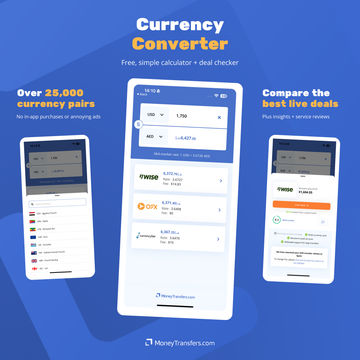
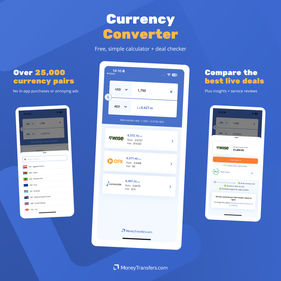
Our handy, modern currency app lets you:
Instantly convert 25,000+ currency pairs
Compare live transfer deals
Get reviews & insights
Our app is free for mobiles and tablets, with no intrusive ads or in-app purchases.


Money transfer apps for business
"Wise Business is used by 300,000+ businesses each year. Easy integrations with Xero, QuickBooks, FreeAgent and more are available."
Please share your experience with Wise
Would you recommend Wise?
Roald
Very good!
Anonymous
They won't open my account.

"Sokin is a global payments platform for businesses. Hold 75+ currencies with free IBAN accounts. Make up to 5,000 payments per batch transfer. Excellent ecommerce payment gateway available."
Please share your experience with Sokin
Would you recommend Sokin?
Anonymous
Still a charge for international transfer of money.
"Airwallex offers a comprehensive financial platform for businesses. Make global transfers to 150+ countries, receive funds in 20+ currencies. Connect with popular software for a seamless approach."
Please share your experience with Airwallex
Would you recommend Airwallex?
Anonymous
Airwallex's FX service has made my life so much easier. The transfers are super quick, happening in seconds because Airwallex uses its own local payment network, not SWIFT. I also love that I can easily open foreign currency accounts with local bank details. This means my clients from different countries can send local transfers to my account without any hassle. It's a great solution for anyone looking for fast, reliable international money transfers. Highly recommend!
Ejike
Unfortunately Airwallex would collect your information only to realize that they don't have presence in your business region. Sad!
Choosing the best apps
Most companies will tell you that being able to send money at a better rate is what makes a good app.
We compare more companies than anyone on the market, and we think a good app is much more than that.
It's not good enough to say an app is one of the best because it is cheaper than using a bank.
Ultimately, money transfer companies will offer a better cost for sending money internationally than a bank.
But there's much more on offer than that. That's why we look at:
Fees, rates, and overall cost as standard
Additional features exclusive to apps
Ability to move between mobile, tablet, and desktop
Speed and performance of the app
Design and user experience
Customer reviews of apps
So when pitted against each other, particularly for apps, it's important to look at features, user reviews, and performance of an app as well.
Each app and what it offers

Wise
Wise is one of the stronger apps for sending and receiving money. The cost of a transfer is around 0.35% vs the 4-5% you will pay with PayPal.
There are a lot of other good features as well, like a multi-currency account and virtual or physical cards.
This makes it a good choice for small, regular transfers and also for travel money spending as well.
Exchange rate | 0% (mid-market rate) |
|---|---|
Fees | from 0.35% |
Multi-currency option | Yes, 10 local accounts |
Virtual cards | Yes |
Supports P2P | Yes |
Open banking and syncing | Yes |
- Low fees of 0.35% and the mid-market rate make Wise one of the cheapest ways to send money
- The app is easy to use and syncs well with the desktop version. You can also switch between local accounts and balances with ease, and add local accounts within a couple of clicks
- Instant transfers to other Wise users through the P2P offering and transfers to other bank accounts, generally within a couple of hours
- Recommended for smaller, regular transfers and overseas spending
- While Wise are introducing a managed option for large transfers, the account and app offering a very much self serve. Being able to reach customer service to solve problems is one of the bigger gripes seen on the App Store and Google Play Store.
Show moreHide
Multi-currency options
The Wise app also doubles as a multi-currency account account. So you can send and receive money to local accounts in 10 different currencies as well.
In fact, Wise also made it to our list of the best multi-currency accounts as the overall best option.
Zing and Revolut both do this well, so worth taking a closer look at how the three companies compare.
For Wise, in particular, the options are:
Currency | Wise Details |
|---|---|
USD | Routing number and Account number |
GBP | Swift/BIC, UK sort code, Account number, and IBAN |
EUR | Swift/BIC and IBAN |
AUD | BSB code and Account number |
NZD | Account number |
SGD | Bank code, Swift/BIC, Bank name, and Account number |
RON | Swift/BIC and Account number |
CAD | Institution number, Transit number, Swift/BIC, and Account number |
HUF | Swift/BIC and Account number |
TRY | Bank name and IBAN |
USD, GBP, and EUR accounts also come with interest rates that (at the time of writing) start at 4% (keep an eye out for any updates here).
Revolut offers slightly higher rates than this, but this does come with a monthly fee.
P2P payments
Wise offers instant transfers between accounts on Wise via a P2P network using a Wisetag. This is either a QR code or @tag that can be shared as needed to request or make payments.
Wise is already one of the fastest money transfer providers on the market, this just aids in quicker transfers and convenience.
Ease of use
The app itself is easy to use and is needly split into four areas: Home, Card, Recipients, Payments
There are not any major surprises here, and the perk of using Wise for sending money is the simplicity it offers. The app is no different.
On the Home screen, you will be able to see recent transactions, both spending and sending, check exchange rates, make payment requests, schedule transfers, set up direct debits, and set up auto conversions on balances that come in.
The latter is particularly useful when receiving regular payments into one account that you may want to convert to a new one.
Please share your experience with Wise
Would you recommend Wise?
Russell Pinkes
I can’t send money to Belize
Katsiaryna
Once trying to open sire, was automatically blocked for no reason
Alan
Unable to transfer money from Philippines to any other country. Philippines Wise does not work
Anonymous
Retiro de dinero en transferencia
Uwe
great rates and service - unfortunately for some countries not yet available
Martin Premprakash Anantharaman
On the first transfer to a hospital in NY they were already screaming that this was a sure scam and the same on my next transfer to a fried in Nigeria. They then summarily closed my account TERMINATING THE RUNNING TRANSFER TO NIGERIA, claiming that, hold on, I was being scammed🤦♂️ Sure, I could have appealed but immediately found that I would have had to provide so much intrusive detail that I desisted.
Martin Premprakash Anantharaman
Setting up is a bit unwieldy if you want to make a one-off transfer, as you have to create an account with complete identification - but it works and the process as well as charges are great.
Anonymous
My brother wants to send me money from India to Nigeria but he's finding it difficult how can he do it
Mohammed
WARNING : Wise was Great until main office decided to ruin WISE By letting the TW India office control handling Random verifications and do what ever they want by insane replies and no replies etc. If you want to waste your time and enjoy a journey into Black Hole of Insane then go ahead and try WISE !
Anonymous
Can't receive money from php to idr so far
sudheir
They don't allow transfer to Brokerage firms from India
Anonymous
Good app to transfer money
Anonymous
I didn't find Cuba on your list.
Anonymous
cuba not work
Nina
I made a transfer to a Canadian company 1.5 months ago, and the funds have not yet been received. After multiple emails, Wise insists that the money was paid out. However, I have received an official statement from the recipient’s bank confirming that the money has not been received. Wise's complaints department sent me a final letter stating that, according to their records, the funds were paid out. Additionally, Wise states the following in their Customer Agreement regarding their responsibility for losses: Quote from Wise's Terms: "Our Customer Agreement also explains our responsibility for losses in Section 29: 29.1 Unforeseeable loss or damage. We are not responsible for any loss or damage that is not foreseeable. Loss or damage is foreseeable if either it is obvious that it will happen or if, at the time the contract was made, both we and you knew it might happen, for example, if you discussed it with us during your sign-up process. 29.9 We are not liable for things which are outside of our control. We (and our affiliates) cannot be liable for our inability to deliver or delay because of things which are outside our control." Despite these terms, Wise has not been able to resolve this issue, and the money has still not been delivered as promised. I find it irresponsible that Wise does not conduct any investigations into the matter. The Canadian bank associated with Wise is unable to provide any information, as everything goes through Wise. Wise must be capable of tracking the funds and providing precise details about where exactly the money is, who received it, and to which bank account it was deposited. I would advise everyone to be cautious when transferring large sums of money with Wise. They are not capable of executing a secure money transfer!
Shengjie Yin
good and perfect
Tristan
Beware: Wise's Unethical Policies and Unresponsive Support Cost My Business I am sharing my experience with Wise to warn fellow business owners about the serious risks and unacceptable practices you may encounter if you choose to use their services. My business, is a legally registered travel agency in the UK, and I relied on Wise to manage payments for my photography and cultural tours, primarily in South America. Things took a turn for the worse when Wise froze my account and accused my business of violating their Acceptable Use Policy, citing my once-a-year humanitarian trip to Cuba. Despite explaining multiple times that: No Cuba-related transactions were ever processed through Wise (I use a separate European bank for this purpose), My tours comply with the “Support for Cuban People” category authorized by OFAC, designed to help Cuban citizens outside state control, Wise completely ignored the facts. Their customer support team responded with automated messages, refused to engage in any meaningful dialogue, and even lied, claiming they didn't monitor my emails—despite clear evidence to the contrary. After days of chasing them and providing thorough documentation, they chose to close my account without justification. The Consequences: Wise left my business in chaos, disrupting essential transactions and client arrangements. Their rigid policies align with sanctions widely condemned by the global community, and in doing so, they indirectly support humanitarian suffering. The Bottom Line: Wise is unreliable, unresponsive, and unethical. If your business has any complexity or humanitarian focus, beware: Wise will shut you down without notice or explanation, and customer support will abandon you. Their actions have serious real-world consequences. Avoid Wise if you value your business stability or require ethical and accountable financial services. There are far better alternatives out there that won’t put your livelihood at risk Beware: Wise's Unethical Policies and Unresponsive Support Cost My Business
Anonymous
I have been a customer for a few years. Yes I love the instant deposits as I make around $1K. However as many non US entities Wise uses a bank out of New York. Therefore the TRANSFER and DEPOSIT from an account transfer can take 4 to 6 days. What this means is that you will not able to make another ACH transfer during this time. This is frustrating if you have to make a follow up transfer in a few days. All in all don't plan to make more than 4 transfer in a month because it may not fo through, Not sure if other transfer companies operate the same way but I am about to find out as I will try Revolute. Bottom linw will require you to use ANOTHER payment method like credit card or some other method. Understand this: YOU MAY HAVE THE MONEY IN YOUR ACCOUNT but they WILL NOT TRY TO VERIFY IT WITHIN THE THE PERIOD IT WILL TAKE THEM TO DEPOSIT IT IN YOUR ACCOUNT. To add insult to injury I called in and the agent siad that they can see that they got paid but the computer takes time to update/reconcille I guess! It is a slow system!
Anonymous
There is a lot of advice on RECEIVING INHERITANCE in the UK from overseas but nothing on the rules for SENDING money gifts to grandchildren living OVERSEAS and the rules on Inheritance Tax in that case.
Anonymous
The service is decent, nothing more. I have had security issues that are not quickly resolved. Call center personnel are average. The app is not, in general, user friendly. You should definitely do research on a variety of service providers before making a choice. Do not take the reviews at face value. I chose Wise based on positive reviews but now regret not doing more research on other companies.
Anonymous
So far so good
Daniel
I checked to see if Wise even sends money to Colombia. Colombia is not even in their list of countries. Why is it even advertising for Colombia?
Bill Sanders
I have used Wise for several years. They once rejected a large transfer because it was to a coal company. Apparently, they are a woke company! But they refused to tell me why. More recently, they required verification of my identity using a smart phone. I am 69 and never owned a cell phone because I don't need one. But they forced me to buy one, which I did last week. Getting the phone updates ate up all my data, so i got 1 GB more. I took 12 different pics of my passport and another 12 of my face for them. They rejected them - and are holding up my transfer. Now my phone ate up that gig of data and I must buy another gig (thru Tracfone) just to use the phone. What a hassle. This is not a photo studio! They know who i am already. Note: This comment has been edited by the MoneyTransfers.com team to align with our content guidelines.
Ziggy Meilus
It used to be always instant, now it may come right away or it can take 5 even 7 days to get the money.
Anonymous
i've heard of people having issues with accounts being locked/restricted, but i think that was mostly for business accounts, maybe they were locked for good reason. for me, i've had no issue with my account though i've only used it for small transfers and not very often, over the past 5+ years

Xe
The XE app allows you to send up to $535,000 per transfer making it a good option for larger transfers.
There are also options for monitoring currencies and setting rate alerts to a mobile - a useful feature for beating changing exchange rates.
No fees are charged for any transfer amounts above $500, making them highly competitive in the high-value remittance market.
In total, the app supports transfers to 65 currencies across 170 countries. You can monitor 10 of these as well for alerts on currency changes.
Exchange rate | 0.4%-1.2% |
|---|---|
Fees | No fee above $500, between $1-$4 |
Multi-currency option | No |
Virtual cards | No |
Supports P2P | No |
Open banking and syncing | No |
The account doesn't have the same bells and whistles as the likes of Wise or Zing with multi-currency options, but does offer currency conversion and historical charts.
- No fees on even larger transfers, puts Xe as one of the better apps for sending money
- Strong features for those interested in currency management, including historical currency charts
- Connects with other apps for both businesses and individuals for sending alerts and information. These include Alexa, Slack, Google Assistant and Facebook
- Exchange rates are higher than some options like Zing and Wise, although these do have fees starting at 0.2% and 0.35% respectively
Overall, XE is a solid choice as a money transfer app, particularly for larger transfers that do not need currency risk.
For those looking for management of a transfer, TorFX might be a better option as an app.
Show moreHide
Currency conversion
The XE app is not just a money transfer account, but also a currency converter and rate alert tracker.
These can be done WITHOUT having to sign up for an account as well.
Ease of use
When downloading you will choose from the option of using a money transfer homepage, or a currency converter homepage.
This is a nice touch as it allows users to amend the app to what they want to use it for, as opposed to trying to push users to sign up.
Outside of currency conversion, you'll have the option to send money, see your activity, and see historical currency charts.
As a point of note, these charts are slick and very fast to update when changed. They also do not feel cumbersome or unreadable - even with 10 years of data set.
So it is worth giving a nod to the user experience and development teams that have made this part of the app as simple to use as the rest.
Within the account, you can also save and amend recipients, access the help center, and check any agreements in place.
The latter should be of note for anybody making larger transfers and in need of having to manage any obligations around regulation and tax.
Other features
XE currently offers a signup bonus of $25 / £25 / €25 following an initial transfer.
The charting system already mentioned gets a second shoutout here as well.
Alongside this, XE offers the ability to use automation to send updates to other platforms.
Please share your experience with Xe
Would you recommend Xe?
Anonymous
The transfer rate was way lower than displayed on the comparison site.
Anonymous
Great for large transfers.
Anonymous
Fast, great rates, easy to use. Good for large transfers.
Paul Ansems
XE money transfer scam -stay away-WARNING Don't use this company! After several successful transfers. This time, I sent the money and they received it. After 7 days with no reason that they would cancel it. I sent their compliance team everything they asked. I found my privacy threatened but sent them anyway. I asked for a supervisor or manager but was denied. They obviously hang onto your money as long as possible and after making money from it like interest. If the exchange rate amount is too high and drops after holding it then they cancel it. WARNING Don't use this company!

TorFx
What makes TorFX stand out is its personalized approach to international transfers.
The app offering is one of the best from an account-managed service, that bridges the gap nicely into a self-service option.
Through the website, you'll work directly with a specialist account manager when using TorFX for large transfers.
However, this does not work in the same way through the app, although, you can call TorFX from the app and request help on transfers.
We always recommend contacting your account manager for particularly large transfers, as they would offer to use a forward contract which could help you get a better rate.
Exchange rate | 0.4% |
|---|---|
Fees | No fees |
Multi-currency option | No, but has a wallet option for up to 24 currencies |
Virtual cards | No |
Supports P2P | No |
Open banking and syncing | No - but can be synced to a debit card |
There's also an option for a wallet, particularly useful for buying currency you want to send and receive.
Recipients can be set up as personal or business, whilst a small touch, it does make using the app easier, and due to the nature of using a currency broker like TorFX, this distinction will aid in keeping finances clean.
- Excellent customer service with a dedicated account manager
- No fees on transfers of any size, whether business or personal
- Strong security measures, like touch ID and auto-logout, add an extra layer of protection
- UK focused business, so not suitable for all global users
Show moreHide
Wallets
The app supports buying and sending 24 currencies, although calling TorFX will give you access to more if needed.
This being said, all the currencies you might 'expect' to be available are: GBP, EUR, USD, AED, AUD, CAD CHF, CZK, DKK, HKD, HUF, ILS, INR, JPY, MXN, NOK, NZD, PLN, RON, SEK, SGD, THB, ZAR and UGX.
This works in a way that you purchase the given currency in the app before sending it. This feature means you can buy EUR at one price and send it at a later date.
Other TorFX features
A couple of areas that add an extra layer of security to TorFX are Touch ID login (in addition to the password) and auto logout.
Whilst this might not seem like too much of a big deal, for accounts where wallets are often full of multiple currencies, this feels a little more like how a banking app would work.
Please share your experience with TorFx
Would you recommend TorFx?
Arun
Misleading information
Anonymous
Can't transfer from India
Currencies Direct
Currencies Direct offers no-fee transfers at low exchange rates between 0.12% and 1.32%.
They also offer account management and are listed as our cheapest account-managed money transfer service provider.
Their transfer limits are not the highest, capped at $50,000, and they only accept bank account transfers, and credit & debit card payments, making them less versatile than some competitors.
Exchange rate | 0.12%- 1.32% |
|---|---|
Fees | No fees |
Multi-currency option | Yes - wallet and multi-currency card |
Virtual cards | Yes (and physical) |
Supports P2P | No |
Open banking and syncing | Yes |
There's access to a multi-currency card available, both virtual and physical.
A nice point here, the physical card is free to order (but is only available to European users at the moment). As a comparison, for Wise, you would pay $9 / £7 for the initial card to be sent.
- Access to a virtual card in the app with spending options in 19 currencies - although exchange rates are a little higher than using other cards
- Access to hold 30 currencies in the app, with more available to be sent through contacting Currencies Direct
- Transfers can take up to 5 days, which is one of the slower options on the market
Show moreHide
Multi-currency card
The card is easy to sign up for as part of the initial sign-up to the account, but conversions on the card are around 2% when spending.
This is high compared to the mid-market rate offered by Wise (+ a 0.35% fee).
You can use the account for spending across 19 currencies in total.
If you have the account and need to use the card, it is convenient, but if you want an app specifically for spending, Wise, Revolut, or Zing (for UK users) is a better option.
30 currency wallets
Within the app as well, it is possible to hold 19 currencies, like TorFX - more can be sent by contacting and working with Currencies Direct.
Those available in the app are EUR, USD, GBP, AED, AUD, BHD, CAD, CHF, CZK, DKK, HKD, HUF, ILS, INR, JPY, KWD, MUR, MXN, NOK, NZD, OMR, PLN, QAR, RON, SAR, SEK, SGD, THB, ZAR, UGX.
Easy sign up
One thing noticeable with Currencies Direct is the ease of signing up, ordering a card, and being ready to send. Everything was done in the app, and within a few minutes.
Please share your experience with Currencies Direct
Would you recommend Currencies Direct?
Anonymous
I wanted to get a quote for sending CAD but web site only allows GBP
Anonymous
Good job 👍🏾
Roshan Firouz
Currencies Direct will be very friendly and efficient in TAKING your money, but when you ask for it to be transferred, they will shamelessly put every possible and impossible obstacle in your way in order to stop you from moving the money.

Remitly
With the Remitly app, you can exchange over 100 currencies.
They take payments by credit and debit card, or by bank transfer/wire transfer, and service over 170 countries.
The company makes the list of best apps as they are they offer the best service when it comes to cash pickup than most alternatives.
With access to Asian markets from the US, UK, and Europe in particular, Remitly is a great choice for sending money to friends and family.
Exchange rate | from 1.5% |
|---|---|
Fees | from 0.7% |
Multi-currency option | No |
Virtual cards | No |
Supports P2P | No |
Open banking and syncing | No |
The perk of the app is the cash pickup option, fees aren't overly competitive and for regular bank transfers Wise or Zing (UK only) are likely the better option.
- Can exchange over 100 currencies and send these into cash pickup locations around the world
- Great for people working abroad an looking to send money to friends and family
- Higher fees across the board mean Remitly is not suitable for larger transfers and there are better options for regular bank transfers
Please share your experience with Remitly
Would you recommend Remitly?
Anonymous
The Exchange rates are Terrible. Lost £150.00 by sending £5000 That is a huge amount. When other companies have much better rates. costing about £25-£35 for the same amount of funds transferred
Anonymous
Was told the money would be there same day, transferred money for an emergency 3 days later and they keep saying something different each time we call. It’s not a small amount of money and the money is no longer in our bank account.
Andrew Lippert
Too convoluted - Not worth the time
Anonymous
MY BANK REFUSE TO DO BUSINESS WITH THIS COMPANY
Anonymous
I am not currently a customer, having an experience of delivery to the wrong account and slow resolution with MoneyGram .
Jymmy François
Okkkkkkkkkkk
Ray
After 14hours of waiting & 6 phone calls by me, recipient never received currency, was told overseas bank problem. Used another currency operator, money arrived in seconds. Poor Show, now waiting for full refund!
Anonymous
Can't send to Russia
Anonymous
Good service
Anonymous
Not possible to send money to a bank account
Kenneth Thomas
The funds I needed arrived in minutes and saved me. It was an easy and straight forward process. Thanks Remitly
Anonymous
Good option
Anonymous
good and easy
Anonymous
First time user. So far is fast and easy.
Anonymous
Currently unavailable to send money from USA to Russia

WorldRemit
Similar to Remitly, WorldRemit makes the list of top apps based on giving access to a range of payout options - directly from the app.
With WorldRemit you can send an airtime top-up to a mobile money account, making it the best money transfer app for transfers to Africa.
The company also offers bank transfers and, like Remitly, cash pickup.
These can be funded through the app with a bank, debit card, or credit card.
Be careful using a credit card as this could incur additional fees from a provider.
Exchange rate | 0.5% - 1.25% |
|---|---|
Fees | from $1.99 |
Multi-currency option | No |
Virtual cards | No |
Supports P2P | No |
Open banking and syncing | Yes |
Exchanges come with a small markup fee, depending on the currency of the transfer. You can calculate exactly how much your transfer will cost by using their calculator before submitting.
The main downside of the service is that WorldRemit doesn’t allow you to send money to many countries in Europe, so check which countries are serviced below before opening an account.
- Offers airtime and mobile money transfers into Africa in particular
- Easy to use currency conversion tool and speed of the app make it a standout in terms of performance
- Low transfer limits of up to $9,000 every 24 hours, and $5,000 per transfer
- Limited service for European countries
Show moreHide
Exchange rate tracking and notifications
WorldRemit offers the ability to track and get notifications on selected rates. A perk of this is you can set it by payment type as well.
So, if you are sending money for cash pickup you can set one alert, and for bank transfers, a different alert.
This is a neat feature offered by the account that isn't available with other apps.
Repeatable send amounts and recipients
For ease of use within the app there's the ability to resend to existing recipients quickly under a 'Send again' button.
Against the likes of TorFX or Currencies Direct, where the transfer feels a little more like a bank transfer process, this is a cool feature that makes everything a little easier and quicker.
Please share your experience with WorldRemit
Would you recommend WorldRemit?
Andrew Judd
My account was deactivated. No reason given. I don’t have multiple accounts. One recipient was a scammer and I deleted them. I’ve helped out many friends with medical expenses. Wisdom tooth extracted 2500 and 1000 for some food. That’s all Motorcycle accident 5000 that’s all Flight home and medicine for grandfather 6000 That’s all. The scammer offered a video. I don’t buy any videos I’m visiting a friend who is a teacher and offered to pay 2600 for a flight and 16000 for luggage, swimsuit and rent on her place while she is off work and holidaying. Now I have to go to a post office and use western union
Terry Twala
Very efficient.
Anonymous
Very misleading, live exchange rate does not match with their app is showing. Fast and seems to be secure, I use them when I'm in need to send fund ASAP.
Anonymous
different price from shown here
Anonymous
exchange rates on comparison website are quite high
Anonymous
Only phone app.
Stanley Davidson
After setting up a valid account with all true and real identity, the system blocked me without any valid reason. Upon calling Customer Service & requesting a reconsideration & a valid reason why I was blocked, Customer Service said that I "violated some TOUs" (Terms Of Use) without stating exactly what I did. My ONLY action was an ATTEMPT to do a normal wire transfer. One can't do anything but to do a wire transfer, & it WAS NOT completed. How do they block my account for something, whatever it was, that I supposedly committed? When I requested the reason for the block they'd said that "it's Company policy to not provide reason(s) why an account is blocked", so exactly how am I supposed to not do something if I re-read their Policy against such action when I can't find why I was blocked? It was asked repeatedly why/what Policy(ices) was/were broken enough to cause the account to be blocked, but they'd completely refused to answer or acknowledge the question, they'd just kept completely silent. That ended the conversation because anything further would remain in total silence, so it was useless to ask anymore questions. I will be 💯% posting this exact statement on www.trustpilot.com for the world to see how undeserving this company is when mistreating a customer for no valid reason. Please enjoy the review!!!
Anonymous
Awesome service
Anonymous
I cannot figure out how to fund my transfer with my bank account instead of a debit card. The Chat service took way to long to answer my questions. Frustrating experience.
Robert Myles
Hi All a good place to send money to ghana
Jake Reynolds
Is this company an app? Or does it run a proper website? Who knows? Customer service is only through their app so I am guessing that if you dont do 100% of your transactions through your phone, forget WorldRemit. I dont use my phone because after all the extra strong passwords, and bio id, and 2 step verify, and whatever comes next they are STILL UNSECURE.
Anonymous
The money I sent got stuck without a return because I couldn't provide a bank statement as proof. The bank account I was having didn't have that privilege. All requirements should be stated beforehand.
Anonymous
app not working. tried to use on my smart phone and woudnt sign up.
.svg)
Aspora
Aspora (ex Vance) is one of the newer money transfer apps specializing in money transfers to India.
They offer cheap transfers from the UK, UAE, Ireland, and Italy to India at the mid-market rate (same as Wise).
However, Aspora is cheaper than Wise when it comes to GBP/INR transfers.
Aspora charges up to £3/€3 for transfers from the UK, IE, and IT, while transfers from the UAE are free at the moment.
Exchange rate | Mid-market rate |
|---|---|
Fees | £3/€3 from the UK, IE, IT, and free from the UAE |
Multi-currency option | No |
Virtual cards | No |
Supports P2P | No |
Open banking and syncing | No |
- Cheapest INR transfers from all other options
- Uses mid-market exchange rate
- Very fast transfers using UPI payments
- A bit slow to get started, verification can take some time
- Limited coverage, currently available in the UK, IE, IT, and UAE
Show moreHide
Please share your experience with Aspora
Would you recommend Aspora?
Firoz
"Complete waste of time and extremely misleading. I sent money thinking it would be fast, but it has been over 24 hours and the funds still haven't arrived
Rahul
I liked it, fast and few min to get the transfer done, app is also nice got a $25 bonus
Sudhakar
My experience is very nice. It is very quick and gives the updates while the transfer in progress. In a few min the transfer is done. I have done multiple transfers and did not face any issues.
Anonymous
Best rates, reliable, and great customer support. Really great experience sending money to my parents back in India.
Anonymous
This is a really good app, the only app that actually provides live google rates. Moreover the first transfer is free and you also get a 20 pound cashback on your first transfer.
Lavisha Moolchandani
My funds took lot of time to credit in bank account. The team doesn't address issue urgently. Very disappointed as this happened multiple times.
George
One of the worst App. My money stuck with them for few days and transfer failed for online banking transfer. For second transfer again failed sent through debit card and not yet received the refund. Please don't use them.
Babu
These cheaters hold your money and takes years to transfer to your account

Global66
With instant peer-to-peer transfers (P2P) to other app users, Global66 is one of the fastest transfer apps on the market.
Domestic P2P transfers with Global66 are free, while international payments come with a small fee.
In particular, the app offers access to South American markets not always supported by other apps.
Exchange rate | 0% (mid-market rate) |
|---|---|
Fees | from $1.99 |
Multi-currency option | No |
Virtual cards | No |
Supports P2P | Yes |
Open banking and syncing | Yes |
The P2P instant transfer service is limited to users in Chile, Peru, Argentina, Brazil, Ecuador, and Mexico, meaning users elsewhere will need to send money directly to their recipient’s bank account (costing you more in fees).
The setup process for Global66 can also be a bit more difficult than average, so it’s a good idea to sign up in advance of your transfer to avoid any delays.
- Fast P2P transfers across a number of key South American markets
- Mid-market exchange rate offered on most transfers
- A great option for South American users looking to send money, either home or out of their home country
- Whilst the mid-market rate is offered, fees on transfers start from $2, which can make them higher than some in the market. Although, the access offered, it may be worth paying a little more
Show moreHide
South American market access
South American markets (such as Colombia, Guyana, Paraguay, Suriname, Uruguay, Venezuela, etc...) often come with higher exchange rates or fees or are not widely accessible by all money transfer companies.
Global66 stands out as a way to connect these markets, and for those making regular payments to South America, it is a great option.
Please share your experience with Global66
Would you recommend Global66?
Anonymous
Good trades
Maria Gilda Hayden Becker
Business transfer
Anonymous
Very good service in Colombia. When compared to other platforms, it offers lot more options and flexibility to Colombian users. Wise for example, does not have option to issue physical card to Colombi, link cuurent account, transfer from balance to Colombia accounts. Global66 provides all these options easily.
Claudia Venegas
Has been a good tool to use when traveling, and aso when needing someone to transfer money back to me. easy to use, and fast and reliable. Nice!

Revolut
Revolut is a neobank offering international transfers and P2P payment options through its app.
The company has recently confirmed a banking license in the UK, so is going through a growth stage that will make it an interesting watch.
Unlike the other companies in the list, Revolut is very much app first, there's no desktop option really. Although businesses can access one.
The main reason Revolut makes our list is its P2P payment option.
With this, transfers are immediate and exchange rates are hugely competitive.
For regular transfers between countries, for sending money home, for example, it is a fantastic option to consider.
Exchange rate | from 0.4% |
|---|---|
Fees | 0% up to £500 per month, then 0.2% |
Multi-currency option | Yes |
Virtual cards | Yes |
Supports P2P | Yes |
Open banking and syncing | Yes |
- Offers the best interest rates on multi-currency balances across USD, EUR and GBP - around 0.2% higher than Wise at the time of writing
- Offers additional perks, like RevPoints, that can be turned into air miles or hotel stays
- Users have access to a wide range of countries (160) and over 70 currencies
- Link all accounts to the app, giving you full access to all finances which may be in other locations
- Limits on transfers are low ($1,000) before you need to pay monthly, or pay increased exchange rates
Show moreHide
P2P payments on Revolut
P2P transfer is the best way to send small payments between friends, family, and colleagues, given you all have a Revolut app installed.
Revolut offers a quick and convenient way to manage these kinds of transactions.
You can easily split the bill into multiple payments, request money from friends, and send money to anyone with the app. All you need is their phone number.
Revolut crowns this list as the best P2P app because of its convenience, availability (18 countries + EEA), and unique RevPoints scheme (more below).
RevPoints and other perks
RevPoints are a relatively new element of the Revolut offering, but make the app a little more attractive for everyday use.
Essentially, spending builds points and these points can then be used on freebies, vouchers, travel points, and other perks.
You get 1 point per £10 spent on a free account, which can be boosted by upgrading to premium plans, doing challenges, using the "Spare Change" feature, and using "Boosts".
It might not seem as much, but I've used the card as a normal travel card since it launched and collected just over 1000 points.
The downside of it is that it is only available in a few EU countries and the UK.
Trading and other aspects of Revolut
Outside of sending money and multi-currency spending, there are a few more perks to Revolut.
Those interested in trading stocks or cryptocurrency can do so through the app. Of course, please do this responsibly.
Please share your experience with Revolut
Would you recommend Revolut?
Anonymous
Family purpose
Anonymous
Our family and in-laws use revolut for when they come to the UK, when we're in Germany, France or Portugal to pay each other back for holiday expenses for our families such as shopping, meals, petrol, gifts etc. It's great.
Anonymous
not competitive
Anonymous
Yes i recommend
Malek
Does not support transactions for people resident in algeria
Gigani
Excellent service
Eric
Does not support transactions for people resident in Indonesia
Anonymous
Excellent
František
I have had Revolut for a long time and I can recommend, the best app for me Note: Translated from "Revolut už mám dlouho a můžu doporučit za mě nejlepší aplikace"
Anonymous
I haven't been able to set up. it won't resend the codes
Airwallex
Airwallex is a money transfer app exclusively for businesses.
In almost all areas it is one of the best products on the market and a lot of what Airwallex does well, translates to the app.
This app is particularly good for expense management and card spending.
At both a business and department level, cards can be created, distributed, used, and tracked for expenses.
The company also exchanges rates that would be considered competitive for personal use, let alone at a business level. These also come with no fees.
Exchange rate | from 0.5% |
|---|---|
Fees | No fees |
Multi-currency option | Yes |
Virtual cards | Yes |
Supports P2P | Yes |
Open banking and syncing | Yes |
Airwallex offers an app that is specifically for businesses making international payments and managing global finance.
If you are looking for support for international business transfers, we recommend comparing all specific business providers.
Please share your experience with Airwallex
Would you recommend Airwallex?
Anonymous
Airwallex's FX service has made my life so much easier. The transfers are super quick, happening in seconds because Airwallex uses its own local payment network, not SWIFT. I also love that I can easily open foreign currency accounts with local bank details. This means my clients from different countries can send local transfers to my account without any hassle. It's a great solution for anyone looking for fast, reliable international money transfers. Highly recommend!
Ejike
Unfortunately Airwallex would collect your information only to realize that they don't have presence in your business region. Sad!
Where is PayPal?
PayPal is probably the biggest app when it comes to international payments and finance - and can offer convenience, but it is unlikely you will get a good price.
In fact, with high fees and worse exchange rates, PayPal a even more expensive than transferring with a bank.
Here's the data:
Method | Detail | Mid-Market Rate | Exchange Rate ($1 = €XX) | Fees | Received amount |
|---|---|---|---|---|---|
Money transfer company | A company online, or through an account manager, offering competitive rates on international transfers. | 0.9302 | 0.9378 | $6.42 | €931.73 ✅ |
Bank account | Every day banks, like Chase, offer weaker exchange rates and slower transfers. | 0.9302 | 0.9058 | $5.00 | €900.80 ❌ |
PayPal | Apps like PayPal generally offer the worst exchange rates and add a fee percentage on top. | 0.9302 | 0.8996 | $4.99 + 4.5% | €858.64 ❌ |
PayPal is not good value for money on international money transfers.
We will only ever recommend sending money with an app we think offers a great service, and good value for money.
Other domestic money transfer apps
Peer-to-peer (P2P) payment apps like Venmo, Cash App, and Zelle allow you to add a linked bank account.
Some are even better than PayPal. For example, Zelle is directly built into most banking apps (such as Bank of America, Wells Fargo, and others), giving you even more convenient domestic transfers.
However, like PayPal, these do not offer much in the way of international transfers and there are better alternatives available as listed above.
Outside of this, Revolut and Wise both other P2P services for international transfers.
Revolut Alternatives
Revolut offers low transfer fees, good exchange rates on smaller transfers, free Revolut to Revolut transfers, and many great banking features.

Wise Alternatives

Alternatives to Zelle
Zelle is fast, free, and easy as long as you’re sending money within the US But the moment you try to send funds internationally, well, you can’t.
Best Venmo Alternatives
Venmo is one of the most popular apps in the US for personal payments and social spending. It’s great for splitting bills, paying friends, or quickly sending money to someone nearby.
.png)
Alternatives to Cash App
As far as mobile services go, Cash App is widely considered to be a safe and reliable P2P app, but does not support international payments.
Money transfer apps in action
Money transfer apps allow you to transfer money electronically.
You can do this by moving money between bank accounts, transferring a card payment, or using an online wallet to send and receive money.
Some of the best money transfer apps on the market, like Wise and WorldRemit, can send money internationally.
Others, like Venmo and Zelle, can only be used for domestic payments. They usually work differently.
Wise, our top pick in the remittance market, allows you to make both domestic and international transfers.
International money transfer apps
International money transfer companies have bank accounts in many different countries around the world.
When you send money via an international money transfer app, the company can credit the amount to their local account, and send the equivalent - minus any fees and markups - to the recipient via the local account in their country.
This is what makes transfer apps so much faster than traditional bank transfers.
The money itself doesn’t cross international borders, the amount is simply sent from the local account.
Are payment wallets the same as money transfer apps?
Payment wallets are different from money transfer apps, but some transfer providers offer digital wallets as well.
A payment wallet is a digital wallet held on your phone. It stores your payment card information so you can make contactless payments.
Whereas a money transfer app is used to send money from one bank account to another, often internationally.
A good example of a digital wallet is Apple Pay (also known as Apple Cash). You connect your bank to it, and your details are securely stored.
When you request or make a payment, money is taken from the linked account without needing you to add any bank details again.
Some apps offer money transfer services and digital wallets. With PayPal, for example, you can send money directly from your PayPal balance to somebody else’s linked bank account.
Timeframes on transfers through money transfer apps
Sending money through a transfer app is generally faster than a standard bank transfer, but different things can affect the speed of your transfer.
This is because a money transfer company will use its own network (particularly where P2P payments are used), whereas banks can result in need to pay intermediary fees and use correspondent banks to complete a transfer.
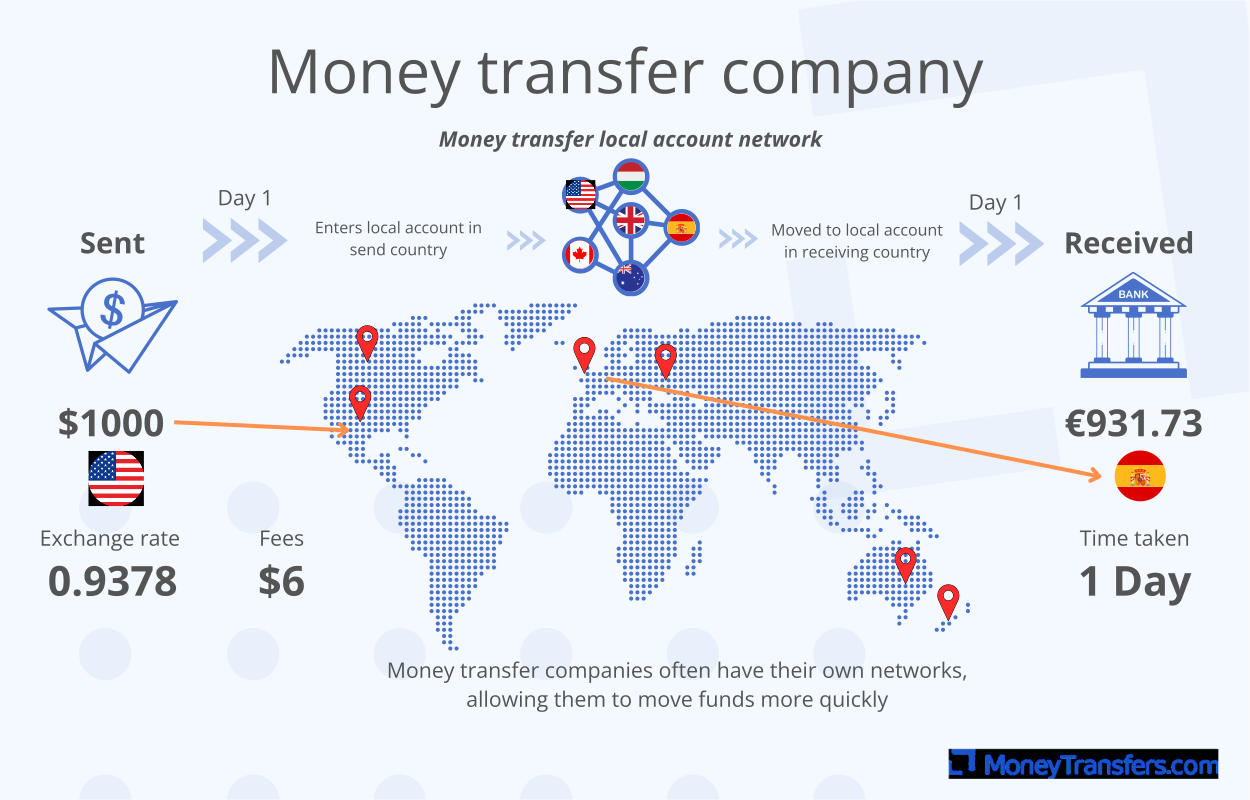
Even when using a money transfer app, there are a few things that could impact the overall cost and timeframe of a money transfer.
💱 Currency being sent
Exchanging currency generally takes longer than transferring the same currency. Using a multi-currency account can sometimes speed up a transfer.
Some currencies are subject to more checks than others. For example, most transfers from US dollars into Canadian dollars can be completed in minutes, while transfers between the USD and NGN can take over a day.
🗺️ Destination country
It takes longer to send money to some countries than others. This can happen due to currency exchanges, regulations in the receiving country, or economic sanctions.
Some countries are categorized as ‘slow-to-pay’ because of their fiscal policy and infrastructure that may require additional checks on payments. For example, sending money from the US to the UK should take seconds, but sending money to Guatemala (as an example) will take around two days to complete.
💳 Payment method used
Some payment methods are faster than others when using a money transfer app.
P2P Payments: In most cases, payment is immediate. Requires the sender and recipient to be using the same money transfer app.
Bank transfer: Usually within a couple of hours for smaller amounts or easier-to-reach locations. Sometimes can be immediate.
Debit or prepaid cards: Topping up an app, or sending with, a debit card will usually be complete within 2 days. Sometimes fees are higher, Wise charges an additional $0.20 for card transfers as example.
Credit cards: Similarly to debit, credit cards can be used to top up some apps. Be aware of fees charged by your card issuers, and any interest you will be liable to pay.
Instant bank transfers
Some apps can be associated directly to a bank account. This means you do not have to top up the account ahead of sending.
This is a great option for regular transfers.
Alternatives to money transfer apps
You can transfer money without using a money transfer app, but there are some drawbacks.
The main alternatives are:
Bank wire transfers
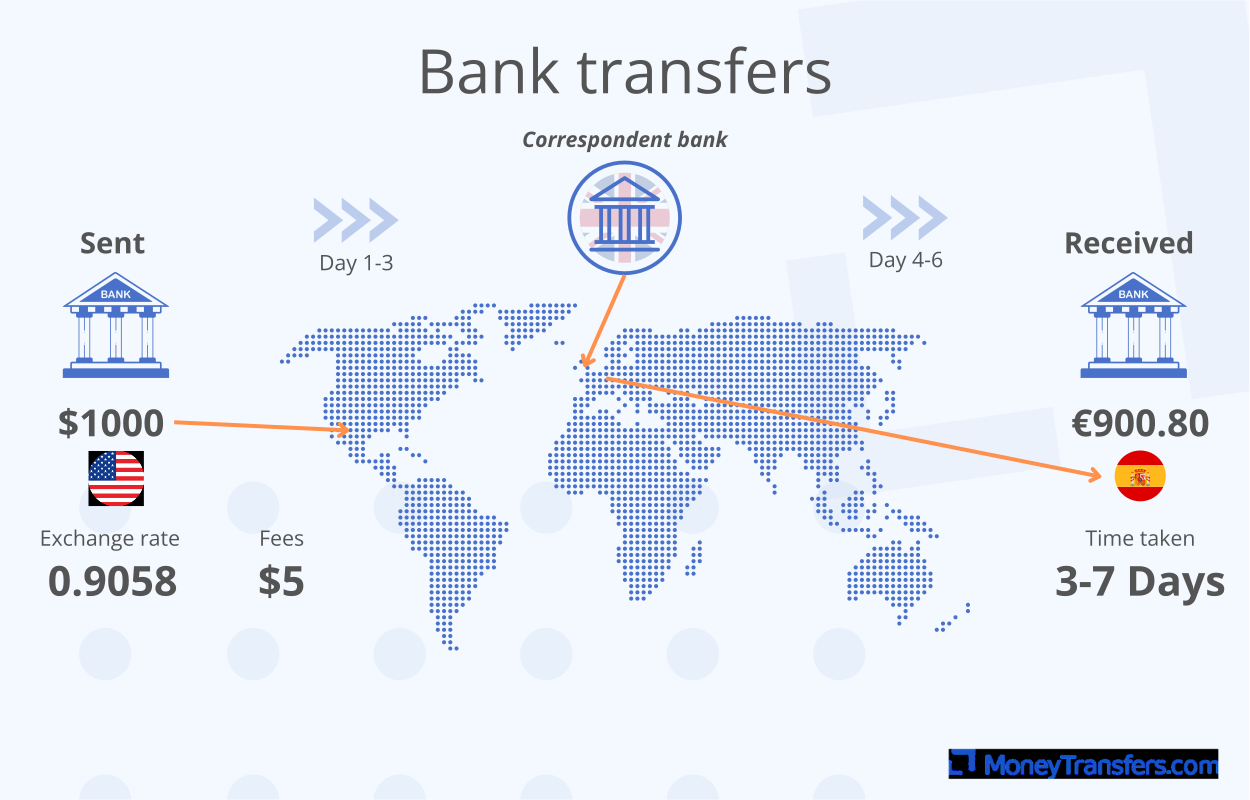
Most banks in the US offer wire transfers at a fee, but they’re often not quite as fast as the best money transfer apps and are considerably more expensive.
Wire transfers average about $15, with international wire transfers reaching amounts as high as $30.
Turnaround times are typically within a day but can be up to 3 business days.
The main difference between ACH and wire is the fees vs speed. But both are worse when compared to the money transfer app.
ACH bank transfers
ACH bank transfers are becoming more and more accessible, with lots of providers offering ACH transfers free of charge.
However, they take at least 3 working days to clear and you can only make ACH transfers within the US.
It's particularly popular with making regular small payments, such as paying employees or paying bills within the US.
If you need to transfer money overseas, use a different method.
Money orders
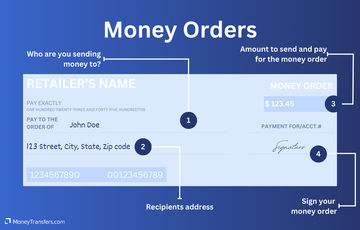
Money orders let you securely send up to $1,000, but they come with a fee. Most banks and credit unions will be able to give you a money order, as well as the US Post Office and some supermarkets.
They allow the recipient to benefit from the security of a check, without the risk that they may ‘bounce’ - i.e. that the money won’t be deposited.
If you need to send more than $1,000, a money order isn’t the best option for you.
Money orders have a limit of $1,000 and they cost more than most international money transfers.
Should I use my online banking app to send money internationally?
Online banking apps can be used to send money internationally, but these will still incur the same fees as standard ACH or wire transfers.
Money transfer apps are also faster, so there may be a better option.
Finding the best app for you
The best app for you will depend on the specific details of the transfer being made and any ongoing needs for the app.
The key things to consider are:
Cost: Don’t just consider fees here. Some providers charge a markup on their exchange rate, so an app offering ‘no fees’ might end up costing more than one with no markup. Wise is a good example of this, fees are charged at 0.35%, but the markup is 0%. So overall, they're one of the cheapest ways to send money.
Speed: The fastest ways to send money will differ based on the specific transfer amount and route, but generally most providers can get your money to its destination quickly.
The amount you want to send: To send a large amount, use an app that can specialize in managing currency risk and forward contracts, like TorFX.
Payment method you want to use: Some providers only accept digital transfers to other app users. Others can process a variety of payment methods, including ACH transfers, card payments, and P2P payments.
Currency you’re transferring to and from: Some apps only deal in the local currency, while others allow you to hold multiple currencies in one bank account. Check your desired currency is supported before choosing an app.
Safety and security
Money transfer apps are some of the most secure means of sending money overseas.
They come with robust security features to ensure your money goes to the intended recipient.
Look out for:

Customer support
Customer support provides security on anything you are unsure of, from requests for details through to aiding with big payments through apps.
Pick a company with a level of support you are comfortable with.
Secure logins
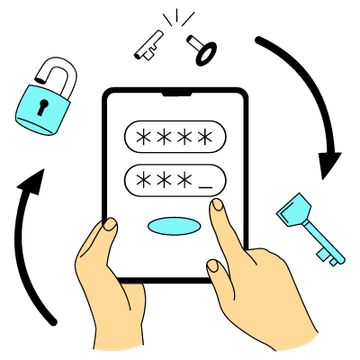
Secure and encrypted logins are standard across financial products and money transfer apps are no different.
Ensure you know what data is being shared.
For P2P payments, this could be contact details for example.

Facial Recognition
Technology like facial or fingerprint recognition can help protect an app from being accessed, even if a phone is lost or stolen.
Not all apps offer this, but Wise, TorFX, and Zing (UK only) all do.

Fraud detection teams
Like banks, international money transfer app providers will often have fraud detection in place.
These teams work to find any unexpected or unusual activity on accounts.
Using a specialist in large transfers can aid in any unnecessary hold-ups on transfers as well.
Despite this, you must check the details of all transfers you make within your transfer app.
If you accidentally send money to the wrong recipient by inputting incorrect information, you’re unlikely to get your money back.
This is why most apps ask you to confirm the information you’ve entered before making the transfer.
Money transfer regulators

Money transfer companies are regulated slightly differently from banks.
Discover how regulators in each country operate.
Save money and time with a money transfer app
Money transfer apps are easier and cheaper to use for money transfer than traditional methods of transferring money.
This applies whether you’re sending money to an account at home or overseas.
With apps like Wise, you can make an instant money transfer to lots of different countries from your cell phone, without the fuss.
Help & FAQ
Get answers to the most common questions asked when sending money abroad. Covers costs, fees and the best way to compare.
Sources and further reading
The Best International Money Transfer Companies
Using your bank for international wire transfers is expensive due to poor exchange rates and high fees.
Currency Converter App by MoneyTransfers.com
The humble currency converter. One of the first apps launched onto app stores back in 2007. Many of us had one on our phone, and many still do.

Send money with a debit card
Opting to send money online with a debit card is usually good for:
International Payment Gateways

How to Receive Money from Abroad
As the recipient of an international transfer, it's easy to get a raw deal.
Contributors

Keith Hodges

Please share your experience with …