
Bank of America International Transfer: Exchange Rates, Fees, and Transfer Times

Author: Artiom Pucinskij
We only list companies that are trustworthy and appropriately licensed. Our aim is to give you a comprehensive view of the regulated money transfer marketplace.
DisclosureMoneyTransfers aims to help users find the best money transfer provider for their needs. To support our free service, we may earn a commission from some of the providers listed in our search results. The commission may also impact the ordering of the providers shown. Our reviews are independent from this and are based on our editorial policy, research and testing of dozens of remittance providers on the market.
On this page
Here, we'll be reviewing Bank of America international transfers. We'll take a look at their exchange rates, fees, support, service quality.
As well as, we'll put Bank of America to test and see how it stands agains other high-street banks and money transfer companies.
Bank of America for international wire transfers
No doubt BofA is one of the more popular banks in the US, but it might not be your best option for sending money abroad.
Here’s a quick overview of how it compares to money transfer providers.
Transfer type | Bank of America | Money Transfer Companies |
|---|---|---|
Sending fees | $45 | $0 - $20 |
Receiving fees | $16 | $0 |
Exchange Markup | 5.3% - 7.37% | 0% - 2% |
Transfer Times | 1 - 2 working days | Instant - 3 business days |
Payment Methods |
|
|
Compare now to get the best transfer rate
You can send money using your Bank of America account through a money transfer provider to save on fees. Fill in the form to get the most out of your transfer.Scoring Bank of America
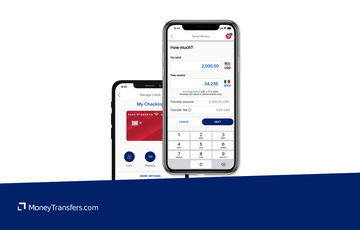
When making transfers abroad, there’s a lot to consider. The most obvious consideration is cost, but there’s also convenience, features, support, and transfer speed.
You’d be surprised how these factors vary between high street banks and other alternatives.
We’ve looked at and analyzed the exchange rates, transfer costs, support, and online user reviews.
Here’s a quick summary of the top highlights and drawbacks.
- Large distribution network: Bank of America can facilitate transfers to over 200 countries and 140 currencies.
- Faster transfer time: BofA enables you to send money internationally in 1 to 2 working days, which is considerably faster than many other banks, such as Wells Fargo’s 2-7 working days transfers.
- Secure transfer method: Sending an international wire transfer is a secure way of moving your funds abroad.
- Zelle integration: Domestic transfers are facilitated by Zelle for convenience. This means you can send up to $3500 in 24 hours with no receiving limits.
- Small international transfer limits: BofA has a maximum sending limit of $1,000 for consumers, and $5,000 for small businesses per day (24 hours). This is in line with other high street banks.
- Expensive fees: You should be prepared to pay up to $45 for an international wire transfer.
- Limited payout options: Transfers can only be sent via wire transfer, ACH, or money order, so your recipient will need a bank account to receive funds.
- Low cancellation window: once your international transfer has been sent, you only have 30 minutes to recall it. After that, the transfer will be raised with the beneficiary bank and subject to their terms.
Bank of America fees and exchange rates
Fees and rates



Exchange rates
As with most high street banks, Bank of America adds a margin onto the “real” exchange rate (the one you’d see on Google or our currency converter). This is known as the exchange rate markup.
Depending on the currency, you can expect a markup of 5.3% - 7.37%. For instance, the GBP/USD pair has a markup of 5.96%.
Here are a few examples of popular currencies and their respective exchange rates at Bank of America.
Country | BofA FX Rate | Amount | USD amount | Mid-Market Rate | Conversion Loss | BofA FX Markup |
|---|---|---|---|---|---|---|
European Union (EUR) | 1.0465 | 955.57 EUR | $1,000.00 | 1.1035 | 54.46 | 5.45 |
1.2252 | 816.19 GBP | $1,000.00 | 1.2946 | 56.63 | 5.66 | |
0.0506 | 19762.8 MXN | $1,000.00 | 0.0533 | 53.00 | 5.30 | |
0.6931 | 1442.8 CAD | $1,000.00 | 0.7313 | 55.16 | 5.52 | |
0.6320 | 1582.28 AUD | $1,000.00 | 0.6697 | 59.52 | 5.97 | |
0.1309 | 7639.4 CNY | $1,000.00 | 0.1401 | 70.02 | 7.00 | |
0.0156 | 64061.2 DOP | $1,000.00 | 0.0168 | 73.67 | 7.37 | |
0.5737 | 1743.07 NZD | $1,000.00 | 0.6070 | 58.07 | 5.81 | |
0.0526 | 19011.5 ZAR | $1,000.00 | 0.0561 | 66.99 | 6.70 | |
0.2545 | 3929.29 AED | $1,000.00 | 0.2723 | 69.78 | 6.98 |
Bank of America states that they “determine the foreign exchange rates offered to customers using a variety of factors including market conditions, how much foreign currency you need, exchange rates charged by other financial institutions, our desired rate of return, market risk, credit risk, and other markets, economic and business factors”.
Can you exchange money for what it’s actually worth?
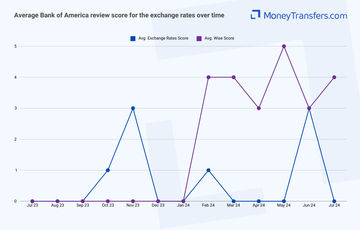
Many users also complain about the rates offered by the bank. Here’s a summary of average user reviews in terms of exchange rates for the past year.
International transfer fees
On top of the exchange rates, Bank of America charges additional fees, including a fixed $45 transfer fee and a $16 receiving fee (a fee for receiving international wire transfers into your account).
They also offer a no-fee transfer if you already have other currencies in your account and wish to send them.
Here’s how these fees compare against Wise, one of the best money transfer providers.
Let’s assume you’re making a $1,000 transfer from the US to these countries:
Destination | Bank of America transfer cost | Wise cost |
|---|---|---|
The United Kingdom (GBP) | $45 + ~5.66% markup | $10.79 + 0% markup |
Canada (CAD) | $45 + ~5.52% markup | $7.34 + 0% markup |
Spain (EUR) | $45 + ~5.45% markup | $10.36 + 0% markup |
*Note, if you already have other currencies in your BofA account, you won’t pay the $45 fee. However, getting these currencies comes with its own set of fees (more on that later).
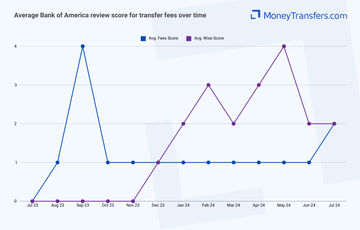
It is clear that Wise is cheaper, but if you’re still unsure, here’s how other users review BofA online in terms of their international transfer fees.
Transfer speed
Transfer speed
Transfers to a foreign bank take between 1 - 2 working days with Bank of America, although transfers may take longer if initiated after the cut-off time (17:00 EST) and especially on a weekend.
Here’s a summary of BofA transfer speeds:
Entity | Transfer Method | Location | Speed |
|---|---|---|---|
Small Business | ACH | Domestic | 3 business days |
Personal | ACH | Domestic | 3 business days |
Personal | ACH | Domestic | Next business day |
Small Business | ACH | Domestic | Next business day |
Personal | ACH | Domestic | Next business day |
Personal | Wire Transfer | Domestic | Same business day |
Small Business | Wire Transfer | Domestic | Same business day |
Personal | Wire Transfer | International | 1 - 2 Business days |
Small Business | Wire Transfer | International | 1 - 2 Business days |
This is much faster when compared to other services such as Wells Fargo (2 - 7 days unless using ExpressSend), but much slower when compared to money transfer providers (instant - couple hours).
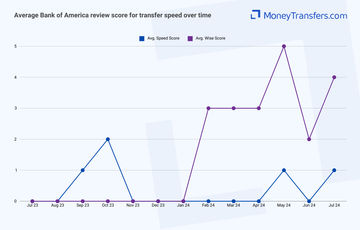
Similarly, we’ve looked at what other users have to say about the international transfer speed. Here’s how the average rating looks for BofA transfer speed.
Transfer limits
Transfer limits
Bank of America has certain transfer limits on domestic and international transfers.
The 24-hour limit for making international transfers is:
$1,000 when sending an international wire transfer as a consumer
$5,000 when sending an international wire transfer as a small business
There’s no limit on receiving transfers into your BofA account
Here’s a full summary of their transfer limits:
Entity | Transfer Method | Location | Sending Limits | Receiving Limits |
|---|---|---|---|---|
Small Business | ACH | Domestic | $5000 Per Transfer | N/A |
Personal | ACH | Domestic | N/A | $1000 Per Transfer |
Personal | ACH | Domestic | $1000 Per Transfer | N/A |
Small Business | ACH | Domestic | $5000 Per Transfer | N/A |
Personal | ACH | Domestic | N/A | $1000 Per Transfer |
Personal | Wire Transfer | Domestic | $1000 Per Transfer | N/A |
Small Business | Wire Transfer | Domestic | $5000 Per Transfer | N/A |
Personal | Wire Transfer | International | $1000 Per Transfer | N/A |
Small Business | Wire Transfer | International | $5000 Per Transfer | N/A |
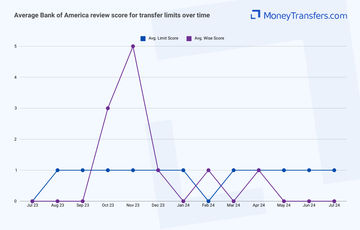
Now onto online user reviews, here’s how BofA users review the bank transfer limits online compared to Wise:
Product offering
Product offering
Bank of America facilitates international wire transfers to over 200 countries in over 140 currencies.
Mobile app
INTERNATIONAL WIRE ALTERNATIVES USING APP
The BofA app is built for day-to-day transfers, it does not support international wire transfers. To make a wire abroad, you will need to log in to your online banking account.
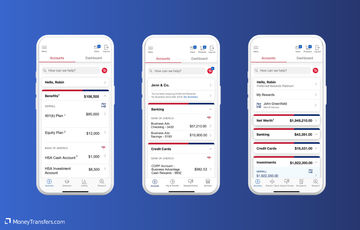
Bank of America has a convenient app available on both Apple and Android stores.
The app can be used to manage accounts, schedule transfers and payments, and earn cashback, and is also compatible with Zelle, which makes sending domestic transfers within the US cheaper and more convenient.
It comes with several features such as Erica, a virtual assistant to help you manage day-to-day transfers and answer your questions.
Use BofA to deposit to Wise
Your Bank of America app will be linked to your BofA account. This means you can use it to transfer money into your Wise account and send money abroad.
To send money abroad, sign up to Wise using the link below, fund your account by sending a bank transfer from the BofA app, and use your Wise account to create an international transfer.
Foreign currency order
In addition to international wire transfers, Bank of America offers a foreign currency purchase feature, allowing you to order foreign currency online or in the branch.
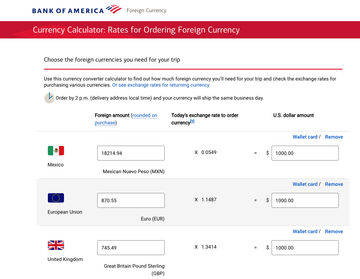
They offer over 70 currencies, which can be delivered to your home address or picked up at a nearby Bank of America branch.
Orders placed before the cut-off time on a business day are generally processed the same day, with home delivery typically taking 1 - 3 business days.
This feature is particularly useful if you’re traveling abroad and need foreign delivery to you.
However, it’s worth noting that there is a hefty markup on foreign currency. For example, getting $1000 will get you 18217.94 MXN at a 0.0549 MXN per USD rate.
Compared to the mid-market rate which is 0.056966 MXN per US dollar, you are overpaying by more than 6%. This means you are losing over 19,410 MXN, around $20.
In this case, a better alternative would be to use a multi-currency account, unless you are traveling to a very rural or exotic area.
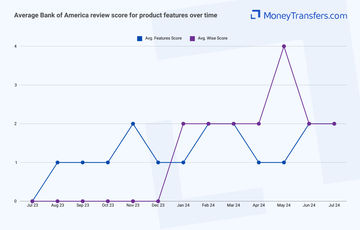
Users also have mixed reviews about this. In most cases, users complain about the cost and service, but many praise the convenience of the service. Here’s a summary of average user reviews over the past year:
Ease of use
Ease of use
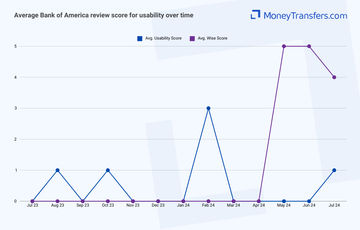
As always, ease of use and convenience is a big factor, especially if you send money often. Here’s how users rate BofA in terms of their usability.
Customer service
Bank of America offers many customer service options to answer your questions, including:
24/7 customer support: Customers can call Bank of America's customer service line at any time for assistance with their accounts, including help with lost or stolen cards, account inquiries, and transaction disputes. The main customer service number is 1-800-432-1000.
Online Banking Support: Customers can access support through the Bank of America website. This includes a comprehensive FAQ section, live chat with a representative, and secure messaging for personalized help within their online banking account.
Mobile App Support: The Bank of America mobile app provides access to customer service, including the ability to send secure messages, chat with customer service representatives, and access the FAQ section directly from the app.
In-Person Support: Customers can visit any Bank of America financial center for in-person assistance. Financial centers offer services such as account management, loan consultations, and personalized financial advice.
Social Media Support: Bank of America offers support via its social media channels, including Twitter and Facebook. Customers can reach out for help with general inquiries and receive responses from the customer service team.
Email and Secure Messaging: Through online banking, customers can send secure messages to customer service representatives for non-urgent inquiries and receive responses within a specified timeframe.
Specialized Support Lines: Bank of America provides specialized support lines for different types of accounts and services, such as mortgage, credit card, and investment accounts, ensuring that customers get expert assistance for their specific needs.
International Support: Customers traveling abroad can call collect for assistance with their accounts. The international support number is 1-302-781-6374.
Here’s a table summarizing BofA contact details:
Contact Method | Contact Information | Availability |
|---|---|---|
24/7 Customer Support | 1-800-432-1000 | 24/7 |
Online Banking Support | Online Banking | 24/7 |
Mobile App Support | Available in the app | 24/7 |
In-Person Support | Business hours | |
Social Media Support | Varies | |
Email/Secure Messaging | Available in online banking | 24/7 |
Specialized Support Lines | Varies (specific to service) | Business hours |
International Support | 1-302-781-6374 (collect) | 24/7 |
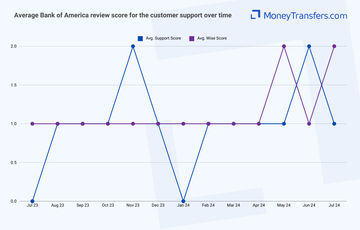
Just like with any bank, many contact options don’t always mean good quality. Here’s how users rated BofA customer service over the past year:
Safety and trust
Safety and trust
Bank of America offers a comprehensive suite of security features to ensure your safety online and safeguard all banking activities. Here’s a summary of their security features:
Multi-factor authentication: This feature requires you to verify your identity using multiple methods, such as passwords and one-time authorization codes sent to your registered mobile devices, enhancing protection against unauthorized access.
USB security keys: For an additional layer of security, you can use USB security keys, which provide a physical method of authentication when performing high-value transfers or logging in from unrecognized devices.
Secured transfer: High-dollar transfers and wires require a one-time authorization code sent to the mobile device, adding an extra layer of security for sensitive transactions.
Encryption: Bank of America uses industry-standard encryption protocols to protect data transmitted between devices and the bank's servers, ensuring that sensitive information remains secure.
Fraud detection: The bank uses advanced fraud detection systems to monitor transactions for unusual activity and sends alerts about potential suspicious actions, allowing you to quickly address any concerns.
Alerts and notifications: You can set up alerts for various account activities, including new payees, password changes, and transaction confirmations, to stay informed about your account status in real time.
Online and mobile banking security guarantee: This guarantee protects from unauthorized transactions or bill payments made via online or mobile banking, provided they are reported promptly.
Trusteer rapport: This optional security software provides additional protection by securing the browser connection between the user and the bank, safeguarding against malware and phishing attacks.
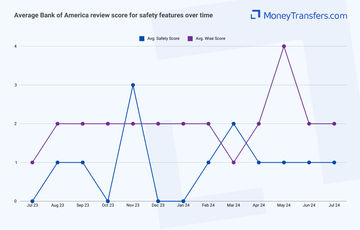
This is how users rated Bank of America’s security over the past year:
Customer feedback
Customer feedback
ANALYSIS OF USER REVIEWS
Bank of America is rated very low on TrustPilot, getting only 1.3/5 stars with 87% of reviewers rating it as 1/5.
Users highlight the ease of working with Bank of America, especially the efficient account setup and the helpfulness of advisors.
Many long-term customers report consistent positive experiences and better service compared to other banks like Wells Fargo.
The convenience of services such as Zelle and the prompt clearing of checks is also mentioned fairly often.
However, many users express frustration with the bank's customer service, citing long hold times and unresponsive staff.
Online banking issues are frequently mentioned, with problems accessing accounts and difficulties with the mobile app.
Customers have also reported problems with fraud alerts, restrictive account holds, and a lack of overall convenience.
Some users even believe that the bank deliberately complicates processes to generate extra fees.
Here's a summary of average user reviews this year.
Jan 24 | Feb 24 | Mar 24 | Apr 24 | May 24 | Jun 24 | Jul 24 | |
|---|---|---|---|---|---|---|---|
International Transfers | 1 | 1 | 1 | 0 | 2 | 1 | 1 |
Fees | 1 | 1 | 1 | 1 | 1 | 1 | 2 |
Exchange Rates | 0 | 1 | 0 | 0 | 0 | 3 | 0 |
Speed | 0 | 0 | 0 | 0 | 1 | 0 | 1 |
Limit | 1 | 0 | 1 | 1 | 1 | 1 | 1 |
Features | 1 | 2 | 2 | 1 | 1 | 2 | 2 |
Ease of Use | 0 | 3 | 0 | 0 | 0 | 0 | 1 |
Safety | 0 | 1 | 2 | 1 | 1 | 1 | 1 |
Customer Support | 0 | 1 | 1 | 1 | 1 | 2 | 1 |
Opening an account with BofA
You can visit a branch directly to open your account with Bank of America, or you can also set up your new account online.
Before you start, make sure you’ve got the following information to hand:
Your Social Security number
Your current residential address
Your email address
Your account number or debit card number to make your opening deposit into your new Bank of America account
Co-applicants personal information (if applicable)
Here are the basic steps for opening a new account:
Open the Bank of America website
Go to the Bank of America website and select ‘open a new account’.
Select account type
You should be redirected to a page that provides some more information about the different types of accounts you should open. Decide which is best for you and select ‘open account’.
Add your details
Fill out the application. This includes providing your full name, address, phone number, etc.
Confirm
Once you’ve confirmed and verified your details, you’ll be sent an email confirming whether your application has been approved.
Making international transfers
International transfer requirements & details
To make an international transfer with Bank of America, you will need the following details:
Recipient’s full name
Recipient’s address
SWIFT/BIC code of the recipient’s bank
Bank routing number (if applicable)
Bank account number
Type of account (checking, savings, etc.)
Amount to be transferred (in USD or foreign currency)
Currency type (if transferring in foreign currency)
Purpose of the transfer (a description of the transfer reason)
You will need your U.S. mobile number to receive a one-time authorization code (If not already enrolled in Secured Transfer).
Any optional instructions for the recipient’s bank (if necessary)
Bank of America Swift Codes
For wire transfers in U.S. dollars (USD)
Swift Code: BOFAUS3N
Address: Bank of America, N.A., 222 Broadway, New York, NY 10038
For wire transfers in foreign currency
Swift Code: BOFAUS6S
Address: Bank of America, N.A., 555 California St., San Francisco, CA 94104
Sending international wire
You can either set up a transfer in person at your local Bank of America branch, or via the app/online banking.
To make an international money transfer with Bank of America using their mobile banking app, follow these steps:
Log In
Open the Bank of America Mobile Banking app and log in to your account.
Prepare Recipient Information
Get the recipient's name, address, and bank information (including SWIFT code, wire routing number, and account number).
Initiate Transfer
Go to the "Pay & Transfer" section and select "Wire."
Select Account
Choose the account from which you want to send the wire transfer.
Add Recipient
If it's the first time you're sending money to this recipient, you'll need to add their details. Select the recipient's country, enter their bank information, and verify it.
Enter Transfer Details
Specify the amount you want to transfer in either USD or foreign currency. Review the exchange rates and any applicable fees.
Purpose and Instructions
Select the purpose of the transfer and add any optional instructions for the recipient’s bank.
Security Verification
If not already enrolled, complete the Secured Transfer enrollment by adding your U.S. mobile number and entering the authorization code received via text message.
Review and Send
Thoroughly review all transfer details, including fees and terms, before authorizing and sending the transfer.
Confirmation
After sending, you will receive an email confirmation and a remittance transfer receipt. Funds are typically credited to the recipient within one to two business days.
Reverting International Wire Transfer
International wire transfers initiated from your accounts can be canceled within 30 minutes if they show as "Scheduled" on the Activity screen. After this period, transfers move to "Processing" and cannot be canceled.
If you need to cancel your transfer when it’s processing, you will need to contact BofA directly and it will be raised with the recipient's bank, based on their T&Cs.
Use Wise to send money from your Bank of America account
It may be simpler to fund your transfer with your BofA account, but use a transfer provider like Wise to send your money overseas.
Register for a Wise account
Signing up only takes a few minutes. You’ll need to take a photo of your ID so they can verify you. If you have any issues setting up your account, you can contact customer services using the contact information in our Wise review.
Add the details of your transfer
Select ‘Send’, choose ‘Send from your bank’, and enter your recipient’s details. You’ll also need to confirm your Bank of America account details.
Review the received amount
Wise will show you exactly how much your recipient will get, and how much the transfer will cost. If you’re happy with this, continue.
Send the money
Proceed with the transfer. Your money will be taken from your Bank of America account and sent to your recipient.
Receive international transfers
To receive an international wire transfer to your Bank of America account, you’ll need to provide the following information to the sender.
Your ABA, RTN, or SWIFT code
For domestic wire transfers, you’ll need to supply the Wire Routing Transit Number (your ABA or RTN): 026009593.
For international wire transfers, you’ll need to supply your SWIFT code or BIC:
BOFAUS3N for USD transfers and BOFAUS6S for foreign currency transfers.
The bank name and address
Depending on the type of transfer, the BofA address is:
For USD transfers: 222 Broadway, New York, NY 10038
For foreign currency transfers: 555 California St., San Francisco, CA 94104
Your account number, name, and address
You’ll need to supply your complete Bank of America account number, the name on your account, and the complete address of your account as it appears on your bank account.
How BofA compares to money transfer services
Generally, money transfer companies are much cheaper than any high street bank. Here’s a list of top alternatives if you’re planning to make international transfers.
Other Alternatives
Alternatively, consider using one of these neobanks for international transfers.
Bank of America: Is it good for transfers abroad?
As one of the largest financial institutions not just in the United States but worldwide, Bank of America is a well-known and trusted name in the banking industry with a wide range of services and financial products to help individuals and businesses alike manage their money.
On balance, Bank of America has some positive points when it comes to international transfers when compared with other banks.
With transfers taking an average of 1 to 2 working days to be processed, this is considerably faster than the average transfer time of 3 to 7 working days that applies to most other banks.
However, it’s fair to say that you will find better exchange rates and lower transfer fees with a specialist money transfer company when sending money abroad. Use our form below to get the best deal right now.
Find the best rates for your transfer
A bit more about Bank of America
Can I open a Bank of America account in any country?
No, although Bank of America does have a wide reach.
If you are a US citizen, you can apply for a Bank of America account online or at a branch in the US.
If you are a non-US citizen or resident, it is still possible to open an account with Bank of America.
Your application for a bank account may still be considered if you do not have a Social Security number (SSN) depending on the other documentation that you do have and what type of account you want to open.
Does Bank of America add a margin to the mid-market exchange rate?
As with most banks, Bank of America adds a margin onto the mid-market exchange rate which is usually around 4-6%.
This means that you will not be able to convert your cash at the same exchange rate that you find on Google or our currency converter, but instead, it will be that + the 4-6% on top.
Help & FAQ
Get answers to the most common questions asked when sending money abroad. Covers costs, fees and the best way to compare.
More Banks
Capital One
You can send international wire transfers with Capital One, however, at a higher cost compared to other banks and services. They also use a SWIFT network to process their transactions, meaning transactions will take longer.
Chase Bank
Here’s a quick overview of Chase and how it compares to an average money transfer provider.
Wells Fargo
Here’s an overview of Wells Fargo’s international transfers, and how they compare to money transfer companies.
Bank of America user feedback
Would you recommend Bank of America?
Sonam wangmo
Yesterday i was waiting for long day and at the last moment they are asking me to pay 40000 bhutan rupees to pay , actually i already pay 20000 and again they are asking for 20000 more to pay for online asecc , is it really too that i need to pay for online access fee, American to Bhutan.
Contributors

Please share your experience with …