
Regions Bank International Transfer: Exchange Rates, Fees, and Transfer Times

Author: April Summers

Editor: Artiom Pucinskij
We only list companies that are trustworthy and appropriately licensed. Our aim is to give you a comprehensive view of the regulated money transfer marketplace.
DisclosureMoneyTransfers aims to help users find the best money transfer provider for their needs. To support our free service, we may earn a commission from some of the providers listed in our search results. The commission may also impact the ordering of the providers shown. Our reviews are independent from this and are based on our editorial policy, research and testing of dozens of remittance providers on the market.
On this page
Regions Bank comes with hefty fees and long waiting times.
Regions Bank charges a flat fee of $45 per international transfer, a $18 receiving fee, and adds a 5% - 7% exchange rate markup.
This means a transfer of $1000 to the UK would cost you $105.00 vs $10.79 with a money transfer provider such as Wise.
You can send money abroad with Regions Bank, but it would be cheaper and quicker to use your account to deposit money into Wise account and send from there.
Regions Bank for international wire transfers
We’ve compared the fees and exchange rates between Regions Bank and an average money transfer provider.
Transfer type | Regions Bank | Money Transfer Companies |
|---|---|---|
Sending fees | $45 | $0 - $20 |
Receiving fees | $18 | $0 |
Exchange Markup | 5% - 7% | 0% - 2% |
Transfer Times | 3-5 business days | Instant - 3 business days |
Payment Methods |
|
|
Compare now to get the best transfer rate
You can send money using your Nave Federal account through a money transfer provider to save on fees. Fill in the form to get the most out of your transfer.Scoring Regions Bank
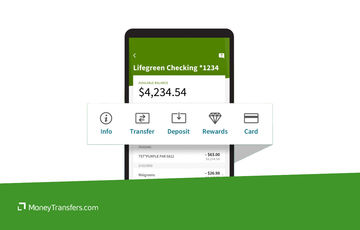
We’ve looked at and analyzed the exchange rates, transfer costs, support, and online user reviews. Here’s a quick summary of the top highlights and drawbacks.
- Domestic and international cash transfer options
- Sophisticated, bank-level security using out-of-band authentication (OOBA)
- Commercial customers can deposit foreign currency to their Regions multi-currency account
- Commercial customers can obtain real-time currency exchange rates when purchasing or selling foreign currency, through RegionsFX Online
- Complicated and varied fee structure
- Available to US-based customers only
- Substantial exchange rate margins (also known as mark-ups) and transfer fees applied to each foreign currency transfer
Regions Bank fees and exchange rates
Fees and rates


There are two main costs to consider when making an international bank transfer:
Exchange rate margins
International bank transfer fees
Exchange rates
Most banks charge an exchange rate margin for converting foreign currencies as part of an international money transfer for their customers; this is referred to as a mark-up.
Banks tend to add a markup of 4 - 6% on top of the actual mid-market rate and the Regions Bank’s markup is no different.
The exact markup on exchange rates for foreign currency will depend on factors such as currency pairing, transfer amount, and delivery method.
On average, you can expect to pay an additional 5% - 7% on top of the ‘real’ mid-market rate with Regions Bank.
Can you exchange money for what it’s actually worth?
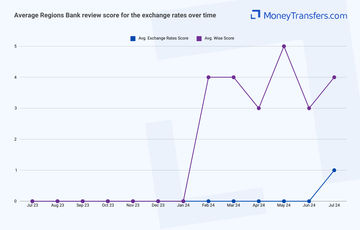
In addition, we’ve looked at what Regions Bank customers have to say about the bank's exchange rates. In summary, this is what it looks like.
International transfer fees
Apart from Regions Bank exchange rate margins, there are international fees to consider.
Regions Bank charges the following fees for international transfers between banks:
Incoming transfers: $18 per transfer (money you receive)
Outgoing transfers: $45 per transfer (money you send)
This is generally on par with other major US high street banks but is significantly more expensive than using a money transfer provider.
However, Regions Bank is partnered with Western Union to provide a cheaper alternative to international transfers abroad.
The following fees are charged for international transfers sent through the bank’s partnership with Western Union:
Sending up to $50: $5 fee
Sending $51 to $300: $8 fee
Sending $300 to $500: $10 fee
Sending $500 to $1,000: $12 fee
Sending over $1,000: 1% of the transfer amount
You can use the service to transfer money abroad to anyone or pay your bills abroad. Either way, it’s nice to see that high street banks are offering cheaper solutions to remittance.
To give you an idea of what these numbers actually mean, this is how Regions Bank compares to Truist Bank and Wise.
Let’s assume you’re making a $1000 transfer from the US to a bank via wire transfer to an account in the following countries:
Country | Regions Bank bank wire transfer | Truist Bank wire transfer | Wise money transfer |
|---|---|---|---|
$45 + ~6% markup | $65 + ~3% markup | $10.79 + 0% markup | |
$45 + ~6% markup | $65 + ~3% markup | $13.16 + 0% markup | |
$45 + ~6% markup | $65 + ~3% markup | $10.36 + 0% markup |
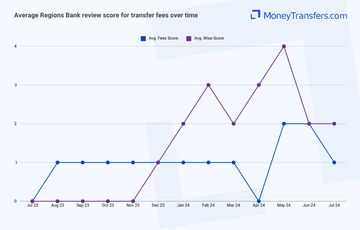
Here’s how users have rated the bank’s fees on average.
Transfer speed
Transfer speed
The international transfer speed is determined by the currency pair, transfer amount, destination country, and receiving bank.
When it comes to Regions Bank, you have a few delivery options that will directly impact the cost and the transfer speed.
For example, using a next-day service will cost you more compared to a standard wire transfer which can take up to 3-5 days.
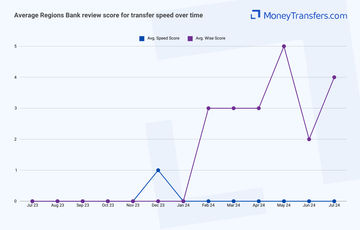
In terms of speed, we’ve looked at what customers are saying online. Here’s what it looks like for the past 12 months.
Transfer limits
Transfer limits
Transfer limits are calculated on a case-by-case basis, depending on the total amount being sent or received.
For wire transfers, there is a $100,000 limit per transaction and a $500,000 limit in aggregate transactions per month.
The same limits apply to ACH transfers.
You can view the limit for each international transfer through the Online Banking account.
BEWARE OF RECEIVING LIMITS
Regions Bank suggests customers to check if any external restrictions may apply to intermediary or receiving banks involved with the transfer.
This simply means that the receiver bank may have limits in place, so you should check with them to make sure the amount can be received with no issues.
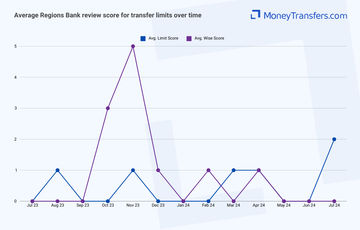
Here’s how users have rated Regions Bank’s transfer limits in the past year.
Product offering
Product offering
Mobile app
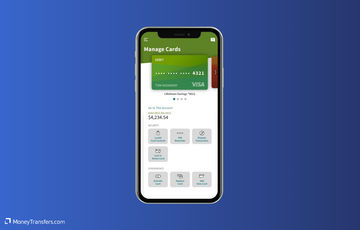
The Regions Bank Mobile app is free for download on iOS or Android devices.
The Regions Bank app is rated fairly low compared to other money transfer apps.
It has a rating of 4.8 on the App Store and a pretty low score of 2.7 on the Google Play Store.
Foreign currency exchange
Regions Bank offers foreign currency exchange services for international money transfers.
However, Regions Bank does not disclose any available currencies, it simply states they have the service.
The exchange service is offered by RegionsFX service, which is aimed at commercial clients and business transfers.
For consumer services, Regions Bank is partnered with Western Union to make international transfers more affordable.
Regions NOW Banking
Regions NOW Banking is a suite of financial services offered by Regions Bank that is designed to provide banking options for those without access to traditional banking services.
It includes various features and services tailored to meet the needs of the underbanked and unbanked.
Here are a few examples of services offered by Regions NOW Banking:
Check cashing: Allows you to cash checks without needing a Regions checking or savings account. However, these come with separate fees.
Western Union® money transfer: Provides domestic and international money transfer services through Western Union. This service allows you to send and receive money quickly, even without a traditional bank account.
Money orders: This enables you to purchase money orders, which can be used for bill payments or other transactions where cash or checks are not suitable.
Regions Now Card: A reloadable Visa prepaid card that you can use for everyday purchases, ATM withdrawals, and online transactions. The card can be reloaded through various methods, including direct deposit and at Regions branches.
Online and mobile banking: Offers digital banking services, allowing you to manage your accounts, transfer funds, pay bills, and more using Regions' online banking platform or mobile app.
Bill pay: Allows you to pay bills electronically, either as one-time payments or set up recurring payments, providing a convenient way to manage monthly expenses.
Savings programs: Includes options to open savings accounts tailored for you if you are looking to build savings with lower fees and minimum balance requirements.
These services are designed to provide flexible and accessible financial solutions, especially for those who may face barriers to traditional banking.
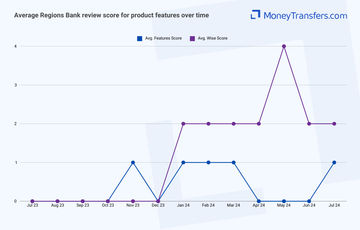
Here’s how users have rated Regions Bank’s features in the past year.
Ease of use
Ease of use
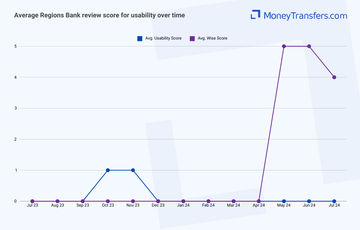
Convenience and ease of use is one of the key factors to consider when picking a bank. Here’s how users have rated Regions Bank’s usability in the past year.
Customer service
Regions Bank offers a wide range of support options to its customers:
Customer service center: General inquiries and support can be addressed by calling 1-800-734-4667.
Online banking support: For assistance with online banking, customers can call 1-800-472-2265.
Card customer service: For help with credit, debit, and prepaid cards, customers can call 1-800-253-2265.
Loan customer service: For questions regarding loans, the dedicated line is 1-800-231-7493.
Mortgage customer service: For mortgage-related support, customers can call 1-800-986-2462.
Report fraud: To report fraud or suspicious activity, customers can call 1-800-734-4667.
International customer service: For international support, customers can call 1-800-458-5890.
Hearing impaired support: TDD/TTY service is available at 1-800-374-5791.
Lost or stolen card: To report a lost or stolen card, customers can call 1-800-734-4667.
Online chat support: Regions Bank offers an online chat option through their website for real-time assistance.
Email support: Customers can send secure messages through the Regions Online Banking portal for email support.
Social media support: Regions Bank provides support through their official Facebook and Twitter pages.
Branch locator: Customers can find support and assistance at any of their local branches using the branch locator on the Regions website.
Here’s how you can contact Regions Bank.
Support Option | Contact Details |
|---|---|
Customer Service Center | 1-800-734-4667 |
Online Banking Support | 1-800-472-2265 |
Card Customer Service | 1-800-253-2265 |
Loan Customer Service | 1-800-231-7493 |
Mortgage Customer Service | 1-800-986-2462 |
Report Fraud | 1-800-734-4667 |
International Customer Service | 1-800-458-5890 |
Hearing Impaired Support | 1-800-374-5791 |
Lost Or Stolen Card | 1-800-734-4667 |
Online Chat Support | Available on Regions website |
Email Support | Secure messages via Online Banking |
Social Media Support | Facebook and Twitter |
Branch Locator | Available on the Regions website |
Similarly to usability, customer options and quality are one of the major considerations. Especially if you’re moving large amounts of money.
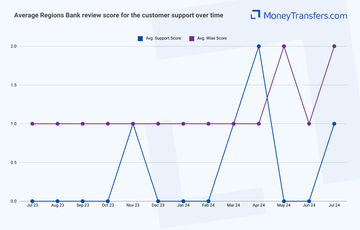
Here’s how users have rated Regions Bank’s customer service in the past year.
Safety and trust
Safety and trust
Just like any other high street bank, Regions Bank has a number of security features in place, including:
Multi-factor authentication (MFA): Requires multiple forms of verification to access accounts.
Fraud detection systems: Monitors accounts for unusual or suspicious activity.
Encryption: Uses advanced encryption technologies to protect sensitive data.
Secure browsing: Employs secure socket layer (SSL) protocols for safe online transactions.
Account alerts: Sends alerts for account activities and potential security issues.
Card controls: Allows customers to lock and unlock their debit and credit cards via the mobile app.
Biometric authentication: Supports fingerprint and facial recognition for mobile app login.
Email and text alerts: Notifies users of significant changes or transactions in their accounts.
Online security center: Provides resources and tips for protecting personal information.
Identity theft protection: Offers services to help detect and resolve identity theft issues.
Chip-enabled cards: Issues cards with EMV chip technology for enhanced security during transactions.
Transaction monitoring: Continuously monitors and analyzes transactions for potential fraud.
Mobile banking security: Implements various security measures for mobile banking, including app-specific security controls.
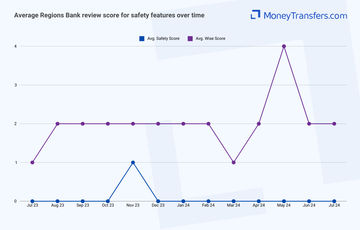
Here’s how users have rated Regions Bank’s safety features in the past year.
Customer feedback
Customer feedback
ANALYSIS OF USER REVIEWS
There are no positives highlighted by the users online. Most of the online reviews are fairly negative.
Many users report significant issues with Regions Bank's customer service and account management.
Including the unexpected closure of long-standing business accounts, understaffed and unqualified local branches, and a lack of available loan officers.
Users also experience delays and complications in receiving debit cards and accessing their funds.
There are issues with the bank's handling of credit card payments, leading to disputes over late fees and missed payments.
Overall, many customers suggest against using Regions Bank due to these numerous difficulties and inefficiencies.
Here's a summary of average user reviews this year.
Jan 24 | Feb 24 | Mar 24 | Apr 24 | May 24 | Jun 24 | Jul 24 | |
|---|---|---|---|---|---|---|---|
International Transfers | 0 | 0 | 0 | 0 | 0 | 0 | 0 |
Fees | 1 | 1 | 1 | 0 | 2 | 2 | 1 |
Exchange Rates | 0 | 0 | 0 | 0 | 0 | 0 | 1 |
Speed | 0 | 0 | 0 | 0 | 0 | 0 | 0 |
Limit | 0 | 0 | 1 | 1 | 0 | 0 | 2 |
Features | 1 | 1 | 1 | 0 | 0 | 0 | 1 |
Ease of Use | 0 | 0 | 0 | 0 | 0 | 0 | 0 |
Safety | 0 | 0 | 0 | 0 | 0 | 0 | 0 |
Customer Support | 0 | 0 | 1 | 2 | 0 | 0 | 1 |
Opening an account
Before sending money, you’ll need to open an account with Regions Bank. Here’s a step-by-step process on how to get started:
Choose the type of account you want
Decide whether you want a checking account, savings account, or both. Review the options on the Regions Bank website or in person to find the account that best suits your needs.
Gather necessary documentation
You will need a valid photo ID (such as a driver’s license or passport), your Social Security number, and proof of address (such as a utility bill or lease agreement).
Visit a Regions Bank branch or apply online
You can open an account by visiting a local branch or through the Regions Bank website. If you choose to apply online, make sure you have digital copies of your documents ready.
Complete the application form
Whether you’re applying online or in person, you’ll need to fill out an application form with your details, including your name, address, and Social Security number.
Deposit initial funds
Most accounts require an initial deposit. Check the minimum deposit requirement for the account you’re opening and ensure you have the funds available to meet it.
Review and sign the terms and conditions
Read through the account terms and conditions carefully. Once you understand and agree to them, sign the necessary forms to complete your account setup.
Receive your account details
After your application is processed, you will receive your account details, including account numbers and any additional information needed to manage your account.
Making international transfers
International transfer requirements & details
When making an international transfer, you will need to have the following details ready:
Recipient’s name: Full name of the person or entity receiving the funds.
Recipient’s address: Complete address of the recipient.
Recipient’s bank name: Name of the recipient’s bank.
Recipient’s bank address: Address of the recipient’s bank.
SWIFT/BIC code: International code used to identify the recipient’s bank.
IBAN: International Bank Account Number for the recipient’s account.
Transfer amount: Amount of money to be transferred.
Currency: Currency in which the recipient will receive the funds.
Regions Bank’s swift code is: UPNBUS44XXX
Where XXX is your branch number. You can find it on any of your bank documents or in your online banking portal.
Making wire transfers
There are three different ways to arrange an international transfer with Regions Bank:
Your account: Use your Regions Bank account for a traditional international bank transfer; this is best suited to individual account holders.
Western Union: Use Regions Bank’s partnership with Western Union Money Transfer®. This way you can move money directly from your deposit account to any participating Western Union Agent location in the world. This is best suited for personal or corporate account holders.
RegionsFX: Use the corporate banking foreign exchange services, RegionsFX Online. This is best suited for commercial customers wanting to make mass payments or large transfers.
Here are step-by-step instructions on how to make an international wire transfer using your Regions Bank account.
Log in to your Regions online banking account
Log in to your Regions online banking account using your username and password. If you do not have an online banking account, you will need to register for one on the Regions website.
Navigate to the transfers section
Once logged in, navigate to the "Transfers" section from the main menu. This section will give you options for various types of money transfers.
Select international wire transfer
In the transfers section, choose the option for an international wire transfer. This will take you to the form where you can enter the details of your transfer.
Enter recipient details
Fill in the recipient's details, including their full name, address, bank name, bank address, and the recipient's bank account number or IBAN. You will also need the SWIFT/BIC code of the recipient’s bank.
Enter transfer details
Specify the amount you want to send and the currency in which the recipient will receive the funds. Review the exchange rate and any fees associated with the transfer.
Verify and confirm details
Carefully review all the entered details to ensure accuracy. Verify the recipient’s information, the transfer amount, and the fees. Confirm the transfer details before proceeding.
Authorize the transfer
Authorize the international wire transfer using the required security measures, which may include entering a one-time password sent to your mobile device or email.
Submit the transfer
After authorization, submit the transfer. You will receive a confirmation message or email with the transaction details. Keep this information for your records.
Use Wise to send money from your Regions Bank account
It may be simpler to fund your transfer with your Regions Bank account, but use a transfer provider like Wise to send your money overseas.
Register for a Wise account
Signing up only takes a few minutes. You’ll need to take a photo of your ID so they can verify you. If you have any issues setting up your account, you can contact customer services using the contact information in our Wise review.
Add the details of your transfer
Select ‘Send’, choose ‘Send from your bank’, and enter your recipient’s details. You’ll also need to confirm your Regions Bank account details.
Review the received amount
Wise will show you exactly how much your recipient will get, and how much the transfer will cost. If you’re happy with this, continue.
Send the money
Proceed with the transfer. Your money will be taken from your Regions Bank account and sent to your recipient.
Receive international transfers
To receive an international wire transfer to your Regions Bank account, you’ll need to provide the following information to the sender.
Your ABA, RTN, or SWIFT code
For domestic wire transfers, you’ll need to supply the Wire Routing Transit Number (your ABA or RTN): 062005690.
For international wire transfers, you’ll need to supply your SWIFT code or BIC: UPNBUS44.
The bank name and address
Regions Bank’s address for wire transfers is 1900 Fifth Avenue North, Birmingham AL, 3520.
Your account number, name, and address
You’ll need to supply your complete Regions Bank account number, the name on your account, and the complete address of your account as it appears on your bank account.
How Regions Bank compares to money transfer services
If you need to send money abroad and already have an account, you can use their partnership with Western Union to make the transfer.
However, amongst money transfer services, Western Union is known to have higher fees than the average.
This is why we’d recommend trying out the alternatives below. You can still use your Regions Bank account to fund your transfer via bank transfer or debit card with any of the providers below.
Other Alternatives
Alternatively, consider using one of these neobanks for international transfers.
Regions Bank: Is it good for transfers abroad?
We believe corporate and commercial customers will reap the benefits of Regions Bank’s services.
But, generally speaking, this bank is very expensive for international transfers (even if we take the Western Union partnership into account).
In fact, it is more expensive than many other high street banks in the US such as Bank of America and Truist Bank.
Regardless of the reason why you need international currency (be it for a transfer, a holiday, or a property purchase abroad), we suggest you always compare your options to get the best exchange rates.
Find the best rates for your transfer
A bit more about Regions Bank
Can I open a Regions Bank account in any country?
No, Regions Bank is available to customers in the United States only.
Can I use a Regions Bank debit card when traveling abroad?
Yes, it is possible to use your Regions Bank card overseas, there is no need to inform the bank of your travel.
Help & FAQ
Get answers to the most common questions asked when sending money abroad. Covers costs, fees and the best way to compare.
More Banks
Capital One
You can send international wire transfers with Capital One, however, at a higher cost compared to other banks and services. They also use a SWIFT network to process their transactions, meaning transactions will take longer.
Bank of America
No doubt BofA is one of the more popular banks in the US, but it might not be your best option for sending money abroad.
Chase Bank
Here’s a quick overview of Chase and how it compares to an average money transfer provider.
Wells Fargo
Here’s an overview of Wells Fargo’s international transfers, and how they compare to money transfer companies.
Regions Bank user feedback
Would you recommend Regions Bank?
Be the first to leave feedback for Regions Bank.
Contributors

April Summers

Please share your experience with …