
HSBC International Transfer: Exchange Rates, Fees, and Transfer Times

Author: April Summers

Editor: Artiom Pucinskij
We only list companies that are trustworthy and appropriately licensed. Our aim is to give you a comprehensive view of the regulated money transfer marketplace.
DisclosureMoneyTransfers aims to help users find the best money transfer provider for their needs. To support our free service, we may earn a commission from some of the providers listed in our search results. The commission may also impact the ordering of the providers shown. Our reviews are independent from this and are based on our editorial policy, research and testing of dozens of remittance providers on the market.
On this page
HSBC is much more competitive than any other high-street bank. However, it is still more expensive than using alternatives.
HSBC has no transfer fee but adds around 3.5% markup to the exchange rate on international transfers.
This means, that a $1000 transfer to Europe would cost you $35.00 vs $10.36 with a money transfer service such as Wise.
You can send money abroad with HSBC, but we'd recommend using your account to deposit funds into Wise and send money from there.
INTRODUCING ZING, A NEW HSBC PAYMENT APP
In a bid to challenge the likes of Wise and Revolut, HSBC has introduced its very own international payments app, Zing.
As of this writing, users can make international transfers across 30 currencies and use their debit cards in more than 200 countries.
CTA - For more information on fees, security, and speed, visit our Zing review.
HSBC for international wire transfers
Transfer type | HSBC | Money Transfer Companies |
|---|---|---|
Sending fees | $0 | $0 - $20 |
Receiving fees | $0 | $0 |
Exchange Markup | 2.4% - 3.5% | 0% - 2% |
Transfer Times | 1-3 working days | Instant - 3 business days |
Payment Methods |
|
|
Compare now to get the best transfer rate
You can send money using your HSBC account through a money transfer provider to save on fees. Fill in the form to get the most out of your transfer.Scoring HSBC
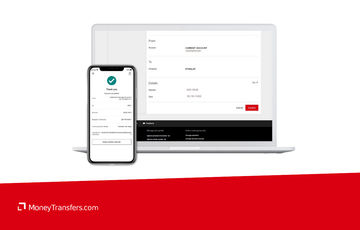
We’ve looked at and analyzed the exchange rates, transfer costs, support, and online user reviews. Here’s a quick summary of the top highlights and drawbacks.
- Different types of bank accounts: You can open a current account, an instant access savings account, local accounts in overseas markets, and so forth.
- Expat bank account options: Expat accounts let you manage multiple currencies in one place with reduced transfer fees and transfers to over 100 countries.
- Extensive global presence: HSBC has a physical presence through branches and regional offices in 64 countries around the globe.
- Free intra-bank transfers: If the beneficiary is also an HSBC customer, transfers are free of cost.
- No fixed fees: HSBC does not charge any fixed fees on international wire transfers. This is a big benefit compared to other high street banks.
- Transfer speed: Most transfers take anywhere from 1-3 working days. However, due to local regulatory requirements, some transfers can take up to 5 working days.
- High exchange rate mark-ups: At a 2.4 - 3.5% markup on the mid-market exchange rate, large transfers can be quite expensive.
- Limited payout options: Transfers can only be to bank accounts which can be limiting if the recipient has no bank account.
HSBC fees and exchange rates
Fees and rates





If you are considering using HSBC for international money transfers, you need to know the fees they charge as well as the exchange rate margins the bank applies.
Here is a summary of what to expect:
Exchange rate markup: HSBC adds a markup to the mid-market rate of around 2.4 - 3.5%. This means you will be paying an additional 2.4 - 3.5% on top of the ‘real’ exchange rate you see on Google or in our currency converter.
Fixed transfer fee: HSBC does not charge any fees on international wire transfers.
Receiving fees: HSBC does not charge any receiving fees, however, charges may apply from the sender's bank.
Exchange rates
As with most banks, HBSC buys currencies wholesale from the currency market and adds a margin when selling to its customers.
A survey from a couple of account holders at HSBC shows that the bank adds between 2.4 - 3.5% above the mid-market rate - this is known as the exchange rate margin and it’s particularly important to pay attention to when transferring large amounts.
Transfers from £50,000 upwards attract margins of about 2.4% and below. Even with their multi-currency bank accounts, transferring money internationally using HSBC is much more expensive than with specialist money transfer companies.
Can you exchange money for what it’s actually worth?
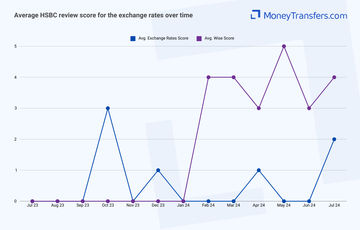
We’ve looked at what users have to say online as well. We summarised average rating scores for international transfers and this is what it looks like.
International transfer fees
In the US, HSBC does not charge any fixed fees for sending money overseas or receiving it from abroad.
This is very unusual for a high street bank, as most usually charge hefty fees. This is likely because the majority of the fees are covered by the exchange rate markup.
To make sense of all these numbers, this is how HSBC transfers compare to other banks and Wise.
Let’s assume you’re making a $1,000 transfer from the US to these countries:
Destination | HSBC international wire fees | BofA fees | Wise fees |
|---|---|---|---|
$0 + ~3.5% markup | $45 + ~5.5% markup | $10.79 + 0% markup | |
$0 + ~3.5% markup | $45 + ~5.5% markup | $8.91 + 0% markup | |
$0 + ~3.5% markup | $45 + ~5.5% markup | $10.36 + 0% markup |
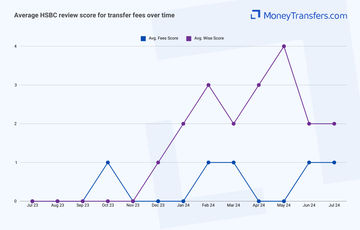
Similar to the exchange rates, we’ve looked at how users are rating HSBC online.
Transfer speed
Transfer speed
According to the bank, bank-to-bank transfers can be delivered within 3 days whereas wire transfers can take up to 5 business days.
All this depends on the destination and whether or not there are intermediaries involved.
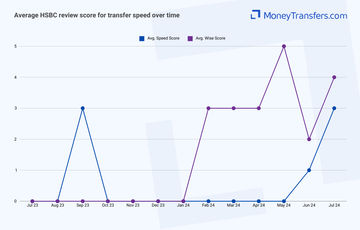
Here's how users rate HSBC online based on their transfer speed.
Transfer limits
Transfer limits
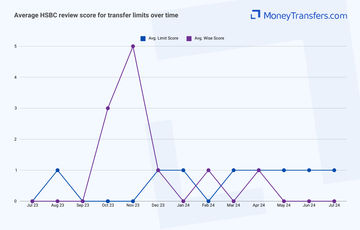
Customers moving money between their HSBC accounts have no transfer limits.
However, according to HSBC US, the maximum outbound and inbound Global Transfers limit for U.S. HSBC accounts is $200,000 per transaction and per day.
For bank-to-bank transfers, you can deposit $50,000 daily. When making a transfer, you'll be using the Real-Time Payments (RTP) system, which is limited to $2,500 per transaction and $5,000 per day.
Whereas in the UK, the limit is £25,000 per account, per day. For international payments, the online limit is £50,000 per day. Transfers beyond £50,000 can be made in person at a branch or using telephone banking.
Here's how users rate HSBC online based on their transfer speed.
Product offering
Product offering
The currencies supported vary from one country to another, as well as depend on the account you hold.
For example, in the US, the HSBC Global Money account allows you to convert and send abroad 19 currencies, but you can only store and hold 8 currencies.
British pound sterling (GBP)
United States dollar (USD)
Euro (EUR)
Hong Kong dollar (HKD)
United Arab Emirates Dirham (AED)
Australian dollar (AUD)
Canadian dollar (CAD)
Chinese yuan renminbi (CNY)
Czech Koruna (CZK)
Danish krone (DKK)
Japanese yen (JPY)
New Zealand dollar (NZD)
Norwegian krone (NOK)
Singapore dollar (SGD)
South African rand (ZAR)
Swedish krona (SEK)
Swiss franc (CHF)
Polish Zloty (PLN)
Thai Baht (THB)
Sending USD to these currencies is fee-free but does come with a markup.
Mobile app
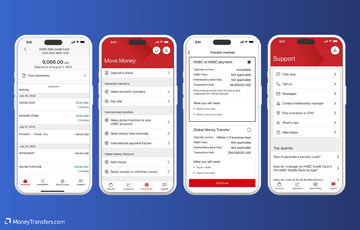
HSBC has a mobile app that customers can download on Play Store and App Store. The features available on the app vary based on the country, but in general, expect the following services:
Money transfer services
Viewing of account balances and transaction history
Viewing and downloading bank statements
Cheque deposit services
Ability to temporarily block your card
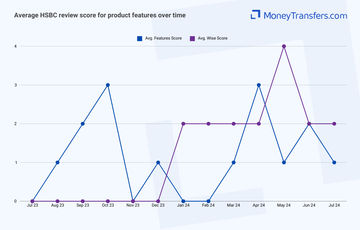
We’ve looked at how users have rated HSBC’s product features in the past year.
Ease of use
Ease of use
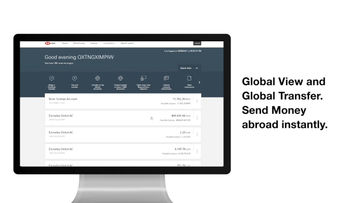
As with other banks and money transfer providers, ease of use and convenience is one of the key factors to consider.
HSBCs design and interface are built for simplicity. Everything is laid out for convenience.
Finding and navigating your account is quick and simple on both desktop and mobile.
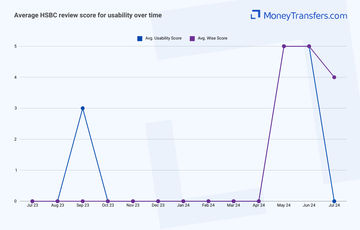
We’ve looked at how users have rated the usability of HSBC in the past year.
Customer service
You can access HSBC customer support services through any of the following ways:
Customer service hotline: General customer service inquiries for all banking-related questions and assistance.
Online banking support: Assistance with online banking services, including account access, transactions, and technical issues.
Mobile banking support: Help with the HSBC mobile app, including installation, navigation, and troubleshooting.
Credit card customer service: Dedicated support for credit card inquiries, including billing, payments, rewards, and disputes.
Fraud prevention hotline: Support for reporting and addressing suspected fraudulent activity on accounts or cards.
Lost or stolen card assistance: Immediate assistance for reporting and handling lost or stolen debit or credit cards.
Mortgage customer service: Specialized support for mortgage-related inquiries, including applications, payments, and refinancing.
Loan customer service: Assistance with personal, auto, and other types of loans offered by HSBC.
Business banking support: Dedicated support for business banking clients, including account management, transactions, and services.
Wealth and personal banking support: Help with investment accounts, financial planning, and personal banking services.
TTY/TDD services: Telecommunication services for hearing-impaired customers to access support.
Branch locator: Tool to find the nearest HSBC branch or ATM for in-person banking support.
Email support: Contact HSBC customer service via email for non-urgent inquiries.
Live chat support: Real-time online chat service for immediate assistance with banking issues.
Social media support: Customer support through HSBC’s official social media channels, including Facebook and Twitter.
Secure messaging: Secure communication options within online and mobile banking platforms for account-specific inquiries.
Here are the details of each contact option:
Support Option | Contact Details |
|---|---|
Customer Service Hotline | 1-800-975-4722 |
Online Banking Support | 1-877-472-2249 |
Mobile Banking Support | 1-800-975-4722 (Same as Customer Service Hotline) |
Credit Card Customer Service | 1-800-477-6000 |
Fraud Prevention Hotline | 1-800-307-3161 |
Lost Or Stolen Card Assistance | 1-800-462-1874 |
Mortgage Customer Service | 1-855-527-8400 |
Loan Customer Service | 1-800-975-4722 (Same as Customer Service Hotline) |
Business Banking Support | 1-877-472-2249 (Same as Online Banking Support) |
Wealth And Personal Banking Support | 1-866-765-9644 |
TTY/TTD Services | 1-800-898-5999 |
Branch Locator | Available on HSBC US Website |
Email Support | Available via HSBC US Website Contact Form |
Live Chat Support | Available on HSBC US Website |
Social Media Support | Official HSBC US Accounts on Facebook and Twitter |
Secure Messaging | Accessible through Online and Mobile Banking Platforms |
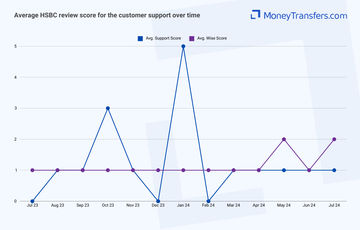
Regarding the customer service quality, here’s how the average rating looks for the past 12 months based on online user reviews.
Safety and trust
Safety and trust
Money in your accounts (be it local or currency balances) is protected by the FDIC in the US and FSCS in the UK.
This means you can keep larger balances on your account without worrying that you may lose access to your money.
This makes it a better alternative to the 'online-only' services like Revolut or Wise.
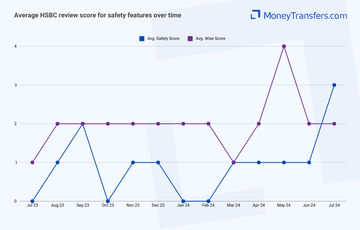
We’ve also looked at how users have rated HSBC’s security features in the past 12 months.
Customer feedback
Customer feedback
ANALYSIS OF USER REVIEWS
Customers enjoy having the helpful and knowledgeable staff at HSBC branches, with specific praise for individuals who assist with complex transactions and provide excellent customer service.
Some users have had positive experiences with HSBC's services both in the UK and internationally, citing professional and efficient support.
The bank is also valued for maintaining high standards of care and attention to customer safety.
However, many users report significant issues with customer service, particularly regarding account management and card services.
Complaints include the inability to use new debit cards while abroad, unexpected account closures, and difficulties with online banking.
The website and mobile app are frequently criticized for being difficult to navigate, leading some customers to consider switching to other banks.
Finally, a few instances of unhelpful staff and poor communication have led to negative experiences.
Here's a summary of average user reviews this year.
Jan 24 | Feb 24 | Mar 24 | Apr 24 | May 24 | Jun 24 | Jul 24 | |
|---|---|---|---|---|---|---|---|
International Transfers | 0 | 0 | 1 | 1 | 1 | 1 | 1 |
Fees | 0 | 1 | 1 | 0 | 0 | 1 | 1 |
Exchange Rates | 0 | 0 | 0 | 1 | 0 | 0 | 2 |
Speed | 0 | 0 | 0 | 0 | 0 | 1 | 3 |
Limit | 1 | 0 | 1 | 1 | 1 | 1 | 1 |
Features | 0 | 0 | 1 | 3 | 1 | 2 | 1 |
Ease of Use | 0 | 0 | 0 | 0 | 5 | 5 | 0 |
Safety | 0 | 0 | 1 | 1 | 1 | 1 | 3 |
Customer Support | 5 | 0 | 1 | 1 | 1 | 1 | 1 |
Opening an account
Whether you are moving money locally or making an international payment, HSBC requires that you first sign up for a bank account. Here is what to expect.
Opening an HSBC account in the US
Before you can open an account with HSBC, you will need to gather the following details:
Valid identification: For example driver’s license, passport, or state-issued ID card
Proof of address: For example utility bill, lease or mortgage statement, or bank statement
Social Security Number (SSN) or Taxpayer Identification Number (TIN)
Personal information: Including full name, date of birth, and employment details
Once you have everything ready, you can open an account. Here’s how to get started:
Visit the HSBC website or branch
Go to the HSBC US website or visit a local HSBC branch. If you prefer to open an account online, navigate to the “Open an Account” section on their website. For in-person applications, find the nearest branch using their branch locator tool.
Fill out the application form
Complete the online application form or the paper form available at the branch. You’ll need to provide personal information, including your name, address, date of birth, and employment details.
Review and submit your application
Double-check all the information you’ve entered for accuracy. If you’re applying online, review the terms and conditions, then submit your application. For in-person applications, give the completed form and documents to the bank representative.
Fund your new account
Depending on the account type, you may need to make an initial deposit. Follow the instructions provided to fund your account, which can usually be done via a transfer from another bank account or with a check.
Verify your account
After your application is processed, you’ll receive confirmation of your new account. Check your email or postal mail for account details and instructions on how to set up online banking.
Set up online banking and mobile app
If you opened an account online, you should set up your online banking credentials. Download the HSBC mobile app and follow the prompts to link your new account and manage it conveniently from your phone.
Start using your account
Once everything is set up and verified, you can start using your account for deposits, withdrawals, and other banking transactions.
Opening an HSBC account in the UK
To open a HSBC bank account in the UK, you need to be 18 and above. You will also need the following documentation:
Proof of identity: This could be a passport, driver’s license, or EU identity card.
Proof of address: You could use your utility bill, telephone bill, council tax bill, rental agreement, or mortgage statement.
Other documents: You may have to provide pay slips, bank statements, or a letter from your current employer depending on your circumstances.
Here’s how to open an HSBC account in the UK:
Access HSBC
Walk into any HSBC branch, make a call, or go to the HSBC website to open an account
Fill in your personal details
While there, fill in your details on the application form which include your email address, name, nationality, and citizenship.
Fill in your contact details
Fill in your contact details which are your phone number and current residential address
Provide financial details
Provide your financial details including your employment status, income, and tax residency status.
Explain the need for the account
Provide a reason for opening your account and state how you will make your first deposit and where it will come from salary, rental, pension, disability benefits, or other sources.
Review & submit
Review your personal details, contact details, financial details, and email information, and then consent to submit the application.
Making international transfers
International transfer requirements & details
Once you have HSBC account details, you can make an international transfer. Here is a list of details you will need to make a transfer:
Recipient’s full name
Recipient’s address
Recipient’s bank name and address
Recipient’s bank account number
Recipient’s bank SWIFT/BIC code
Amount to be transferred
Currency of the transfer
Your account number
Your contact details
Purpose of the transfer
Any additional reference or message for the recipient
HSBC’s swift code in the US is MRMDUS33
Making wire transfers
After your account is approved, you can send money online, over the phone, or at the branch.
Here are the steps to follow when making an online transfer abroad.
Log into your HSBC online banking account
Open your web browser and go to the HSBC US Bank website. Enter your login credentials to access your account.
Navigate to the wire transfer section
Once logged in, go to the "Transfers" or "Payments" tab on the main menu. Select "International Wire Transfer" from the options available.
Enter transfer details
Provide the necessary details for the transfer, including the recipient's bank account information, the amount to be transferred, and the currency.
Review exchange rates and fees
Check the current exchange rates and any associated fees for the transfer. HSBC will display this information before you confirm the transaction.
Verify recipient information
Double-check the recipient’s bank account number, routing number, and any other required details to ensure accuracy.
Confirm and authorize the transfer
Review all the details of your wire transfer carefully. Once you are certain everything is correct, authorize the transfer by following the on-screen prompts.
Receive confirmation
After authorizing the transfer, you will receive a confirmation receipt. Save or print this receipt for your records.
Track your transfer
Use the HSBC online banking platform to track the status of your wire transfer. You can check for updates and verify when the transfer has been completed.
Use Wise to send money from your HSBC account
It may be simpler to fund your transfer with your HSBC account, but use a transfer provider like Wise to send your money overseas.
Register for a Wise account
Signing up only takes a few minutes. You’ll need to take a photo of your ID so they can verify you. If you have any issues setting up your account, you can contact customer services using the contact information in our Wise review.
Add the details of your transfer
Select ‘Send’, choose ‘Send from your bank’, and enter your recipient’s details. You’ll also need to confirm your HSBC account details.
Review the received amount
Wise will show you exactly how much your recipient will get, and how much the transfer will cost. If you’re happy with this, continue.
Send the money
Proceed with the transfer. Your money will be taken from your HSBC account and sent to your recipient.
Receive international transfers
To receive an international wire transfer to your HSBC account, you’ll need to provide the following information to the sender.
Your ABA, RTN, or SWIFT code
For domestic wire transfers, you’ll need to supply the Wire Routing Transit Number (your ABA or RTN): 021001088 and 122240861 in California only.
For international wire transfers, you’ll need to supply your SWIFT code or BIC:
MRMDUS33 for USD transfers and MRMDUS33 for foreign currency transfers.
In case you need it, HSBC’s CHIPS number is: 435499
The bank name and address
HSBC address for wire transfers is 66 Hudson Boulevard E New York, NY 10001.
Your account number, name, and address
You’ll need to supply your complete HSBC account number, the name on your account, and the complete address of your account as it appears on your bank account.
How HSBC compares to money transfer services
HSBC is probably one of the better banks to use for international money transfers. However, it’s still more expensive than some of the top money transfer companies.
Here are a few money transfer companies that we think are better than HSBC.
Other Alternatives
Alternatively, consider using one of these neobanks for international transfers.
HSBC: Is it good for transfers abroad?
HSBC has a wide array of account types and financial products for both individuals and businesses, including international and local money transfers.
The bank’s extensive global footprint and high sending limits make it convenient for people moving large amounts to different destinations around the world.
Having said that, HSBC may not be the best option where transfers are supposed to be delivered within a short time, and it’s also worth noting that the exchange rate margins are high for international transfers.
In addition, when sending small transfers to the tune of $1,000, HSBC may not give you the best deal thanks to their poor exchange rates.
Before making a transfer, it may be worth looking at alternative solutions such as money transfer companies.
Typically, their services are cheaper than banks and transfers can be delivered within minutes through a variety of payout options.
To make your work even simpler, you can use our comparison form below to find the best money transfer deal for your needs.
Find the best rates for your transfer
FAQS
A bit more about HSBC
Can I open a HSBC account in any country?
No, but you can in a very large number of countries.
HSBC is a global bank with a footprint in 64 countries in Europe, Asia, North and South America, North Africa, and the Middle East.
It supports over 40 currencies thus enabling customers to open accounts and trade freely across borders.
Help & FAQ
Get answers to the most common questions asked when sending money abroad. Covers costs, fees and the best way to compare.
More Banks
Capital One
You can send international wire transfers with Capital One, however, at a higher cost compared to other banks and services. They also use a SWIFT network to process their transactions, meaning transactions will take longer.
Bank of America
No doubt BofA is one of the more popular banks in the US, but it might not be your best option for sending money abroad.
Chase Bank
Here’s a quick overview of Chase and how it compares to an average money transfer provider.
Wells Fargo
Here’s an overview of Wells Fargo’s international transfers, and how they compare to money transfer companies.
HSBC user feedback
Would you recommend HSBC?
Be the first to leave feedback for HSBC.
Contributors

April Summers

Please share your experience with …