
Federal Bank International Transfer: Exchange Rates, Fees, and Transfer Times

Author: April Summers

Editor: Artiom Pucinskij
We only list companies that are trustworthy and appropriately licensed. Our aim is to give you a comprehensive view of the regulated money transfer marketplace.
DisclosureMoneyTransfers aims to help users find the best money transfer provider for their needs. To support our free service, we may earn a commission from some of the providers listed in our search results. The commission may also impact the ordering of the providers shown. Our reviews are independent from this and are based on our editorial policy, research and testing of dozens of remittance providers on the market.
On this page
The Federal Bank Limited is fairly expensive when it comes to international transfers.
The Federal Bank charges around ₹1860 on ₹50,000 transfer (+TCS & GST where applicable), a ~1% - 6% exchange rate markup, and takes up to 5 business days to process.
This means that if you send ₹50,000 to Australia, it would cost you around ₹1894.83 (22.66 USD) vs $15.74 with a money transfer service such as Wise.
To save on your transfer, we recommend using your Federal Bank account to fund your Wise account and send money from there.
Federal Bank for international wire transfers
We’ve had a look at how Federal Bank is compared to money transfer providers, and here’s a quick summary of the two.
Transfer type | Federal Bank | Money Transfer Companies |
|---|---|---|
Sending fees | ~₹1860 on ₹50,000 transfer (+TCS & GST where applicable) | $0 - $20 |
Receiving fees | ~₹0 | $0 |
Exchange Markup | ~1-6% | 0% - 2% |
Transfer Times | ~2 - 5 business days | Instant - 3 business days |
Payment Methods |
|
|
Compare now to get the best transfer rate
You can send money using your Wells Fargo account through a money transfer provider to save on fees. Fill in the form to get the most out of your transfer.Scoring Federal Bank
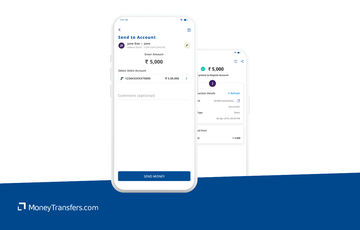
We’ve looked at and analyzed the exchange rates, transfer costs, support, and online user reviews. Here’s a quick summary of the top highlights and drawbacks.
- Accessible information: The official website has all the information you may need to get started with the bank.
- International transfer partnerships: Federal Bank is partnered with Western Union and Fed-e-Remit for international transfers. This allows for more currencies and cheaper transfers abroad.
- Wide Network: With a vast network of correspondent banks, Federal Bank ensures that transfers can reach almost any destination worldwide.
- Multiple Transfer Options: The bank provides various methods for international transfers, including SWIFT, Western Union, and other money transfer services.
- Transfer Fees: International transfers with Federal Bank can incur significant fees, which may reduce the overall amount received by the beneficiary.
- Processing Time: While the Federal Bank offers efficient services, international transfers can still take several business days to process, depending on the destination country and corresponding banks.
- Limited Branch Access: Customers who prefer in-person banking may find Federal Bank's branch network limited compared to larger multinational banks.
Federal Bank fees and exchange rates
Fees and rates





Exchange rates
The Federal Bank offers conversions to widely used currencies, such as INR (Indian Rupee), EUR (Euro), and GBP (British Pound).
The Federal Bank doesn’t explicitly state their exchange rates.
This usually means that the exchange rate is affected by many factors such as transfer amounts and currencies involved.
As per its T&Cs, Federal Bank charges around Rs 180 per Rs 100,000 sent, however, this will depend on your personal circumstances and does not include any other fees (more on that below).
Can you exchange money for what it’s actually worth?
Online money transfer providers like Wise, Revolut, and Instarem all make exchanges using the mid-market rate, but there’s a small fee for your transfer.
International transfer fees
According to Federal Banks T&Cs, the following charges apply to remittance transfers:
Fee | Amount |
|---|---|
Commission amount | Rs 1,000 (Excluding GST) |
Tax | 18% of the commission amount |
Swift charge | Rs 590 |
Forex conversion tax - Below Rs 100,000 | INR Amount X .0018 |
Forex conversion tax - Rs 100,000 to Rs 999,999 | (Amount - 100,000) X .0009 + 180 |
Forex conversion tax - Rs 1,000,000 and above | (Amount - 1,000,000) X .00018 + 990 |
Most of the transfer methods that the Federal Bank employs are for inward remittances, meaning it’s coming from abroad to India.
Most high street banks charge a fixed fee for making international wire transfers, and most will charge a fee for receiving (with a few exceptions like HSBC and NFCU)
In comparison to a money transfer provider, you will be overpaying by a fair bit.
Let’s assume you’re making a ₹50,000 transfer from India to a bank via Fed-e-Remit to an account in the following countries:
Country | Fed-e-Remit transfer cost | Wise transfer cost |
|---|---|---|
~₹1860 (+TCS & GST where applicable) | 1,141.63 INR + 0% markup | |
~₹1860 (+TCS & GST where applicable) | 1,316.30 INR + 0% markup | |
~₹1860 (+TCS & GST where applicable) | 1,139.46 INR + 0% markup |
As you can see, you're looking at saving around 500-700 INR per transfer with Wise.
Transfer speed
Transfer speed
Local transfers with the Federal Bank all happen in real time after successful transactions.
Based on our research and testing, the only option you have to send money from India abroad is using Fed-e-Remit.
Fed-e-Remit transfers can take between 2 - 5 days, depending on the amount you send and the delivery method.
In addition, transactions made before 16:00 IST will be processed on the same day, anything after will be processed the next business day, adding 1 more day to your transfer time.
This is somewhat in line with other high street banks. However, it’s much slower than the international money transfer providers.
Money transfer services are faster due to how they process the payments and are usually instant.
Transfer limits
Transfer limits
Federal Bank offers a few transfer types for transfers to India from abroad with different transfer limits. Here’s a quick overview of each:
The National Electronic Funds Transfer (NEFT): has a 50,000 INR transfer limit per transaction for local money transfers.
The Real Time Gross Settlement (RTGS): has no maximum transfer limit as long as the customer’s minimum total transfer amount is 200,000 INR.
The Immediate Payment Service (IMPS): has a 50,000 INR transfer limit per day.
When it comes to sending money from India to other countries, you can use Fed-e-Remit for your transfer.
With Fed-e-Remit you can send up to $25,000 per day or USD 250,000 per year.
You can make a bigger transfer if you need to, but you will have to visit your local branch.
If you are looking to transfer a large amount of money to or from India, we’d recommend using a currency broker such as RegencyFX or OFX.
Product offering
Product offering
Fed-e-Remit
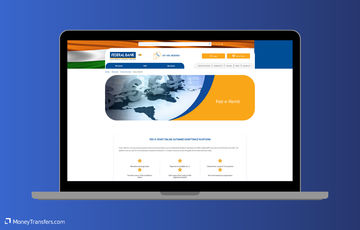
Federal Bank offers a remittance service called Fed-e-Remit for transfers from India.
You can make transfers in 13 currencies, including:
AED (United Arab Emirates)
AUD (Australia)
CAD (Canada)
CHF (Switzerland)
EUR (Europe)
GBP (United Kingdom)
HKD (Hong Kong)
JPY (Japan)
NZD (New Zealand)
QAR (Qatar)
SAR (Saudi Arabia)
SGD (Singapore)
USD (United States)
The service is primarily aimed at making remittances as opposed to business transfers. With main purposes including education abroad and student fees, immigration, working abroad, supporting relatives, touring, and sending gifts.
You can send up to 25,000 USD per day and it will take around 2-5 days to arrive (as transfers are made over the SWIFT network).
Mobile app
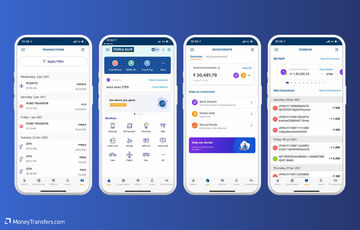
Federal Bank customers can only register in the app using the same mobile number they used to register with the bank.
Customers can download the FedMobile app from Google Play, the App Store, and the Windows Store.
Its rating is 3.3 out of 5 in Google Play and 3.2 out of 5 in App Store.
Here are some of its key features:
Funds transfer and bill payment: Customers can use FedMobile to transfer funds to any bank account nationwide. FedMobile also allows customers to settle utility, school, and mobile payments within the app.
Opening term deposits, loans, and investment options: Customers can view options within the app for term deposits, loans, and investment options. They can open, close, or avail of their chosen options from the app as well. Mutual funds and insurance can be opened under-investment options.
Bookings: Hotel, bus, cab, movie, and event bookings are functions available in the app to increase the convenience for Federal Bank customers.
Ease of use
Ease of use
Customer service
Here's a list of customer support options available at Federal Bank:
Customer care toll-free number: Call 1800-425-1199 or 1800-420-1199 for general inquiries, banking services, and support.
Email support: Send queries and complaints to contact@federalbank.co.in.
Missed call service: Give a missed call to 84319 60000 for account balance and 84319 50000 for a mini statement.
SMS banking: Send predefined keywords to 98950 88888 for various banking services.
Net banking helpdesk: Call 1800-425-1199 or email nrb@federalbank.co.in for assistance with online banking services.
Branch locator: Use the branch locator tool on the website to find the nearest branches and contact information.
Relationship manager: Contact your assigned relationship manager for personalized banking assistance.
Feedback and complaints form: Submit feedback or complaints through the form available on the bank's website.
Social media support: Reach out through Facebook, Twitter, and LinkedIn for assistance and updates.
WhatsApp banking: Send 'Hi' to 98950 88888 for various banking services via WhatsApp.
Chatbot: Use the AI-powered chatbot on the bank’s website for instant help and information.
Personal information such as address registered with Federal Bank, customer ID, and last three transactions will be requested for verification.
Use the following details to contact them if you have any issues or need help.
Support Option | Contact Details |
|---|---|
Customer Care Toll-Free | 1800-425-1199 / 1800-420-1199 |
Email Support | |
Missed Call Service | 84319 60000 (Balance), 84319 50000 (Mini Statement) |
SMS Banking | 98950 88888 |
Net Banking Helpdesk | 1800-425-1199 / nrb@federalbank.co.in |
Branch Locator | Available on the website |
Relationship Manager | Contact Assigned Relationship Manager |
Feedback And Complaints | Form available on the website |
Social Media Support | Facebook, Twitter, LinkedIn |
WhatsApp Banking | 98950 88888 |
Chatbot | Available on the website |
Safety and trust
Safety and trust
Just like any other high street bank, Federal Bank has several safety features in place, including:
Multi-factor authentication (MFA): Requires multiple forms of verification for online and mobile banking access.
Fraud detection systems: Monitors accounts for unusual or suspicious activity to detect potential fraud and notifies customers immediately if fraudulent activity is detected.
Encryption: Utilizes advanced encryption techniques to protect customer data.
Secure login: Ensures secure access through encrypted login processes.
Biometric authentication: Supports fingerprint and facial recognition for mobile app access.
Card controls: Allows customers to manage their debit and credit cards, including locking and unlocking.
Automatic logout: Logs users out automatically after a period of inactivity.
Identity theft protection: Offers services to help detect and resolve identity theft issues.
Online security center: Provides resources and tips for protecting personal information.
EMV chip technology: Issues cards with EMV chip technology for secure transactions.
Virtual keypad: Uses a virtual keyboard to enter passwords, preventing keylogging malware from capturing keystrokes.
Customer feedback
Customer feedback
We couldn’t find many objective reviews for the Federal Bank.
Opening an account
To open an account with Federal Bank, you'll need to provide the following details and documents:
Full name
Date of birth
Gender
Nationality
Marital status
Occupation
Residential address
Permanent address (if different from residential)
Contact phone number
Email address
Government-issued ID (e.g., passport, driver’s license)
Proof of address (e.g., utility bill, bank statement)
Passport-sized photograph
Once you’ve gathered everything you need, follow these steps to open an account with Federal Bank.
Visit the Federal Bank website
Go to the Federal Bank's official website to start the account opening process. Look for the "Personal Banking" or "Open an Account" section.
Choose the type of account
Select the type of account you want to open, such as a savings account, current account, or fixed deposit account. Review the features and requirements for each type to choose the one that best suits your needs.
Fill out the online application form
Complete the online application form with your personal details, including your name, address, date of birth, and contact information. You will also need to provide details of your identity and address proof.
Submit necessary documents
Upload scanned copies of the required documents. These typically include a government-issued ID (like a passport or driver’s license), proof of address (such as a utility bill or bank statement), and a passport-sized photograph.
Review and confirm the information
Carefully review the information you’ve entered and the documents you’ve uploaded. Make sure everything is accurate and complete before submitting your application.
Verify your identity
Federal Bank may require you to verify your identity through an online video call or by visiting a branch. Follow the instructions provided to complete this step.
Await confirmation
After submitting your application and completing any necessary verification, wait for Federal Bank to process your request. You will receive a confirmation email or message with your account details and instructions on how to activate your account.
Activate your account
Follow the activation instructions provided by the bank. This might involve setting up your online banking credentials or making an initial deposit.
Start using your account
Once activated, you can begin using your Federal Bank account for your banking needs. You may also want to download the Federal Bank mobile app for easy account management.
Making international transfers
International transfer requirements & details
Once you’re ready to make a transfer abroad, you will need the following information:
Recipient's full name
Recipient's address
Recipient's bank account number
Recipient's bank name
Recipient's bank address
SWIFT/BIC code of the recipient’s bank
Amount to be transferred
Currency of the transfer
Purpose of the transfer (if required)
Your Federal Bank account number
Any intermediary bank details (if applicable)
Federal Bank’s SWIFT code is FDRLINBBIBD.
Making wire transfers
Transfers with the Federal Bank can be done through mobile or Internet banking.
Federal Bank customers have three local transfer options:
National Electronic Funds Transfer (NEFT)
NEFT is used for interbank transfers within India, as well as paying off credit card debts and loans.
Real-Time Gross Settlement (RTGS)
RTGS is used for large transactions because it has a minimum amount requirement of 200,000 INR (no maximum requirement).
Immediate Payment Service (IMPS)
IMPS is used for interbank transfers within India.
All transfer options are done in real time.
Here’s how to make an international transfer using NEFT.
Log in to your online banking account
Access your Federal Bank online banking account using your username and password.
Navigate to the wire transfer section
Once logged in, locate the wire transfer option. This may be found under the "Transfers" or "Payments" tab.
Select international wire transfer
Choose the option for international transfers, which may be labeled as "International Wire" or "Global Transfer."
Enter recipient details
Fill in the recipient’s information, including their name, address, and bank account details. Ensure you provide accurate information to avoid delays.
Input bank details
Provide the recipient’s bank details, including the bank’s name, address, and SWIFT/BIC code. This code is essential for international transfers.
Specify the transfer amount and currency
Enter the amount you wish to transfer and select the currency if needed. Double-check the amount to avoid errors.
Review and confirm the transfer
Check all entered details for accuracy. Once confirmed, submit the transfer request.
Authenticate the transfer
Complete any additional security steps required by Federal Bank, such as entering a one-time password or answering security questions.
Save the confirmation
After the transfer is submitted, save or print the confirmation receipt for your records.
Monitor the transfer
Track the progress of your wire transfer through your online banking account or contact Federal Bank for updates.
Remittance services
The Federal Bank offers remittance services through cash pickup options. These are endorsed to NRIs (non-resident Indians) to remit to India.
The bank does not disclose additional information on the whole process of receiving money, so you will need to contact the bank or visit the nearest branch to inquire about these services.
Use Wise to send money from your Federal Bank account
It may be simpler to fund your transfer with your Federal Bank account, but use a transfer provider like Wise to send your money overseas.
Register for a Wise account
Signing up only takes a few minutes. You’ll need to take a photo of your ID so they can verify you. If you have any issues setting up your account, you can contact customer services using the contact information in our Wise review.
Add the details of your transfer
Select ‘Send’, choose ‘Send from your bank’, and enter your recipient’s details. You’ll also need to confirm your Federal Bank account details.
Review the received amount
Wise will show you exactly how much your recipient will get, and how much the transfer will cost. If you’re happy with this, continue.
Send the money
Proceed with the transfer. Your money will be taken from your Federal Bank account and sent to your recipient.
Receive international transfers
To receive an international wire transfer to your Federal Bank account, you’ll need to provide the following information to the sender.
Your ABA, RTN, or SWIFT code
For domestic wire transfers, you’ll need to supply the Wire Routing Transit Number (your ABA or RTN).
For international wire transfers, you’ll need to supply your SWIFT code or BIC: FDRLINBBIBD
Your account number, name, and address
You’ll need to supply your complete Federal Bank account number, the name on your account, and the complete address of your account as it appears on your bank account.
How Federal Bank compares to money transfer services
As you’ve probably guessed, the Federal Bank is not the best option for sending money abroad due to its lack of transparency and lack of international transfer features.
We suggest you take a look at the following alternatives to get more value out of your transfer.
Other Alternatives
Alternatively, consider using one of these neobanks for international transfers.


Federal Bank: Is it good for transfers abroad?
Although Federal Bank attempts to offer money transfer options to make it convenient for its customers, it is not the best option to use.
They don’t provide enough information to make informed transfer decisions. Also, their lack of transfer features and partnerships indicates that they are more of a day-to-day bank.
If you’re looking to send money abroad from India, we strongly suggest you use one of the provided alternatives. Alternatively, use our form below to get the best deal for your specific needs.
Find the best rates for your transfer
A bit more about Federal Bank
Can I open a Federal Bank account in any country?
Yes, but only if a customer has all the required documents for account opening and is a non-resident Indian (NRI).
Some of the requirements for NRIs are a passport with an address, another identity document if the passport does not contain the customer’s present address, and NRI status proof (e.g. student visa, residence visa, employment visa).
The account opening process is all done online, so documents must be submitted in PDF form.
Can I use a Federal Bank debit card when traveling abroad?
Yes. Federal Bank’s debit cards are powered by MasterCard and Visa, making it possible for customers to use them while traveling abroad.
Help & FAQ
Get answers to the most common questions asked when sending money abroad. Covers costs, fees and the best way to compare.
More Banks
Capital One
You can send international wire transfers with Capital One, however, at a higher cost compared to other banks and services. They also use a SWIFT network to process their transactions, meaning transactions will take longer.
Bank of America
No doubt BofA is one of the more popular banks in the US, but it might not be your best option for sending money abroad.
Chase Bank
Here’s a quick overview of Chase and how it compares to an average money transfer provider.
Wells Fargo
Here’s an overview of Wells Fargo’s international transfers, and how they compare to money transfer companies.
Federal Bank user feedback
Would you recommend Federal Bank?
Be the first to leave feedback for Federal Bank.
Contributors

April Summers

Please share your experience with …