
City National Bank (CNB) International Transfer: Exchange Rates, Fees, and Transfer Times

Author: April Summers

Editor: Artiom Pucinskij
We only list companies that are trustworthy and appropriately licensed. Our aim is to give you a comprehensive view of the regulated money transfer marketplace.
DisclosureMoneyTransfers aims to help users find the best money transfer provider for their needs. To support our free service, we may earn a commission from some of the providers listed in our search results. The commission may also impact the ordering of the providers shown. Our reviews are independent from this and are based on our editorial policy, research and testing of dozens of remittance providers on the market.
On this page
City National Bank is very expensive when it comes to international transfers.
City National charges $12 - $55 per transfer, a $5 - $35 monthly fee, a $25 below threshold fee, a $25 receiving fee, and ~4% - 6% exchange rate markup.
This means a transfer of $1000 to France would cost you $115.00 vs $10.36 with a money transfer service such as Wise.
We'd recommend using your City National Bank account to deposit money into Wise and send money from there.
City National Bank for international wire transfers
Despite the bank’s presence in multiple states, City National Bank lacks the same reach as other, larger high-street banks like Chase, Wells Fargo, or Bank of America.
You can make international wire transfers with City National Bank, but the fees are higher compared to money transfer services, as well as, it will take longer for your money to reach its destination.
Here’s an overview of how City National Bank compares to an average money transfer provider.
Transfer type | City National Bank | Money Transfer Companies |
|---|---|---|
Sending fees | $12 - $55 + ($5 - $35 / month) + $25 (if sending under $250) | $0 - $20 |
Receiving fees | $25 | $0 |
Exchange Markup | ~4%-6% | 0% - 2% |
Transfer Times | 3-5 business days | Instant - 3 business days |
Payment Methods |
|
|
Compare now to get the best transfer rate
You can send money using your CNB account through a money transfer provider to save on fees. Fill in the form to get the most out of your transfer.Scoring City National Bank
We’ve looked at and analyzed the exchange rates, transfer costs, support, and online user reviews. Here’s a quick summary of the top highlights and drawbacks.
- 90+ available currencies: Compared to other high street banks, this is fairly high.
- Substantial transfer fees: City National Bank fees start at 12 USD per transfer, with a maximum of 55 USD. This is higher than the likes of BofA and Wells Fargo.
- Lack of transparency on forex rates: To receive a quote for a specific currency pairing, you need to contact the bank directly; this will delay the money transfer process and foreign exchange spread can range from 3 - 8% depending on currency.
- High account minimum: To avoid further charges, customers must maintain a minimum account balance of $3,000 for Personal Checking, $7,500 for Personal Checking Plus, and $50,000 for Premium Checking; this is not sustainable for all customers.
- Inconvenient transfer limits: The minimum sending amount for a City National Bank transfer is $250 which will not suit the needs of all customers.
City National Bank fees and exchange rates
Fees and rates




Exchange rates
City National Bank supports more than 90 different currencies but does not disclose its exchange rates on its website. Instead, the bank simply states that rates are competitive.
From our research and testing, traditional banks are known to charge anywhere between 4 - 6% above the mid-market rate for transfers that require currency conversion.
This means you will need to initiate the transfer or call your local branch to get the latest exchange rate.
Can you exchange money for what it’s actually worth?
International transfer fees
Wire transfer fees range from $12 to $55, depending on the transfer type (domestic or international) and if you’re making it online or in person.
In addition, you will need to pay a $25 fee, if your transfer is below the minimum threshold of $250.
There is also City National’s monthly service charge, although this can be avoided by maintaining a minimum balance and transaction volume.
Other bank fees to consider include:
Monthly Account Maintenance Fees: ranging from 5 to 35 USD per month, depending on account type.
Overdraft Fees: start at 37 USD, with a maximum of 185 USD per day
Withdrawals from out-of-network ATMs: 2.50 USD, depending on the account type
To put these numbers in perspective, let’s assume you’re making a $1000 transfer from the US to a bank via wire transfer to an account in the following countries:
Country | City National Bank fees | Wells Fargo fees | Wise fees |
|---|---|---|---|
$55 + ~6% markup | $30 + ~6% markup | $10.79 + 0% markup | |
$55 + ~6% markup | $30 + ~6% markup | $13.16 + 0% markup | |
$55 + ~6% markup | $30 + ~6% markup | $10.36 + 0% markup |
Transfer speed
Transfer speed
On average, City National Bank takes 3-5 business days to deposit funds in the beneficiary’s account.
If you’re looking to exchange currencies before making a transfer, you can get it the next business day if you convert before 2 PM.
Transfer limits
Transfer limits
City National Bank has a transfer limit of $25,000 per day and $5,000 per transfer, with a maximum of five transfers allowed per day.
These rates may change over time. The bank may also impose limits on dollar amounts or the number of wire transfers at its discretion.
Product offering
Product offering
Foreign Currency Accounts
CNB offers foreign currency bank accounts designed specifically for international transactions.
These accounts allow you to hold and manage funds in multiple foreign currencies, reducing the need for frequent currency conversions and providing flexibility in international markets.
You get access to foreign currency CDs, demand deposit accounts, and the ability to hedge against currency fluctuations.
Currency Exchange
City National Bank offers currency exchange services that allow individuals and businesses to buy and sell foreign currencies.
These services are ideal if you’re traveling abroad, engaging in international business, or need to convert and hold foreign currency.
However, you can only do it at the local branch and you will be limited to $2,500 per day.
Mobile App
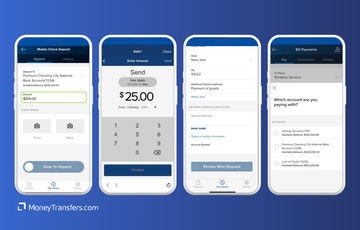
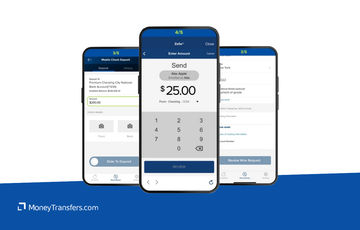
The City National Bank App® is available for free download on Apple and Android devices.
You can check account balances, transfer money between accounts, send money with Zelle, pay bills, and much more.
The app has a rating of 2.7 on the Google Play Store, and 3.5 on the App Store.
Ease of use
Ease of use
Customer service
CNB offers multiple contact options including:
Phone
Email
Mail
Branch Locator
Secure Message
Live Chat
If you have any questions or concerns, you can reach CNB via the following:
Contact Method | Details |
|---|---|
Phone | (888) 309-5139 for international banking and (800) 773-7100 for customer service. More phone options available here. |
Available through a secure online form. | |
City National Bank, P.O. Box 60938, Los Angeles, CA 90060-0938. | |
Branch Locator | Use the online tool to find a nearby branch. |
Secure Message | Send via online banking after logging into your account. |
Live Chat | Available on the website during business hours. |
Safety and trust
Safety and trust
Just like any other reputable high street bank, CNB comes with multiple security features, including:
ACH positive pay: Allows businesses to review and approve ACH debits before they are paid, ensuring unauthorized transactions are blocked.
Check positive pay: Matches checks presented for payment against a list of checks issued by the business, identifying potentially fraudulent checks.
Reverse positive pay: Provides a list of checks presented for payment, allowing businesses to approve or reject each item.
ACH debit block: Blocks all unauthorized ACH debit transactions from being processed.
ACH filter: Automatically reviews and filters ACH transactions, allowing only those that meet predefined criteria to be processed.
Card management tools: Enables businesses to manage card usage, set transaction limits, and monitor activity to prevent unauthorized use.
Fraud alerts: Sends real-time alerts for suspicious transactions or activity on business accounts.
Two-factor authentication (2FA): Requires an additional verification step, such as a code sent to a mobile device, to access accounts.
Encryption: Uses advanced encryption methods to protect data transmitted between clients and the bank.
Automatic logoff: Logs users out of online banking after a period of inactivity to prevent unauthorized access.
Dedicated fraud team: A specialized team is available to assist clients in identifying and responding to fraud.
Suspicious activity monitoring: Monitors client accounts for unusual transactions or patterns indicative of fraud.
24/7 fraud monitoring: Continuous monitoring of transactions to identify and prevent fraudulent activity.
Immediate fraud notifications: Notifies clients immediately upon detecting suspicious transactions.
For more information, check CNB resources here.
Customer feedback
Customer feedback
ANALYSIS OF USER REVIEWS
Overall, there aren’t many user reviews for CNB.
However, based on the available ones, City National Bank (CNB) customers are not happy with CNB banking services, especially after the merger.
Many complain about poor customer service, deceptive practices, and operational mistakes. Common complaints are around difficulties reaching support, unresolved disputes, misleading credit score assessments, undisclosed personal liabilities on business loans, and transaction errors leading to fees.
Some describe their experience with CNB as unprofessional, with abrupt terminations from the bank's advisory board.
However, there are a few positives, particularly with specific branches and staff members, where users have found the service to be good with friendly staff and efficient handling of business loans.
Opening an account with City National Bank
To open an account with CNB, you will need the following details:
Social Security number
Driver’s license or state ID
Home address
A debit card or account information for funding
With these details, you can open an account by following these steps:
Choose your account type
Visit the City National Bank and pick the account type you want from the available options, such as Personal Checking, or City National Bank Account.
Make sure to check minimum deposits, fees, and benefits to find the account that best meets your needs. For example, the Personal Checking account has a $1,000 minimum opening deposit and a $25 monthly maintenance fee, which can be waived with a $3,000 average daily balance.
Gather required documents
Prepare the necessary documents, including a valid government-issued photo ID (e.g., driver’s license or passport), your Social Security Number (SSN), and proof of current address (such as a utility bill or lease agreement).
Open your account
To open an account, submit the form on the website, visit a nearby CNB branch, or call their customer service.
Regardless of the method, next, you will need to fill in the application, be it over the phone or in person, and make the required initial deposit.
Enroll in online banking
After opening your account, go to the CNB Online Banking Enrollment page and click "Enroll."
Follow the instructions to create your online banking profile, including setting up a username, password, and security questions.
Verify and start using
Complete any required verification steps, such as confirming your identity through a one-time passcode.
Once verified, you can begin using your new CNB account and access online and mobile banking features for managing your finances.
Making international transfers
To send money abroad with CNB, you will need the following details:
Beneficiary’s full name and address
Beneficiary’s bank name and address
Beneficiary’s bank SWIFT/BIC code
Beneficiary’s bank account number (or IBAN)
Currency and amount to be transferred
Purpose of payment
Your CNB account details
City National Bank’s SWIFT code is CINAUS6L
Sending international wire
Once you have all the details ready, follow these steps to make the transfer:
Sign in
Log in to your City National Bank account via online banking.
Access wire transfers
Navigate to the "Transfers & Payments" section and select "Wire Transfer."
Enter beneficiary details
Provide the beneficiary’s information, including bank details and SWIFT code.
Specify transfer details
Enter the amount, currency, and purpose of the transfer.
Review and submit
Review all the details carefully and submit the wire transfer request for processing.
Use Wise to send money from your City National Bank account
It may be simpler to fund your transfer with your CNB account, but use a transfer provider like Wise to send your money overseas.
Register for a Wise account
Signing up only takes a few minutes. You’ll need to take a photo of your ID so they can verify you. If you have any issues setting up your account, you can contact customer services using the contact information in our Wise review.
Add the details of your transfer
Select ‘Send’, choose ‘Send from your bank’, and enter your recipient’s details. You’ll also need to confirm your CNB account details.
Review the received amount
Wise will show you exactly how much your recipient will get, and how much the transfer will cost. If you’re happy with this, continue.
Send the money
Proceed with the transfer. Your money will be taken from your CNB account and sent to your recipient.
Receive international transfers
To receive an international wire transfer to your CNB account, you’ll need to provide the following information to the sender.
Your ABA, RTN, or SWIFT code
For domestic wire transfers, you’ll need to supply the Wire Routing Transit Number (your ABA or RTN): 122016066.
For international wire transfers, you’ll need to supply your SWIFT code or BIC: CINAUS6L.
The bank name and address
Depending on the type of transfer, the CNB address is City National Bank, Los Angeles, CA.
Your account number, name, and address
You’ll need to supply your complete CNB account number, the name on your account, and the complete address of your account as it appears on your bank account.
How City National Bank compares to money transfer services
CNB is a good option for high earners and businesses making large transactions.
However, CNB is extremely expensive compared to the likes of Wise Business, XE, and Airwallex.
If you already have a bank account with CNB, you can use it to fund your transfer as well.
Here’s a list of services that can offer money transfers abroad with higher limits, lower fees, and better exchange rates.
Other Alternatives
Alternatively, consider using one of these neobanks for international transfers.
City National Bank: Is it good for transfers abroad?
City National Bank lets customers send and receive money domestically or internationally in person, via online banking, or mobile app.
However, due to the fees, daily transfer limits, lack of payment options, and unclear exchange rates, this bank is not the best money transfer option.
We recommend comparing your options to get the best exchange rates for your needs using our form below. You can use your existing bank account to deposit the funds to any of the recommended providers and save on transfer fees.
Find the best rates for your transfer
A bit more about City National Bank
Can I open a City National Bank account in any country?
If you’re a US citizen abroad, it is possible to open a City National checking or savings account from anywhere in the world.
To get started, you will need the following:
Drivers license or government-issued ID
Social security number
Account number
Can I use a City National Bank debit card when traveling abroad?
Yes, the City National Bank Visa debit card allows you to access funds anywhere that supports Visa, as well as any Cirrus ATM Network location.
However, using your card abroad can incur additional charges.
Help & FAQ
Get answers to the most common questions asked when sending money abroad. Covers costs, fees and the best way to compare.
More Banks
Capital One
You can send international wire transfers with Capital One, however, at a higher cost compared to other banks and services. They also use a SWIFT network to process their transactions, meaning transactions will take longer.
Bank of America
No doubt BofA is one of the more popular banks in the US, but it might not be your best option for sending money abroad.
Chase Bank
Here’s a quick overview of Chase and how it compares to an average money transfer provider.
Wells Fargo
Here’s an overview of Wells Fargo’s international transfers, and how they compare to money transfer companies.
City National Bank user feedback
Would you recommend City National Bank?
Be the first to leave feedback for City National Bank.
Contributors

April Summers

Please share your experience with …